<?xml version="1.0" encoding="utf-8"?><feed xmlns="http://www.w3.org/2005/Atom" ><generator uri="https://jekyllrb.com/" version="4.4.1">Jekyll</generator><link href="https://neildeighan.com/feed.xml" rel="self" type="application/atom+xml" /><link href="https://neildeighan.com/" rel="alternate" type="text/html" /><updated>2026-04-03T20:23:36+00:00</updated><id>https://neildeighan.com/feed.xml</id><title type="html">Neil Deighan</title><subtitle>Project based tutorials in software and electronics.</subtitle><entry><title type="html">Sounduino</title><link href="https://neildeighan.com/pronguino-6/" rel="alternate" type="text/html" title="Sounduino" /><published>2021-04-07T00:00:00+00:00</published><updated>2021-04-07T00:00:00+00:00</updated><id>https://neildeighan.com/sounduino-sound-with-arduino</id><content type="html" xml:base="https://neildeighan.com/pronguino-6/"><![CDATA[<h1 id="sounduino">Sounduino</h1>

<p><img src="/assets/images/featured/neildeighan-blog-pronguino-6-featured.png" alt="Sounduino" /></p>

<p>What would a video game be without sound? Not a very good one! So we are going to add a piezo to the circuit to generate game sounds and also add some processing code, so that when the Arduino UNO is disconnected, sound will play through your computer speakers.</p>

<h2 id="introduction">Introduction</h2>

<p>After some digging on the web, I managed to <a href="https://stelioskanitsakis.medium.com/an-audio-comparison-between-the-sounds-of-ataris-pong-and-the-silence-of-magnavox-odyssey-s-83e6fac56653">find</a> the actual frequency and duration for the sounds used in the original Pong game…</p>

<table>
  <thead>
    <tr>
      <th>Sound</th>
      <th>Frequency</th>
      <th>Duration</th>
      <th>Listen</th>
    </tr>
  </thead>
  <tbody>
    <tr>
      <td>Ball hits wall</td>
      <td>226 Hz</td>
      <td>16 ms</td>
      <td><audio controls=""><source src="/assets/audio/WallSound.wav" type="audio/wav" /></audio></td>
    </tr>
    <tr>
      <td>Paddle hits ball</td>
      <td>459 Hz</td>
      <td>96 ms</td>
      <td><audio controls=""><source src="/assets/audio/PaddleSound.wav" type="audio/wav" /></audio></td>
    </tr>
    <tr>
      <td>Point scored</td>
      <td>490 Hz</td>
      <td>257 ms</td>
      <td><audio controls=""><source src="/assets/audio/PointSound.wav" type="audio/wav" /></audio></td>
    </tr>
  </tbody>
</table>

<p>… I have implemented these into the Arduino Pronguino Library Speaker class, and also created Waveform Audio files for each of the game sounds (which are also used in the table above) that are played through the Speaker class in the Processing code, these .wav files were generated using an online tone generator, there are quite a few to choose from, and will ask for some/all of the following parameters…</p>

<table>
  <thead>
    <tr>
      <th>Parameter</th>
      <th>Wall Sound</th>
      <th>Paddle Sound</th>
      <th>Point Sound</th>
    </tr>
  </thead>
  <tbody>
    <tr>
      <td>Depth</td>
      <td>16-bit</td>
      <td>16-bit</td>
      <td>16-bit</td>
    </tr>
    <tr>
      <td>Wave</td>
      <td>Square</td>
      <td>Square</td>
      <td>Square</td>
    </tr>
    <tr>
      <td>Frequency (Hertz)</td>
      <td>226 Hz</td>
      <td>459 Hz</td>
      <td>490 Hz</td>
    </tr>
    <tr>
      <td>Duration (Milliseconds)</td>
      <td>16 ms</td>
      <td>96 ms</td>
      <td>257 ms</td>
    </tr>
    <tr>
      <td>Sample Rate (Kilohertz)</td>
      <td>14.1 kHz</td>
      <td>14.1 kHz</td>
      <td>14.1 kHz</td>
    </tr>
    <tr>
      <td>Amplitude/Volume</td>
      <td>(experiment)</td>
      <td>(experiment)</td>
      <td>(experiment)</td>
    </tr>
  </tbody>
</table>

<p class="challenge-section"><strong>Challenge:</strong> Find or create more modern versions of these game sounds, maybe tennis / table tennis sounds ?</p>

<h4 id="scope">Scope</h4>

<div class="table-wrap-text">

  <table>
    <thead>
      <tr>
        <th> </th>
        <th>Description</th>
      </tr>
    </thead>
    <tbody>
      <tr>
        <td>Circuit</td>
        <td>Adding a piezo buzzer to the existing circuit.</td>
      </tr>
      <tr>
        <td>Arduino</td>
        <td>Extending the component and Pronguino libraries with piezo support. Using the <code class="language-plaintext highlighter-rouge">tone()</code> function to generate sounds.</td>
      </tr>
      <tr>
        <td>Processing</td>
        <td>Adding sound playback via the Minim library as a fallback when the Arduino is disconnected.</td>
      </tr>
      <tr>
        <td>Game</td>
        <td>Triggering sounds on game events: ball hitting a wall, a paddle, and a point being scored.</td>
      </tr>
    </tbody>
  </table>

</div>

<h4 id="learning">Learning</h4>

<div class="table-wrap-text">

  <table>
    <thead>
      <tr>
        <th> </th>
        <th>Description</th>
      </tr>
    </thead>
    <tbody>
      <tr>
        <td>Piezo Buzzer</td>
        <td>How a piezo buzzer works and how to wire it to the Arduino.</td>
      </tr>
      <tr>
        <td><code class="language-plaintext highlighter-rouge">tone()</code> Function</td>
        <td>How to generate square wave tones at a specific frequency and duration using the Arduino <code class="language-plaintext highlighter-rouge">tone()</code> function.</td>
      </tr>
      <tr>
        <td>Game Sounds</td>
        <td>How the original Pong game sounds were reproduced using specific frequencies and durations.</td>
      </tr>
      <tr>
        <td>Minim Library</td>
        <td>How to use the Processing Minim library to play .wav audio files.</td>
      </tr>
      <tr>
        <td>Software Fallback</td>
        <td>How to design code that adapts behaviour based on whether the Arduino is connected.</td>
      </tr>
    </tbody>
  </table>

</div>

<h2 id="getting-started">Getting Started</h2>

<h4 id="recommended">Recommended</h4>

<p>I recommend reading through the <a href="/pronguino-4/">Servuino</a> and subsequent posts, as we are building circuit on top of the one built in Servuino.</p>

<h4 id="components">Components</h4>

<p>All the components that you need listed here are in the Arduino Starter Kit, as mentioned above, this is being built on top of previously built circuit, see existing components list, as well as the following…</p>

<table>
  <thead>
    <tr>
      <th>Component</th>
      <th>Quantity</th>
    </tr>
  </thead>
  <tbody>
    <tr>
      <td>Piezo</td>
      <td>1</td>
    </tr>
    <tr>
      <td>5mm orange wire</td>
      <td>1</td>
    </tr>
    <tr>
      <td>20mm blue wire</td>
      <td>1</td>
    </tr>
  </tbody>
</table>

<p class="note-section"><strong>Note:</strong> I have been specific on the length in particular on the above wires, mainly for the smaller ones that are used just on the breadboard, so they are as flat as possible.</p>

<h2 id="the-circuit">The Circuit</h2>

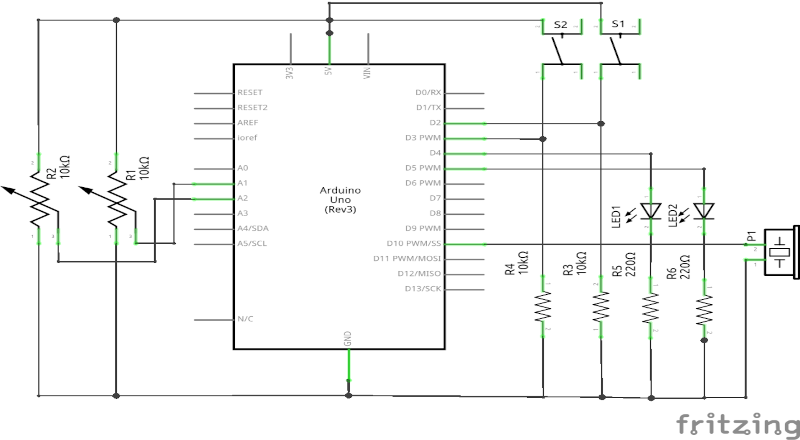
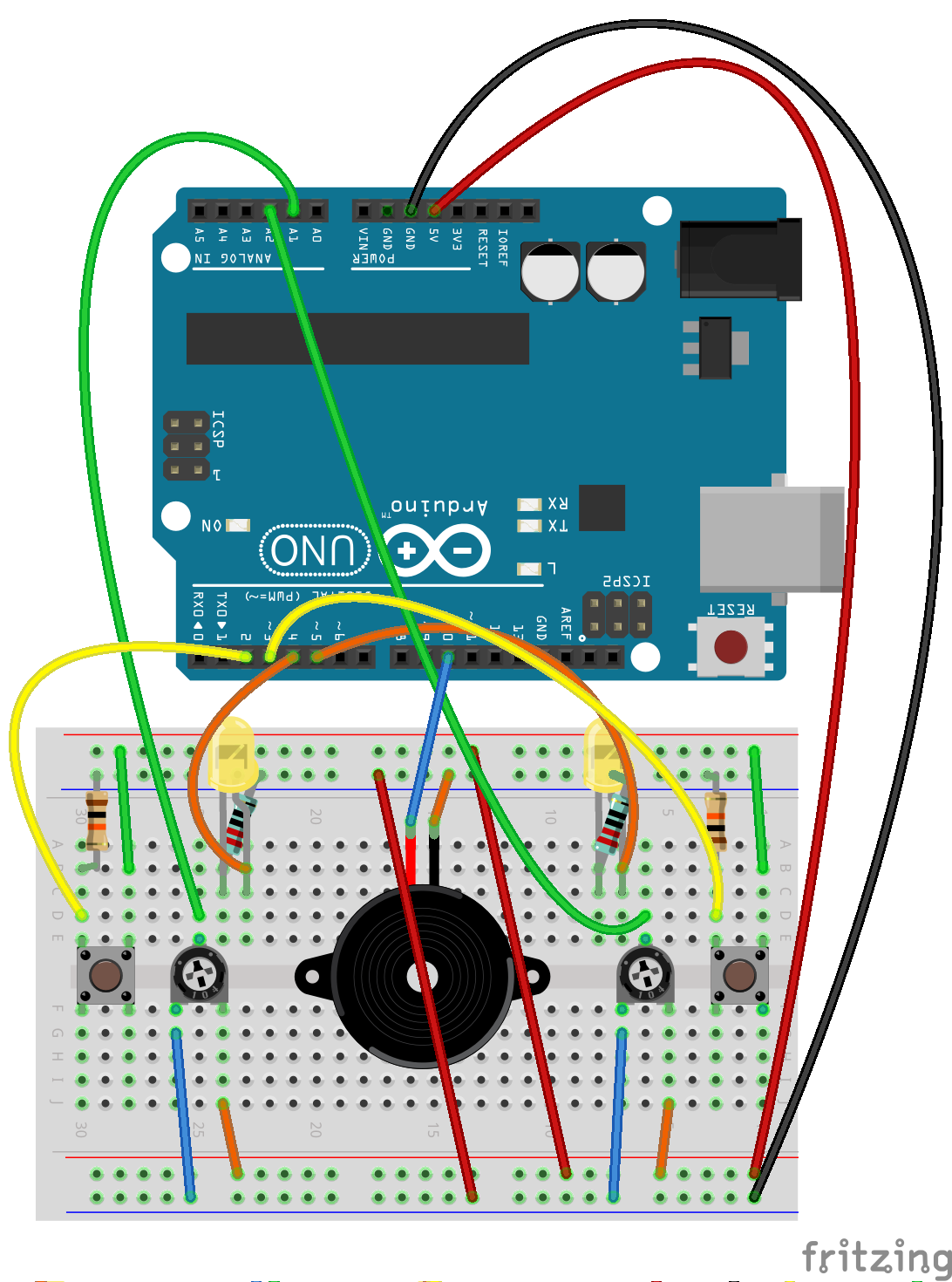
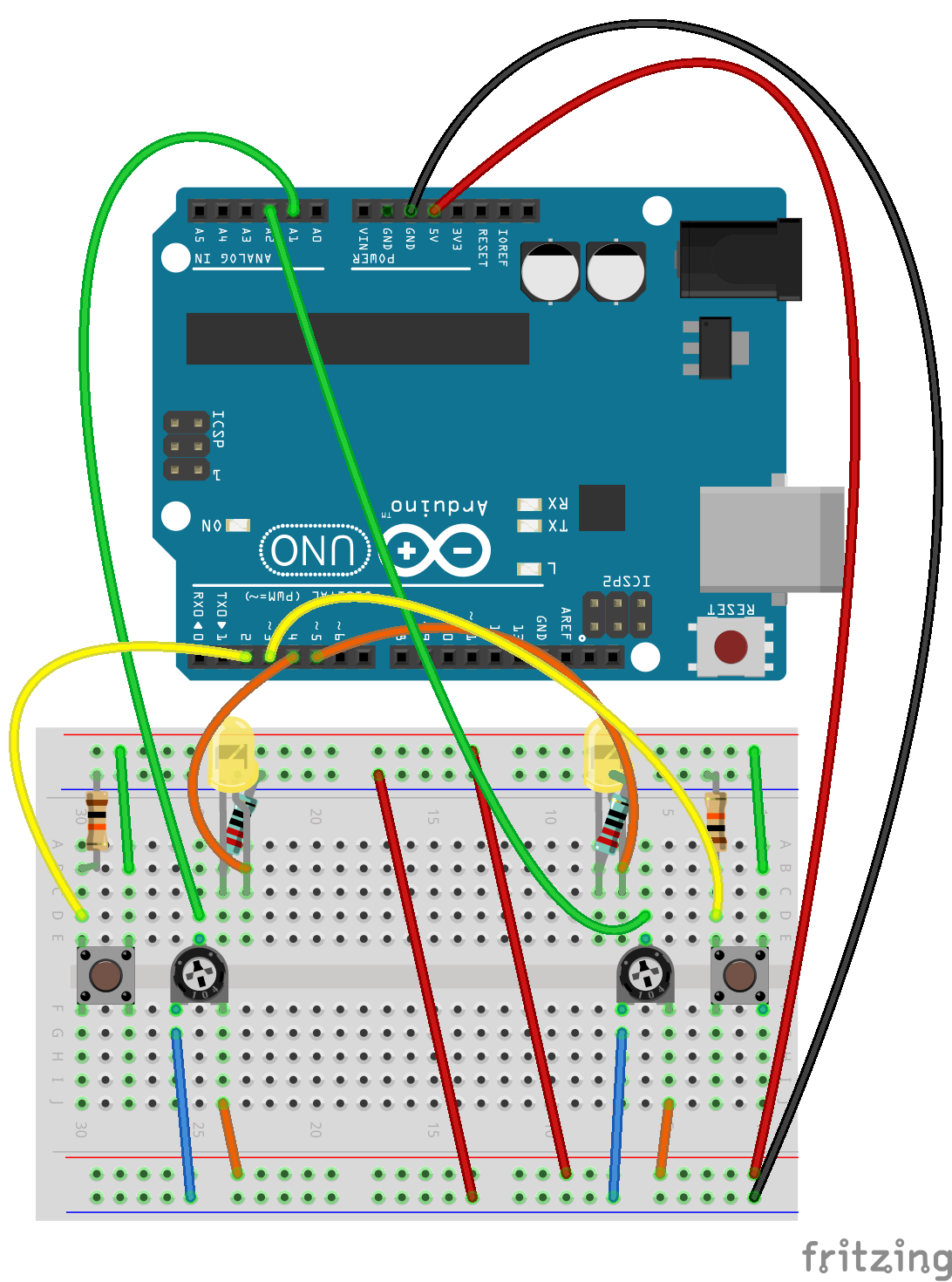
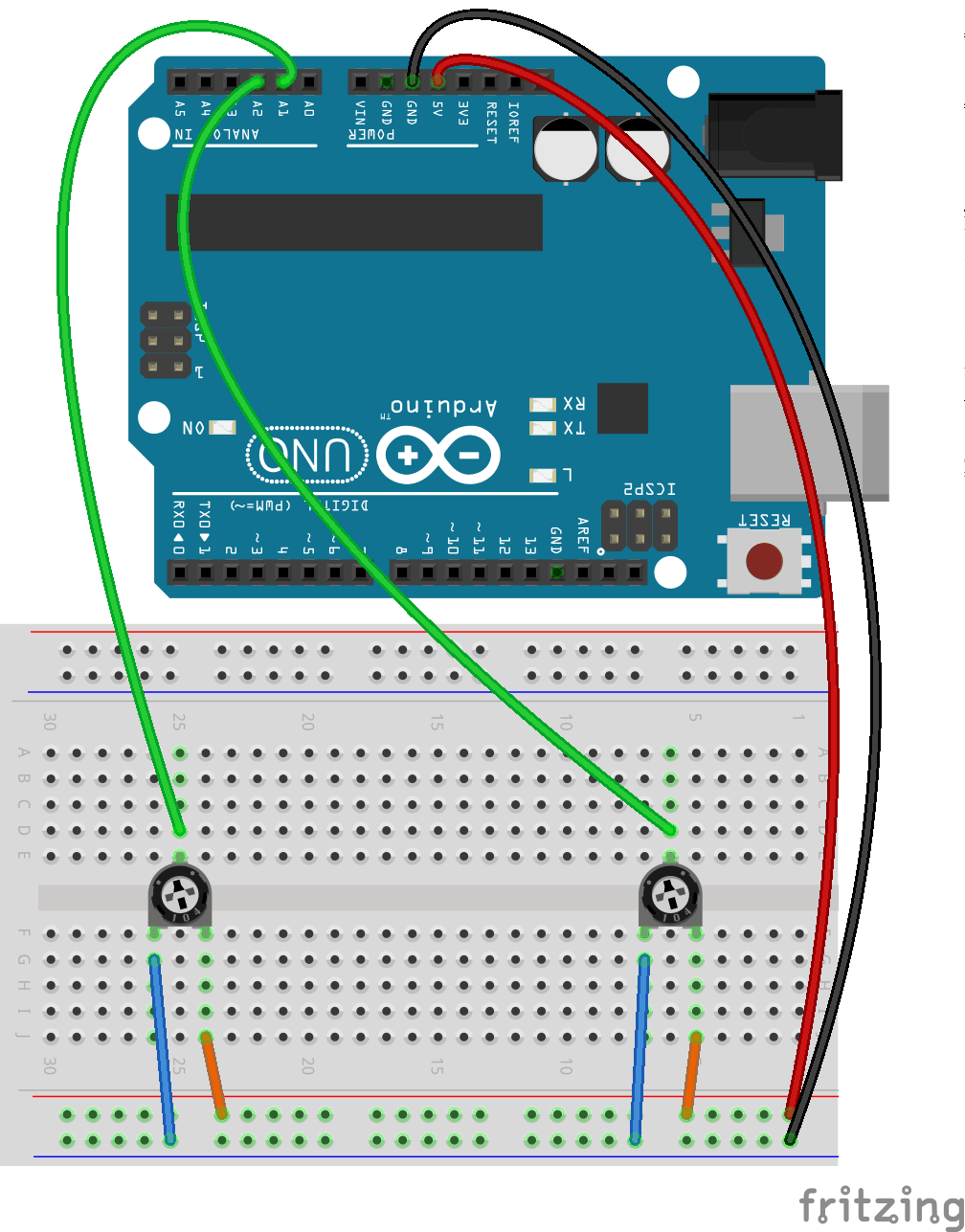
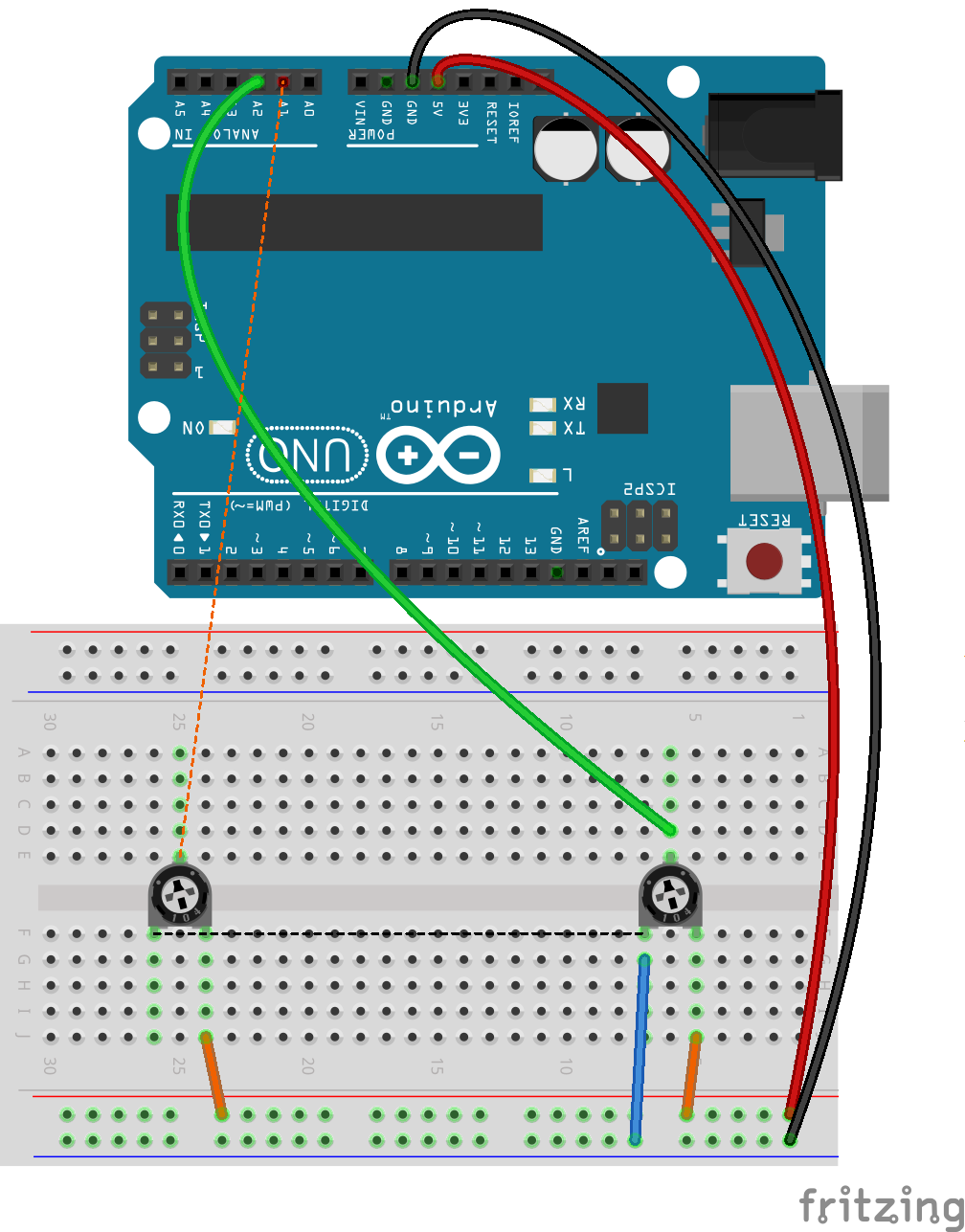
<p><img src="/assets/images/neildeighan-blog-pronguino-6-circuit-fritzing_bb.png" alt="Fritzing Breadboard" /></p>

<p class="figure-caption">Fritzing Breadboard - Sounduino</p>

<h4 id="assembly">Assembly</h4>

<p>These instruction steps are used to assemble the circuit as shown above.</p>

<div class="table-wrap-text table-first-col-60">

  <table>
    <thead>
      <tr>
        <th>Step</th>
        <th>Instructions</th>
      </tr>
    </thead>
    <tbody>
      <tr>
        <td>1</td>
        <td>Ensure you have unplugged from power source and at least one end of USB cable is removed from either the UNO / computer.</td>
      </tr>
      <tr>
        <td>2</td>
        <td>The piezo will be slightly different to that shown in circuit above, the pins will be underneath. Gently place the two pins over sockets, making a note of the row column numbers on board, and then push piezo in.</td>
      </tr>
      <tr>
        <td>3</td>
        <td>Insert one end of the <span class="highlight-blue">20mm blue</span> wire into the digital pin <span class="highlight-blue">D10</span>, and the other end into nearest board socket on one of the rows noted above.</td>
      </tr>
      <tr>
        <td>4</td>
        <td>Insert one end of the <span class="highlight-orange">5mm orange</span> wire into a socket on the <span class="negative">GND</span> bus line, and the other end into the nearest board socket on the other row noted above.</td>
      </tr>
    </tbody>
  </table>

</div>

<p class="note-section"><strong>Note:</strong> It is recommended not to use digital pins 0 and 1, due to them being used by USB serial communication.</p>

<h2 id="the-code">The Code</h2>

<div class="code-links">
  <div class="code-link-item">
    <a href="https://github.com/neildeighan/pronguino-6" class="code-link-btn" target="_blank" rel="noopener" aria-label="View on GitHub" title="View on GitHub">
      <svg viewBox="0 0 24 24" width="28" height="28"><path fill="currentColor" d="M12 .297c-6.63 0-12 5.373-12 12 0 5.303 3.438 9.8 8.205 11.385.6.113.82-.258.82-.577 0-.285-.01-1.04-.015-2.04-3.338.724-4.042-1.61-4.042-1.61C4.422 18.07 3.633 17.7 3.633 17.7c-1.087-.744.084-.729.084-.729 1.205.084 1.838 1.236 1.838 1.236 1.07 1.835 2.809 1.305 3.495.998.108-.776.417-1.305.76-1.605-2.665-.3-5.466-1.332-5.466-5.93 0-1.31.465-2.38 1.235-3.22-.135-.303-.54-1.523.105-3.176 0 0 1.005-.322 3.3 1.23.96-.267 1.98-.399 3-.405 1.02.006 2.04.138 3 .405 2.28-1.552 3.285-1.23 3.285-1.23.645 1.653.24 2.873.12 3.176.765.84 1.23 1.91 1.23 3.22 0 4.61-2.805 5.625-5.475 5.92.42.36.81 1.096.81 2.22 0 1.606-.015 2.896-.015 3.286 0 .315.21.69.825.57C20.565 22.092 24 17.592 24 12.297c0-6.627-5.373-12-12-12" /></svg>
    </a>
    <span class="code-link-label">View</span>
  </div>
  <div class="code-link-item">
    <button class="code-link-btn code-clone-btn" data-url="https://github.com/neildeighan/pronguino-6.git" aria-label="Copy clone URL" title="Copy clone URL to clipboard">
      <svg viewBox="0 0 24 24" width="28" height="28"><path fill="currentColor" d="M16 1H4c-1.1 0-2 .9-2 2v14h2V3h12V1zm3 4H8c-1.1 0-2 .9-2 2v14c0 1.1.9 2 2 2h11c1.1 0 2-.9 2-2V7c0-1.1-.9-2-2-2zm0 16H8V7h11v14z" /></svg>
    </button>
    <span class="code-link-label">Clone</span>
  </div>
  <div class="code-link-item">
    <a href="https://github.com/neildeighan/pronguino-6/archive/refs/heads/master.zip" class="code-link-btn" aria-label="Download ZIP" title="Download ZIP from GitHub">
      <svg viewBox="0 0 24 24" width="28" height="28"><path fill="currentColor" d="M19 9h-4V3H9v6H5l7 7 7-7zM5 18v2h14v-2H5z" /></svg>
    </a>
    <span class="code-link-label">Download</span>
  </div>
</div>

<h3 id="arduino">Arduino</h3>

<h4 id="whats-new">What’s New</h4>

<p>There have been no new sketch files added.</p>

<h4 id="whats-changed">What’s Changed</h4>

<h5 id="component-library">Component Library</h5>

<p>With the introduction of the piezo, code has been added to the Component Library.</p>

<table>
  <thead>
    <tr>
      <th>File</th>
      <th>Changes</th>
    </tr>
  </thead>
  <tbody>
    <tr>
      <td>component.h</td>
      <td>Declaration of Piezo class added</td>
    </tr>
    <tr>
      <td>component.cpp</td>
      <td>Implementation of Piezo class added</td>
    </tr>
  </tbody>
</table>

<h5 id="pronguino-library">Pronguino Library</h5>

<p>The concept of a “console”, which has the Speaker and Controllers “attached”, this has been encapsulated in the Pronguino Library GameConsole class.</p>

<table>
  <thead>
    <tr>
      <th>File</th>
      <th>Changes</th>
    </tr>
  </thead>
  <tbody>
    <tr>
      <td>pronguino.h</td>
      <td>Declaration of Speaker class added. <br />Declaration of GameConsole class added</td>
    </tr>
    <tr>
      <td>pronguino.cpp</td>
      <td>Implementation of Speaker class added. <br />Implementation of GameConsole class added</td>
    </tr>
  </tbody>
</table>

<h5 id="pronguino-sketch">Pronguino Sketch</h5>

<table>
  <thead>
    <tr>
      <th>File</th>
      <th>Changes</th>
    </tr>
  </thead>
  <tbody>
    <tr>
      <td>pronguino.ino</td>
      <td>Added logic for GameConsole / Speaker. <br />Added testing for GameConsole / Speaker</td>
    </tr>
  </tbody>
</table>

<h4 id="testing">Testing</h4>

<p>As previously, if you change <code class="language-plaintext highlighter-rouge">TESTING</code> to be <code class="language-plaintext highlighter-rouge">true</code>, upload the new code, you will see the same results in the serial monitor as in <a href="/pronguino-4#testing-arduino">Servuino Testing</a>, but will now also play sounds depending on the button(s) pressed as follows…</p>

<table>
  <thead>
    <tr>
      <th>Sound</th>
      <th>Button(s)</th>
    </tr>
  </thead>
  <tbody>
    <tr>
      <td>Ball hits wall</td>
      <td>Left</td>
    </tr>
    <tr>
      <td>Paddle hits ball</td>
      <td>Right</td>
    </tr>
    <tr>
      <td>Point scored</td>
      <td>Left+Right</td>
    </tr>
  </tbody>
</table>

<h4 id="troubleshooting">Troubleshooting</h4>

<p>Check the following, as well as items in previous <a href="/pronguino-4#arduino-troubleshooting">Troubleshooting</a> guide….</p>

<div class="table-wrap-text">

  <table>
    <thead>
      <tr>
        <th>Issue</th>
        <th>Check</th>
      </tr>
    </thead>
    <tbody>
      <tr>
        <td>Nothing is working</td>
        <td>Check Arduino is plugged in securely. <br />Check <span class="positive">red</span> &amp; <span class="negative">black</span> wires on board are secure. <br />Check <span class="highlight-orange">wires</span> connecting bus lines.</td>
      </tr>
      <tr>
        <td>No sound (when buttons pressed in test mode, or when events triggered such as ball hits wall etc)</td>
        <td>Check piezo is firmly pushed in. <br />Check the wires to <span class="highlight-blue">D10</span> are connected ok. <br />Check the wires to <span class="negative">GND</span> are ok. <br />Check wires from buttons are ok.</td>
      </tr>
    </tbody>
  </table>

</div>

<p class="challenge-section"><strong>Challenge:</strong> As I write the code, sometimes I have little ideas, notes to improve or fix things, see if you can tackle any that you see a the top of some of the code files, feel free to comment any questions you may have.</p>

<h3 id="processing">Processing</h3>

<h4 id="whats-new-1">What’s New</h4>

<p>After some experimentation with trying to create the correct tones / and also .wav playback using the standard <a href="https://processing.org/reference/libraries/sound/index.html">Sound Library</a>, I ended up using the <a href="https://code.compartmental.net/tools/minim/">Minim library</a>, which simplified the process of .wav playback.</p>

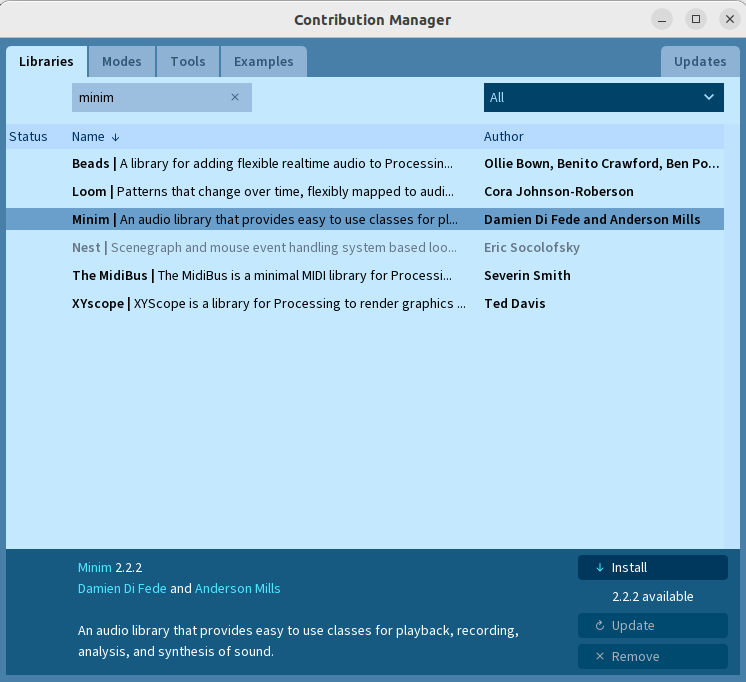
<p>You will need to install the Minim library from the Processing IDE…</p>

<p>Sketch -&gt; Import Library -&gt; Manage Libraries… and search for “minim”</p>

<p><img src="/assets/images/neildeighan-blog-pronguino-6-install-minim.png" alt="Manage Libraries - Minim" /></p>

<p class="figure-caption">Manage Libraries - Minim</p>

<p>I have added a Speaker interface along with implementations for an ExternalSpeaker (Arduino) and InternalSpeaker (Computer), and also introduced the Console interface, with implementations for ExternalConsole and InternalConsole, to look after the controllers and speaker.</p>

<div class="table-wrap-text">

  <table>
    <thead>
      <tr>
        <th>File</th>
        <th>Description</th>
      </tr>
    </thead>
    <tbody>
      <tr>
        <td>data/WallSound.wav</td>
        <td>Wave Audio file (Ball hits wall)</td>
      </tr>
      <tr>
        <td>data/PaddleSound.wav</td>
        <td>Wave Audio file (Paddle hits ball)</td>
      </tr>
      <tr>
        <td>data/PointSound.wav</td>
        <td>Wave Audio file (Point scored)</td>
      </tr>
      <tr>
        <td>Console</td>
        <td>Console interface. <br />AbstractConsole implementation of abstract class. <br />ConsoleFactory, determines which type of console to create. <br />ExternalConsole implementation. <br />InternalConsole implementation</td>
      </tr>
      <tr>
        <td>Speaker</td>
        <td>Speaker Interface. <br />ExternalSpeaker implementation. <br />InternalSpeaker implementation</td>
      </tr>
    </tbody>
  </table>

</div>
<h4 id="whats-changed-1">What’s Changed</h4>

<div class="table-wrap-text">

  <table>
    <thead>
      <tr>
        <th>File</th>
        <th>Changes</th>
      </tr>
    </thead>
    <tbody>
      <tr>
        <td>Constants</td>
        <td>Added data bit masks for sounds</td>
      </tr>
      <tr>
        <td>Controller</td>
        <td>Removed connected flag (moved to Console)</td>
      </tr>
      <tr>
        <td>Paddle</td>
        <td>Added position function to determine how/where to initially position paddle</td>
      </tr>
      <tr>
        <td>Player</td>
        <td>Use console to access controller</td>
      </tr>
      <tr>
        <td>Pronguino</td>
        <td>Some refactoring. <br />Consumes Console class. <br />Adds calls to sound methods in relevant places</td>
      </tr>
    </tbody>
  </table>

</div>

<h4 id="troubleshooting-1">Troubleshooting</h4>

<div class="table-wrap-text">

  <table>
    <thead>
      <tr>
        <th>Issue</th>
        <th>Solution</th>
      </tr>
    </thead>
    <tbody>
      <tr>
        <td>The package “ddf” does not exist. You might be missing a library. No library found for ddf.minim</td>
        <td>Make sure minim library has been installed via Sketch -&gt; Import Library -&gt; Manage Libraries…</td>
      </tr>
    </tbody>
  </table>

</div>

<p class="challenge-section"><strong>Challenge:</strong> See if you can utilise the standard Sound library to either produce the tones or playback .wav files, I tried a few things .. <a href="https://processing.org/reference/libraries/sound/SqrOsc.html">SqrOsc</a>, <a href="https://processing.org/reference/libraries/sound/AudioSample.html">AudioSample</a> and <a href="https://processing.org/reference/libraries/sound/SoundFile.html">SoundFile</a>, but couldn’t quite get them to work as I would expect, I may have missed something.</p>

<h2 id="play">Play</h2>

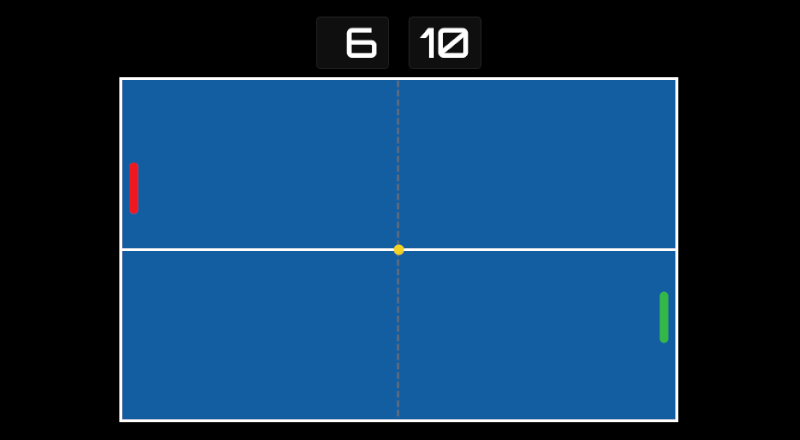
<p>Break time… Turn off testing mode, and re-upload…. volume up (if not using UNO) .. no change in controls…</p>

<table>
  <thead>
    <tr>
      <th>Player</th>
      <th>Up</th>
      <th>Down</th>
      <th>Pause/Resume/Serve</th>
    </tr>
  </thead>
  <tbody>
    <tr>
      <td>1</td>
      <td>q</td>
      <td>a</td>
      <td>space</td>
    </tr>
    <tr>
      <td>2</td>
      <td>p</td>
      <td>l</td>
      <td>space</td>
    </tr>
  </tbody>
</table>

<h4 id="rules">Rules</h4>

<p>No functional changes to game, so rules are the same..</p>

<div class="table-wrap-text">

  <table>
    <thead>
      <tr>
        <th>Rule</th>
        <th>Description</th>
      </tr>
    </thead>
    <tbody>
      <tr>
        <td>Game Over</td>
        <td>The first player to SCORE_MAX wins the game.</td>
      </tr>
      <tr>
        <td>Opening Serve</td>
        <td>PLAYER_ONE has the first service.</td>
      </tr>
      <tr>
        <td>Player Misses</td>
        <td>The same player serves.</td>
      </tr>
      <tr>
        <td>Serve Direction</td>
        <td>If the player serving has paddle in top half of surface, the direction will be down/left or right depending on player. <br /><br />If the player serving has paddle in bottom half of surface, the direction will be up/left or right depending on player.</td>
      </tr>
    </tbody>
  </table>

</div>

<h2 id="piezo">Piezo</h2>

<p>A piezo sounder contains a <a href="https://en.wikipedia.org/wiki/Piezoelectric_speaker">piezo electric</a> vibration plate within a moulded case. Sound is emitted when a voltage is applied and the piezo element inside the case vibrates. I won’t get into the details of how it works, just keeping simple for the context of this project.</p>

<div class="post-image-text-row">

  <div class="post-image-text">
  <img src="/assets/images/neildeighan-blog-pronguino-6-piezo.png" style="width: 130px;" alt="Piezo sounder wiring diagram" />
</div>

  <div class="post-image-text">
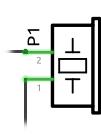
    <p>Terminal 1 (\(T_1\)) connected to <span class="negative">GND</span>.
<br /><br />
Terminal 2 (<span class="highlight-blue">\(T_2\)</span>) connected to digital pin <span class="highlight-blue">D10</span>.</p>
  </div>

</div>

<p>The <a href="https://www.arduino.cc/reference/en/language/functions/advanced-io/tone/"><code class="language-plaintext highlighter-rouge">tone()</code></a> function generates a square wave where the duty cycle is 50% (HIGH half the time, LOW half the time), at a given frequency in cycles per second (Hertz), for a specified duration in milliseconds to the required pin, in this case digital pin <span class="highlight-blue">D10</span>.</p>

<p class="learn-section"><strong>Learn:</strong> I find it important to get to know your components, and how they work, it helps when things don’t work as planned, look up the datasheets of the components to get data to be used to equations such as Ohms law to make sure you choose correctly.</p>

<h2 id="conclusion">Conclusion</h2>

<p>A reasonably easy addition to this project. We have added a piezo buzzer to the circuit, used the <code class="language-plaintext highlighter-rouge">tone()</code> function to generate game sounds at the accurate frequencies from the original Pong game, and introduced a software fallback using the Minim library so that sounds are heard regardless of whether the Arduino is connected. Throughout these posts I have hopefully covered some of the very basics of a classic retro game — building the circuit, writing the software, and now bringing it to life with sound. I will probably be referring back to some posts or sections in future projects.</p>]]></content><author><name></name></author><category term="arduino" /><category term="electronics" /><category term="gaming" /><category term="piezo" /><category term="pong" /><category term="processing" /><category term="pronguino" /><category term="retro" /><category term="serial" /><category term="software" /><summary type="html"><![CDATA[Add sound to the Pronguino Pong game using a piezo buzzer and Arduino — covering serial communication, frequency control, and integrating audio feedback into the game.]]></summary></entry><entry><title type="html">Phorms</title><link href="https://neildeighan.com/pronguino-5/" rel="alternate" type="text/html" title="Phorms" /><published>2021-03-07T00:00:00+00:00</published><updated>2021-03-07T00:00:00+00:00</updated><id>https://neildeighan.com/phorms-processing-forms</id><content type="html" xml:base="https://neildeighan.com/pronguino-5/"><![CDATA[<h1 id="phorms">Phorms</h1>

<p><img src="/assets/images/featured/neildeighan-blog-pronguino-5-featured.png" alt="Phorms" /></p>

<h2 id="introduction">Introduction</h2>
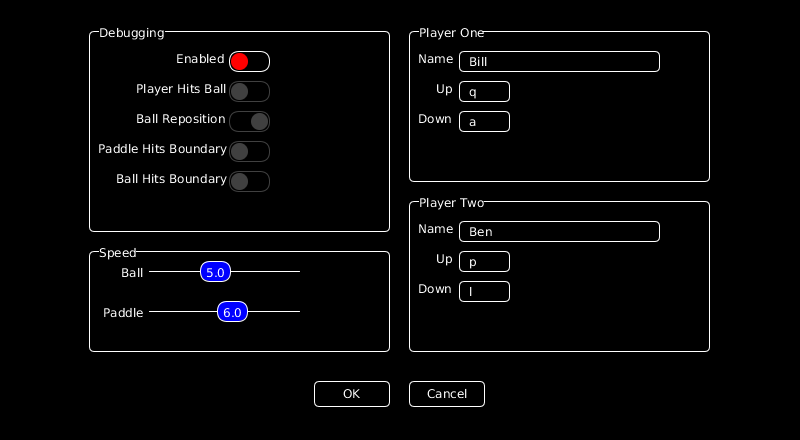
<p>In this post, we are going to look at creating some form fields (with a dive into more object oriented methods), which have been used to create a menu and an options screen to change some of the settings.</p>

<h4 id="scope">Scope</h4>

<div class="table-wrap-text">

  <table>
    <thead>
      <tr>
        <th> </th>
        <th>Description</th>
      </tr>
    </thead>
    <tbody>
      <tr>
        <td>Processing</td>
        <td>Creating a custom form controls library. Adding a Menu and an Options screen.</td>
      </tr>
      <tr>
        <td>Game</td>
        <td>Adding game state for menu and options screens.</td>
      </tr>
      <tr>
        <td>File</td>
        <td>Reading and writing game options using JSON.</td>
      </tr>
    </tbody>
  </table>

</div>

<h4 id="learning">Learning</h4>

<div class="table-wrap-text">

  <table>
    <thead>
      <tr>
        <th> </th>
        <th>Description</th>
      </tr>
    </thead>
    <tbody>
      <tr>
        <td>Object-Orientation</td>
        <td>Key OO concepts: encapsulation, abstraction, interfaces, abstract classes, inheritance and polymorphism.</td>
      </tr>
      <tr>
        <td>Form Controls</td>
        <td>Building interactive form controls (Button, Input, Toggle, Slider, Frame) from scratch in Processing.</td>
      </tr>
      <tr>
        <td>JSON File Handling</td>
        <td>Reading and writing JSON files in Processing to persist settings between sessions.</td>
      </tr>
      <tr>
        <td>Event Driven</td>
        <td>Cascading mouse and keyboard events down through a class hierarchy.</td>
      </tr>
    </tbody>
  </table>

</div>

<h2 id="getting-started">Getting Started</h2>

<h4 id="recommended">Recommended</h4>

<p>I recommend that you go through the previous posts for this project, although completing the Arduino part of the project is not essential.</p>

<h2 id="the-code">The Code</h2>

<div class="code-links">
  <div class="code-link-item">
    <a href="https://github.com/neildeighan/pronguino-5" class="code-link-btn" target="_blank" rel="noopener" aria-label="View on GitHub" title="View on GitHub">
      <svg viewBox="0 0 24 24" width="28" height="28"><path fill="currentColor" d="M12 .297c-6.63 0-12 5.373-12 12 0 5.303 3.438 9.8 8.205 11.385.6.113.82-.258.82-.577 0-.285-.01-1.04-.015-2.04-3.338.724-4.042-1.61-4.042-1.61C4.422 18.07 3.633 17.7 3.633 17.7c-1.087-.744.084-.729.084-.729 1.205.084 1.838 1.236 1.838 1.236 1.07 1.835 2.809 1.305 3.495.998.108-.776.417-1.305.76-1.605-2.665-.3-5.466-1.332-5.466-5.93 0-1.31.465-2.38 1.235-3.22-.135-.303-.54-1.523.105-3.176 0 0 1.005-.322 3.3 1.23.96-.267 1.98-.399 3-.405 1.02.006 2.04.138 3 .405 2.28-1.552 3.285-1.23 3.285-1.23.645 1.653.24 2.873.12 3.176.765.84 1.23 1.91 1.23 3.22 0 4.61-2.805 5.625-5.475 5.92.42.36.81 1.096.81 2.22 0 1.606-.015 2.896-.015 3.286 0 .315.21.69.825.57C20.565 22.092 24 17.592 24 12.297c0-6.627-5.373-12-12-12" /></svg>
    </a>
    <span class="code-link-label">View</span>
  </div>
  <div class="code-link-item">
    <button class="code-link-btn code-clone-btn" data-url="https://github.com/neildeighan/pronguino-5.git" aria-label="Copy clone URL" title="Copy clone URL to clipboard">
      <svg viewBox="0 0 24 24" width="28" height="28"><path fill="currentColor" d="M16 1H4c-1.1 0-2 .9-2 2v14h2V3h12V1zm3 4H8c-1.1 0-2 .9-2 2v14c0 1.1.9 2 2 2h11c1.1 0 2-.9 2-2V7c0-1.1-.9-2-2-2zm0 16H8V7h11v14z" /></svg>
    </button>
    <span class="code-link-label">Clone</span>
  </div>
  <div class="code-link-item">
    <a href="https://github.com/neildeighan/pronguino-5/archive/refs/heads/master.zip" class="code-link-btn" aria-label="Download ZIP" title="Download ZIP from GitHub">
      <svg viewBox="0 0 24 24" width="28" height="28"><path fill="currentColor" d="M19 9h-4V3H9v6H5l7 7 7-7zM5 18v2h14v-2H5z" /></svg>
    </a>
    <span class="code-link-label">Download</span>
  </div>
</div>

<h3 id="processing">Processing</h3>

<h4 id="whats-new">What’s New</h4>

<p>The first thing I wanted to do in this stage was to move some of the game operations away from pronguino sketch into a new class Game. Also added a starting Menu, which allows us to change Options before we play.</p>

<div class="table-wrap-text table-first-col-120">

  <table>
    <thead>
      <tr>
        <th>Class</th>
        <th>Description</th>
      </tr>
    </thead>
    <tbody>
      <tr>
        <td>Game</td>
        <td>Class to encapsulate game operations. <br />– Options <br />– State <br />– Begin <br />– Pause <br />– Resume</td>
      </tr>
      <tr>
        <td>Form</td>
        <td>Contains a number of form control classes <br />– Frame <br />– ToggleControl <br />– InputControl <br />– SliderControl <br />– ButtonControl</td>
      </tr>
      <tr>
        <td>Menu</td>
        <td>Class to encapsulate menu operation <br />– Play <br />– Options <br />– Exit <br />– Status Message</td>
      </tr>
    </tbody>
  </table>

</div>
<h4 id="whats-changed">What’s Changed</h4>

<p>Most of the files have had a minor change due to moving Options into Game as a child property, below are the significant changes…</p>

<div class="table-wrap-text table-first-col-120">

  <table>
    <thead>
      <tr>
        <th>File</th>
        <th>Changes</th>
      </tr>
    </thead>
    <tbody>
      <tr>
        <td>pronguino</td>
        <td>Implemented new <em>Game</em> class. <br />Implemented new <em>Menu</em> class <br />Handle serial errors as status messages <br />Added further mouse/keyboard events <br />Added game events</td>
      </tr>
      <tr>
        <td>Ball</td>
        <td>Added <code class="language-plaintext highlighter-rouge">applyOptions()</code> method</td>
      </tr>
      <tr>
        <td>Constants</td>
        <td>Added new menu/option states <br />Added new status message colours <br />Add new colours constants</td>
      </tr>
      <tr>
        <td>Debug</td>
        <td>Cleared constructor</td>
      </tr>
      <tr>
        <td>Options</td>
        <td>Added form controls for options <br />Add file handling for options file <br />Add various methods/events</td>
      </tr>
      <tr>
        <td>Paddle</td>
        <td>Added <code class="language-plaintext highlighter-rouge">applyOptions()</code> method</td>
      </tr>
      <tr>
        <td>Player</td>
        <td>Added <code class="language-plaintext highlighter-rouge">name</code> property <br />Added <code class="language-plaintext highlighter-rouge">applyOptions()</code> method <br />Added <code class="language-plaintext highlighter-rouge">serve()</code> method</td>
      </tr>
      <tr>
        <td>Scoreboard</td>
        <td>Remove <code class="language-plaintext highlighter-rouge">score</code> property <br />Added <code class="language-plaintext highlighter-rouge">player</code> property <br />Display <code class="language-plaintext highlighter-rouge">player.score</code> on scoreboard <br />Display <code class="language-plaintext highlighter-rouge">player.name</code> above scoreboard</td>
      </tr>
    </tbody>
  </table>

</div>

<p class="challenge-section"><strong>Challenge:</strong> I have started adding TODO’s at top of some of the files, adding items I’d like to do, should do, or may do in the future. Sometimes when I am putting the code together for these posts it is easy to get carried away, but I have to find the cut-off point, so feel free to scan these and have a go yourself.</p>

<h2 id="play">Play</h2>

<p>The rules haven’t changed, keys and controls are still the same, now you can select Options from the Menu and change your name(s), set speed, or switch on debugging without changing the code!</p>

<figure class="post-video"><video controls="" src="/assets/video/pronguino-5-r60-s800x600.mp4"></video><figcaption class="wp-element-caption">Phorms</figcaption></figure>

<h2 id="forms">Forms</h2>

<p>When a Processing application starts it runs <code class="language-plaintext highlighter-rouge">setup()</code> once, and then runs the code continuously in the loop <code class="language-plaintext highlighter-rouge">draw()</code> method, where the objects get displayed. With two new “forms” being added I have added some further state constants….</p>

<div class="language-java highlighter-rouge"><div class="highlight"><pre class="highlight"><code><span class="kd">static</span> <span class="kd">final</span> <span class="kt">int</span> <span class="no">STATE_MENU</span> <span class="o">=</span> <span class="mi">5</span><span class="o">;</span>      <span class="c1">// Game menu showing</span>
<span class="kd">static</span> <span class="kd">final</span> <span class="kt">int</span> <span class="no">STATE_OPTIONS</span> <span class="o">=</span> <span class="mi">6</span><span class="o">;</span>   <span class="c1">// Game options showing</span>
</code></pre></div></div>

<p>… which get set accordingly … at the start…</p>

<div class="language-java highlighter-rouge"><div class="highlight"><pre class="highlight"><code><span class="kt">void</span> <span class="nf">setup</span><span class="o">()</span> <span class="o">{</span>
   <span class="o">...</span>
   <span class="n">game</span><span class="o">.</span><span class="na">state</span> <span class="o">=</span> <span class="nc">Constants</span><span class="o">.</span><span class="na">STATE_MENU</span><span class="o">;</span>
   <span class="o">...</span>
<span class="o">}</span>
</code></pre></div></div>

<p>… and when Options button clicked…</p>

<div class="language-java highlighter-rouge"><div class="highlight"><pre class="highlight"><code><span class="kt">void</span> <span class="nf">optionsButtonClicked</span><span class="o">()</span> <span class="o">{</span>
  <span class="n">game</span><span class="o">.</span><span class="na">state</span> <span class="o">=</span> <span class="nc">Constants</span><span class="o">.</span><span class="na">STATE_OPTIONS</span><span class="o">;</span>
<span class="o">}</span>
</code></pre></div></div>

<p>.. and these are used to determine what gets displayed during <code class="language-plaintext highlighter-rouge">draw()</code> method…</p>

<div class="language-java highlighter-rouge"><div class="highlight"><pre class="highlight"><code><span class="c1">// Display ..</span>
<span class="k">switch</span><span class="o">(</span><span class="n">game</span><span class="o">.</span><span class="na">state</span><span class="o">)</span> <span class="o">{</span>
  <span class="k">case</span> <span class="nc">Constants</span><span class="o">.</span><span class="na">STATE_MENU</span><span class="o">:</span>
    <span class="n">background</span><span class="o">(</span><span class="n">game</span><span class="o">.</span><span class="na">options</span><span class="o">.</span><span class="na">backgroundColour</span><span class="o">);</span>
    <span class="n">menu</span><span class="o">.</span><span class="na">display</span><span class="o">();</span>
    <span class="k">break</span><span class="o">;</span>
  <span class="k">case</span> <span class="nc">Constants</span><span class="o">.</span><span class="na">STATE_OPTIONS</span><span class="o">:</span>
    <span class="n">background</span><span class="o">(</span><span class="n">game</span><span class="o">.</span><span class="na">options</span><span class="o">.</span><span class="na">backgroundColour</span><span class="o">);</span>
    <span class="n">game</span><span class="o">.</span><span class="na">options</span><span class="o">.</span><span class="na">display</span><span class="o">();</span>
    <span class="k">break</span><span class="o">;</span>
  <span class="k">default</span><span class="o">:</span>
    <span class="o">...</span>
    <span class="c1">// Game Objects</span>
    <span class="o">...</span>
    <span class="k">break</span><span class="o">;</span>
<span class="o">}</span>
</code></pre></div></div>

<p>In preparation for adding controls onto the form, we need to know when certain events happen while the form is shown, these events can only be triggered in the main sketch (pronguino) and need to be cascaded down to the form … i.e.</p>

<div class="language-java highlighter-rouge"><div class="highlight"><pre class="highlight"><code><span class="kt">void</span> <span class="nf">mouseClicked</span><span class="o">()</span> <span class="o">{</span>
  <span class="o">...</span>
  <span class="k">if</span> <span class="o">(</span><span class="n">game</span><span class="o">.</span><span class="na">state</span> <span class="o">==</span> <span class="nc">Constants</span><span class="o">.</span><span class="na">STATE_MENU</span><span class="o">)</span> <span class="o">{</span>
    <span class="c1">// Cascade down</span>
    <span class="n">menu</span><span class="o">.</span><span class="na">clicked</span><span class="o">();</span>
  <span class="o">}</span>
<span class="o">}</span>
</code></pre></div></div>

<p>.. and so the <code class="language-plaintext highlighter-rouge">clicked()</code> method is called in Menu class … it is in this method, the form still doesn’t know what has been clicked so checks each controls <code class="language-plaintext highlighter-rouge">clicked()</code> method to identify, and act accordingly.</p>

<div class="language-java highlighter-rouge"><div class="highlight"><pre class="highlight"><code><span class="kt">void</span> <span class="nf">clicked</span><span class="o">()</span> <span class="o">{</span>
  <span class="c1">// Check if options button clicked ..</span>
  <span class="k">if</span><span class="o">(</span><span class="k">this</span><span class="o">.</span><span class="na">optionsButton</span><span class="o">.</span><span class="na">clicked</span><span class="o">())</span> <span class="o">{</span>
    <span class="c1">// Call event method     </span>
    <span class="n">optionsButtonClicked</span><span class="o">();</span>
  <span class="o">}</span>
  <span class="o">...</span>
<span class="o">}</span>
</code></pre></div></div>

<p>If any of the controls used on a form have the <code class="language-plaintext highlighter-rouge">validate()</code> method and <code class="language-plaintext highlighter-rouge">valid</code> property implemented, a <code class="language-plaintext highlighter-rouge">valid()</code> method can be added to check all the relevant controls, which in this case is used to disable the OK button on the options form, to prevent invalid data being saved…</p>

<div class="language-java highlighter-rouge"><div class="highlight"><pre class="highlight"><code><span class="kt">boolean</span> <span class="nf">valid</span><span class="o">()</span> <span class="o">{</span>
  <span class="c1">// Currently only input controls need validation ... </span>
  <span class="k">for</span> <span class="o">(</span><span class="kt">int</span> <span class="n">id</span><span class="o">=</span><span class="mi">0</span><span class="o">;</span> <span class="n">id</span> <span class="o">&lt;</span> <span class="nc">Constants</span><span class="o">.</span><span class="na">PLAYER_COUNT</span><span class="o">;</span> <span class="n">id</span><span class="o">++)</span> <span class="o">{</span>
    <span class="c1">// ... this will return false if any of the controls are invalid</span>
    <span class="k">if</span> <span class="o">(!</span><span class="k">this</span><span class="o">.</span><span class="na">playerNameInputs</span><span class="o">[</span><span class="n">id</span><span class="o">].</span><span class="na">valid</span> <span class="o">||</span> <span class="o">!</span><span class="k">this</span><span class="o">.</span><span class="na">playerUpInputs</span><span class="o">[</span><span class="n">id</span><span class="o">].</span><span class="na">valid</span> <span class="o">||</span> <span class="o">!</span><span class="k">this</span><span class="o">.</span><span class="na">playerDownInputs</span><span class="o">[</span><span class="n">id</span><span class="o">].</span><span class="na">valid</span><span class="o">)</span> <span class="o">{</span>
      <span class="k">return</span> <span class="kc">false</span><span class="o">;</span>
    <span class="o">}</span>
  <span class="o">}</span>
  <span class="c1">// returns true on completion of loop, nothing invalid</span>
  <span class="k">return</span> <span class="kc">true</span><span class="o">;</span>
<span class="o">}</span>
</code></pre></div></div>

<h2 id="controls">Controls</h2>

<p>Processing is great for fast visual imagery and for games too, sometimes though you need to be able to interact with an application to adjust settings or enter data etc. There are a number of <a href="https://processing.org/reference/libraries/#gui">libraries</a> available for such form controls, these would have been written in Java (which is what Processing language is based on).</p>

<p>As an exercise I decided to put some together using the “out-of-the-box” language, (will have a look at building own Java library another time) this allows me to further explore keyboard and mouse events, graphic/text combinations, and is also a good example to demonstrate some object-oriented methods.</p>

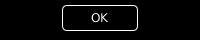
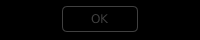
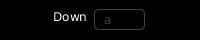
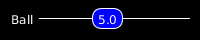
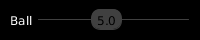
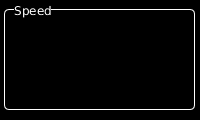
<div class="table-scroll-wrapper">

  <table>
    <thead>
      <tr>
        <th>Control</th>
        <th>Description</th>
        <th style="text-align: center">Enabled</th>
        <th style="text-align: center">Disabled</th>
      </tr>
    </thead>
    <tbody>
      <tr>
        <td>Button</td>
        <td>Simple push button.</td>
        <td style="text-align: center"><img src="/assets/images/neildeighan-blog-pronguino5-control-button-enabled.png" alt="Button Enabled" /></td>
        <td style="text-align: center"><img src="/assets/images/neildeighan-blog-pronguino5-control-button-disabled.png" alt="Button Disabled" /></td>
      </tr>
      <tr>
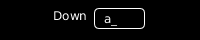
        <td>Input</td>
        <td>Simple text entry.</td>
        <td style="text-align: center"><img src="/assets/images/neildeighan-blog-pronguino5-control-input-enabled.png" alt="Input Enabled" /></td>
        <td style="text-align: center"><img src="/assets/images/neildeighan-blog-pronguino5-control-input-disabled.png" alt="Input Disabled" /></td>
      </tr>
      <tr>
        <td>Toggle</td>
        <td>Used for true/false values</td>
        <td style="text-align: center"><img src="/assets/images/neildeighan-blog-pronguino5-control-toggle-enabled.png" alt="Toggle Enabled" /></td>
        <td style="text-align: center"><img src="/assets/images/neildeighan-blog-pronguino5-control-toggle-disabled.png" alt="Toggle Disabled" /></td>
      </tr>
      <tr>
        <td>Slider</td>
        <td>Choose value within a range by dragging slider along gauge.</td>
        <td style="text-align: center"><img src="/assets/images/neildeighan-blog-pronguino5-control-slider-enabled.png" alt="Slider Enabled" /></td>
        <td style="text-align: center"><img src="/assets/images/neildeighan-blog-pronguino5-control-slider-disabled.png" alt="Slider Disabled" /></td>
      </tr>
      <tr>
        <td>Frame</td>
        <td>Used to group related controls / text.</td>
        <td style="text-align: center"><img src="/assets/images/neildeighan-blog-pronguino5-control-frame.png" alt="Frame" /></td>
        <td style="text-align: center">N/A</td>
      </tr>
    </tbody>
  </table>

</div>
<p>In this section we will look into behavior and drawing of the controls, a further look into how they are put together will be covered more in <a href="#object-orientation">Object-Orientation</a> …</p>

<p>All the controls that extend the <em>Control</em> class will have the following properties… although not all are necessarily used…</p>

<table>
  <thead>
    <tr>
      <th>Property</th>
      <th>Type</th>
      <th>Description</th>
    </tr>
  </thead>
  <tbody>
    <tr>
      <td>x</td>
      <td>float</td>
      <td>X co-ordinate</td>
    </tr>
    <tr>
      <td>y</td>
      <td>float</td>
      <td>Y co-ordinate</td>
    </tr>
    <tr>
      <td>w</td>
      <td>float</td>
      <td>Width</td>
    </tr>
    <tr>
      <td>h</td>
      <td>float</td>
      <td>Height</td>
    </tr>
    <tr>
      <td>label</td>
      <td>String</td>
      <td>Label</td>
    </tr>
    <tr>
      <td>hasFocus</td>
      <td>boolean</td>
      <td>Has control got focus</td>
    </tr>
    <tr>
      <td>disabled</td>
      <td>boolean</td>
      <td>Is control disabled</td>
    </tr>
  </tbody>
</table>

<p>Also all the controls will share common functionality through these <em>Control</em> methods… although not all are necessarily called… and some may even override implementation…</p>

<table>
  <thead>
    <tr>
      <th>Method</th>
      <th>Return</th>
      <th>Description</th>
    </tr>
  </thead>
  <tbody>
    <tr>
      <td>over()</td>
      <td>boolean</td>
      <td>Returns true if the mouse cursor is over the control.</td>
    </tr>
    <tr>
      <td>display()</td>
      <td>void</td>
      <td>Draws the control.</td>
    </tr>
    <tr>
      <td>clicked()</td>
      <td>boolean</td>
      <td>Returns true if the mouse button is clicked over the control.</td>
    </tr>
  </tbody>
</table>

<h4 id="button">Button</h4>

<p>… the <em>ButtonControl</em> requires an additional property…</p>

<table>
  <thead>
    <tr>
      <th>Property</th>
      <th>Type</th>
      <th>Description</th>
    </tr>
  </thead>
  <tbody>
    <tr>
      <td>caption</td>
      <td>String</td>
      <td>text displayed on button</td>
    </tr>
  </tbody>
</table>

<p>.. and overrides the following method from <em>Control</em> …</p>

<table>
  <thead>
    <tr>
      <th>Method</th>
      <th>Return</th>
      <th>Description</th>
    </tr>
  </thead>
  <tbody>
    <tr>
      <td>display()</td>
      <td>void</td>
      <td>Draws the button</td>
    </tr>
  </tbody>
</table>

<p>After declaring the <em>ButtonControl</em>, we create it in the containing “form” class … in this case <em>Options</em> …</p>

<div class="language-java highlighter-rouge"><div class="highlight"><pre class="highlight"><code><span class="nc">ButtonControl</span> <span class="n">okButton</span><span class="o">;</span>
<span class="o">...</span>
<span class="k">this</span><span class="o">.</span><span class="na">okButton</span> <span class="o">=</span> <span class="k">new</span> <span class="nc">ButtonControl</span><span class="o">(</span><span class="mi">305</span><span class="o">,</span><span class="mi">450</span><span class="o">,</span><span class="mi">75</span><span class="o">,</span><span class="mi">25</span><span class="o">,</span><span class="s">"OK"</span><span class="o">);</span>
</code></pre></div></div>

<p>… the additional property is set in the controls constructor, the other properties are set by calling <a href="https://processing.org/reference/super.html">super(…)</a> which calls the relevant constructor in the <em>Control</em> class.</p>

<div class="language-java highlighter-rouge"><div class="highlight"><pre class="highlight"><code><span class="kd">class</span> <span class="nc">ButtonControl</span> <span class="kd">extends</span> <span class="nc">Control</span> <span class="o">{</span>
  <span class="o">...</span>
  <span class="nc">String</span> <span class="n">caption</span><span class="o">;</span>
  <span class="o">...</span>
  <span class="nc">ButtonControl</span><span class="o">(</span><span class="kt">float</span> <span class="n">x</span><span class="o">,</span> <span class="kt">float</span> <span class="n">y</span><span class="o">,</span> <span class="kt">float</span> <span class="n">w</span><span class="o">,</span> <span class="kt">float</span> <span class="n">h</span><span class="o">,</span> <span class="nc">String</span> <span class="n">caption</span><span class="o">)</span> <span class="o">{</span>
    <span class="c1">// Call the constructor of the superclass</span>
    <span class="kd">super</span><span class="o">(</span><span class="n">x</span><span class="o">,</span> <span class="n">y</span><span class="o">,</span> <span class="n">w</span><span class="o">,</span> <span class="n">h</span><span class="o">);</span>
    <span class="c1">// Sets own properties </span>
    <span class="k">this</span><span class="o">.</span><span class="na">caption</span> <span class="o">=</span> <span class="n">caption</span><span class="o">;</span>
  <span class="o">}</span>
  <span class="o">...</span>
<span class="o">}</span>
</code></pre></div></div>

<p>When the <code class="language-plaintext highlighter-rouge">mouseClicked()</code> event is triggered in the pronguino sketch, and the <code class="language-plaintext highlighter-rouge">state</code> is set to <code class="language-plaintext highlighter-rouge">STATE_OPTIONS</code>, the following method is called in the Options class…</p>

<div class="language-java highlighter-rouge"><div class="highlight"><pre class="highlight"><code><span class="kt">void</span> <span class="nf">clicked</span><span class="o">()</span> <span class="o">{</span>
  <span class="o">...</span>
  <span class="k">if</span><span class="o">(</span><span class="k">this</span><span class="o">.</span><span class="na">okButton</span><span class="o">.</span><span class="na">clicked</span><span class="o">())</span> <span class="o">{</span>
    <span class="k">this</span><span class="o">.</span><span class="na">okButtonClicked</span><span class="o">();</span>
  <span class="o">}</span>
  <span class="o">...</span>
<span class="o">}</span>
</code></pre></div></div>

<p>.. which will then check with the following method in the <em>Control</em> class whether this control has been <code class="language-plaintext highlighter-rouge">clicked()</code>…</p>

<div class="language-java highlighter-rouge"><div class="highlight"><pre class="highlight"><code><span class="kt">boolean</span> <span class="nf">clicked</span><span class="o">()</span> <span class="o">{</span>
  <span class="k">this</span><span class="o">.</span><span class="na">hasFocus</span> <span class="o">=</span> <span class="k">this</span><span class="o">.</span><span class="na">over</span><span class="o">();</span>
  <span class="k">return</span> <span class="k">this</span><span class="o">.</span><span class="na">hasFocus</span><span class="o">;</span>
<span class="o">}</span>
</code></pre></div></div>

<p>.. it will do this by calling the <code class="language-plaintext highlighter-rouge">over()</code> method in the <em>Control</em> class, which will check to see if the <code class="language-plaintext highlighter-rouge">mouseX</code> and <code class="language-plaintext highlighter-rouge">mouseY</code> are within the boundary of the control, ignoring this check if control disabled…</p>

<div class="language-java highlighter-rouge"><div class="highlight"><pre class="highlight"><code><span class="kt">boolean</span> <span class="nf">over</span><span class="o">()</span>  <span class="o">{</span>
  <span class="k">if</span><span class="o">(</span><span class="k">this</span><span class="o">.</span><span class="na">disabled</span><span class="o">)</span> <span class="o">{</span>
    <span class="k">return</span> <span class="kc">false</span><span class="o">;</span>
  <span class="o">}</span>    
  <span class="k">if</span> <span class="o">(</span><span class="n">mouseX</span> <span class="o">&gt;=</span> <span class="k">this</span><span class="o">.</span><span class="na">x</span> <span class="o">&amp;&amp;</span> <span class="n">mouseX</span> <span class="o">&lt;=</span> <span class="k">this</span><span class="o">.</span><span class="na">x</span><span class="o">+</span><span class="k">this</span><span class="o">.</span><span class="na">w</span> <span class="o">&amp;&amp;</span> 
      <span class="n">mouseY</span> <span class="o">&gt;=</span> <span class="k">this</span><span class="o">.</span><span class="na">y</span> <span class="o">&amp;&amp;</span> <span class="n">mouseY</span> <span class="o">&lt;=</span> <span class="k">this</span><span class="o">.</span><span class="na">y</span><span class="o">+</span><span class="k">this</span><span class="o">.</span><span class="na">h</span><span class="o">)</span> <span class="o">{</span>
    <span class="k">return</span> <span class="kc">true</span><span class="o">;</span>
  <span class="o">}</span> <span class="k">else</span> <span class="o">{</span>
    <span class="k">return</span> <span class="kc">false</span><span class="o">;</span>
  <span class="o">}</span>  
<span class="o">}</span>
</code></pre></div></div>

<p>When the button gets drawn, it uses the <code class="language-plaintext highlighter-rouge">disabled</code> property and <code class="language-plaintext highlighter-rouge">over()</code> method to determine which colours to use, one notable method being used here is <a href="https://www.processing.org/reference/textAlign_.html">textAlign()</a> … it tells the following <code class="language-plaintext highlighter-rouge">text()</code> method how to interpret the x, y parameters .. in this case the <code class="language-plaintext highlighter-rouge">CENTER</code> point is in the middle of the text.</p>

<div class="language-java highlighter-rouge"><div class="highlight"><pre class="highlight"><code><span class="kt">void</span> <span class="nf">display</span><span class="o">()</span> <span class="o">{</span>
  <span class="c1">// Border colour depending on disabled state        </span>
  <span class="n">stroke</span><span class="o">(</span><span class="k">this</span><span class="o">.</span><span class="na">disabled</span> <span class="o">?</span> <span class="nc">Constants</span><span class="o">.</span><span class="na">CONTROL_COLOUR_DISABLED</span> <span class="o">:</span> <span class="nc">Constants</span><span class="o">.</span><span class="na">CONTROL_COLOUR_ENABLED</span><span class="o">);</span>
   
  <span class="c1">// Draw button, colour depending on whether mouse over</span>
  <span class="n">fill</span><span class="o">(</span><span class="k">this</span><span class="o">.</span><span class="na">over</span><span class="o">()</span> <span class="o">?</span> <span class="nc">Constants</span><span class="o">.</span><span class="na">CONTROL_COLOUR_ENABLED</span> <span class="o">:</span> <span class="nc">Constants</span><span class="o">.</span><span class="na">CONTROL_COLOUR_BACKGROUND</span><span class="o">);</span>
  <span class="n">rectMode</span><span class="o">(</span><span class="no">CORNER</span><span class="o">);</span>
  <span class="n">rect</span><span class="o">(</span><span class="k">this</span><span class="o">.</span><span class="na">x</span><span class="o">,</span> <span class="k">this</span><span class="o">.</span><span class="na">y</span><span class="o">,</span> <span class="k">this</span><span class="o">.</span><span class="na">w</span><span class="o">,</span> <span class="k">this</span><span class="o">.</span><span class="na">h</span><span class="o">,</span> <span class="mi">5</span><span class="o">);</span>
  
  <span class="c1">// Text, colour depending on disabled state / or mouse over</span>
  <span class="n">fill</span><span class="o">(</span><span class="k">this</span><span class="o">.</span><span class="na">over</span><span class="o">()</span> <span class="o">?</span> <span class="nc">Constants</span><span class="o">.</span><span class="na">CONTROL_COLOUR_BACKGROUND</span> <span class="o">:</span> <span class="k">this</span><span class="o">.</span><span class="na">disabled</span> <span class="o">?</span> <span class="nc">Constants</span><span class="o">.</span><span class="na">CONTROL_COLOUR_DISABLED</span> <span class="o">:</span> <span class="nc">Constants</span><span class="o">.</span><span class="na">CONTROL_COLOUR_ENABLED</span><span class="o">);</span>
  <span class="n">textAlign</span><span class="o">(</span><span class="no">CENTER</span><span class="o">,</span><span class="no">CENTER</span><span class="o">);</span>
  <span class="n">text</span><span class="o">(</span><span class="k">this</span><span class="o">.</span><span class="na">caption</span><span class="o">,</span> <span class="k">this</span><span class="o">.</span><span class="na">x</span><span class="o">+(</span><span class="k">this</span><span class="o">.</span><span class="na">w</span><span class="o">/</span><span class="mi">2</span><span class="o">),</span> <span class="k">this</span><span class="o">.</span><span class="na">y</span><span class="o">+(</span><span class="k">this</span><span class="o">.</span><span class="na">h</span><span class="o">/</span><span class="mi">2</span><span class="o">)-</span><span class="mi">2</span><span class="o">);</span>
<span class="o">}</span>
</code></pre></div></div>

<h4 id="input">Input</h4>

<p>… the InputControl requires additional properties…</p>

<table>
  <thead>
    <tr>
      <th>Property</th>
      <th>Type</th>
      <th>Description</th>
    </tr>
  </thead>
  <tbody>
    <tr>
      <td>value</td>
      <td>String</td>
      <td>Value being input/edited</td>
    </tr>
    <tr>
      <td>maxLength</td>
      <td>int</td>
      <td>Maximum length of value</td>
    </tr>
    <tr>
      <td>valid</td>
      <td>boolean</td>
      <td>Is value a valid input</td>
    </tr>
  </tbody>
</table>

<p>… and the following additional methods…</p>

<table>
  <thead>
    <tr>
      <th>Method</th>
      <th>Return</th>
      <th>Description</th>
    </tr>
  </thead>
  <tbody>
    <tr>
      <td>value(String)</td>
      <td>void</td>
      <td>Sets the <code class="language-plaintext highlighter-rouge">value</code> property with a String</td>
    </tr>
    <tr>
      <td>value(char)</td>
      <td>void</td>
      <td>Sets the <code class="language-plaintext highlighter-rouge">value</code> property with a String converted from a char</td>
    </tr>
    <tr>
      <td>validate()</td>
      <td>void</td>
      <td>Sets the <code class="language-plaintext highlighter-rouge">valid</code> property</td>
    </tr>
    <tr>
      <td>typed(char)</td>
      <td>void</td>
      <td>Event method called when key typed.</td>
    </tr>
  </tbody>
</table>

<p>.. and overrides the following method from <em>Control</em> …</p>

<table>
  <thead>
    <tr>
      <th>Method</th>
      <th>Return</th>
      <th>Description</th>
    </tr>
  </thead>
  <tbody>
    <tr>
      <td>display()</td>
      <td>void</td>
      <td>Draws the input control</td>
    </tr>
  </tbody>
</table>

<p>After declaring the InputControl, in this case an array, we create it in the containing “form” class … in this case <em>Options</em> …</p>

<div class="language-java highlighter-rouge"><div class="highlight"><pre class="highlight"><code><span class="o">...</span>
<span class="nc">InputControl</span><span class="o">[]</span> <span class="n">playerNameInputs</span><span class="o">;</span>
<span class="o">...</span>
<span class="k">this</span><span class="o">.</span><span class="na">playerNameInputs</span><span class="o">[</span><span class="nc">Constants</span><span class="o">.</span><span class="na">PLAYER_ONE</span><span class="o">]</span> <span class="o">=</span> <span class="k">new</span> <span class="nc">InputControl</span><span class="o">(</span><span class="mi">450</span><span class="o">,</span><span class="mi">120</span><span class="o">,</span><span class="mi">200</span><span class="o">,</span><span class="mi">20</span><span class="o">,</span> <span class="s">"Name"</span><span class="o">,</span> <span class="mi">10</span><span class="o">,</span> <span class="k">this</span><span class="o">.</span><span class="na">names</span><span class="o">[</span><span class="nc">Constants</span><span class="o">.</span><span class="na">PLAYER_ONE</span><span class="o">]);</span>
<span class="o">...</span>
</code></pre></div></div>

<p>… with the exception of <code class="language-plaintext highlighter-rouge">valid</code> , … the additional properties are set in the controls constructor, the other properties are set by calling <code class="language-plaintext highlighter-rouge">super(...)</code> which calls the relevant constructor in the <em>Control</em> class.</p>

<div class="language-java highlighter-rouge"><div class="highlight"><pre class="highlight"><code><span class="nc">InputControl</span><span class="o">(</span><span class="kt">float</span> <span class="n">x</span><span class="o">,</span> <span class="kt">float</span> <span class="n">y</span><span class="o">,</span> <span class="kt">float</span> <span class="n">w</span><span class="o">,</span> <span class="kt">float</span> <span class="n">h</span><span class="o">,</span> <span class="nc">String</span> <span class="n">label</span><span class="o">,</span> <span class="kt">int</span> <span class="n">maxLength</span><span class="o">,</span> <span class="nc">String</span> <span class="n">value</span><span class="o">)</span> <span class="o">{</span>
  <span class="kd">super</span><span class="o">(</span><span class="n">x</span><span class="o">,</span> <span class="n">y</span><span class="o">,</span> <span class="n">w</span><span class="o">,</span> <span class="n">h</span><span class="o">,</span> <span class="n">label</span><span class="o">);</span>
  <span class="k">this</span><span class="o">.</span><span class="na">maxLength</span> <span class="o">=</span> <span class="n">maxLength</span><span class="o">;</span>
  <span class="k">this</span><span class="o">.</span><span class="na">value</span><span class="o">(</span><span class="n">value</span><span class="o">);</span>    
<span class="o">}</span>
</code></pre></div></div>

<p>… a setter method <code class="language-plaintext highlighter-rouge">value(...)</code> is used to set the value …</p>

<div class="language-java highlighter-rouge"><div class="highlight"><pre class="highlight"><code><span class="kt">void</span> <span class="nf">value</span><span class="o">(</span><span class="nc">String</span> <span class="n">value</span><span class="o">)</span> <span class="o">{</span>
  <span class="k">this</span><span class="o">.</span><span class="na">value</span> <span class="o">=</span> <span class="n">value</span><span class="o">;</span>
  <span class="k">this</span><span class="o">.</span><span class="na">validate</span><span class="o">();</span>
<span class="o">}</span>
</code></pre></div></div>

<p>… which also calls the <code class="language-plaintext highlighter-rouge">validate()</code> method, which sets the <code class="language-plaintext highlighter-rouge">valid</code> property accordingly …</p>

<div class="language-java highlighter-rouge"><div class="highlight"><pre class="highlight"><code><span class="kt">void</span> <span class="nf">validate</span><span class="o">()</span> <span class="o">{</span>
  <span class="k">this</span><span class="o">.</span><span class="na">valid</span> <span class="o">=</span> <span class="o">(</span><span class="k">this</span><span class="o">.</span><span class="na">value</span><span class="o">.</span><span class="na">length</span><span class="o">()</span> <span class="o">&gt;</span> <span class="mi">0</span><span class="o">);</span>
<span class="o">}</span>
</code></pre></div></div>

<p>When the <code class="language-plaintext highlighter-rouge">mouseClicked()</code> event is triggered in the pronguino sketch, and the state is set to <code class="language-plaintext highlighter-rouge">STATE_OPTIONS</code>, the following method is called in the <em>Options</em> class …</p>

<div class="language-java highlighter-rouge"><div class="highlight"><pre class="highlight"><code><span class="kt">void</span> <span class="nf">clicked</span><span class="o">()</span> <span class="o">{</span>
  <span class="o">...</span>  
  <span class="k">for</span> <span class="o">(</span><span class="kt">int</span> <span class="n">id</span><span class="o">=</span><span class="mi">0</span><span class="o">;</span> <span class="n">id</span> <span class="o">&lt;</span> <span class="nc">Constants</span><span class="o">.</span><span class="na">PLAYER_COUNT</span><span class="o">;</span> <span class="n">id</span><span class="o">++)</span> <span class="o">{</span> 
    <span class="k">this</span><span class="o">.</span><span class="na">playerNameInputs</span><span class="o">[</span><span class="n">id</span><span class="o">].</span><span class="na">clicked</span><span class="o">();</span>
    <span class="o">...</span>
  <span class="o">}</span>
  <span class="o">...</span>
<span class="o">}</span>
</code></pre></div></div>

<p>… which will then check with the following method in the <em>Control</em> class whether this control has been <code class="language-plaintext highlighter-rouge">clicked()</code> … however, note how this method is called slightly differently, we are not interested in the result of method, as we don’t have to do anything at this level.</p>

<p class="note-section"><strong>Note:</strong> This is a good way to get around the fact that the following method implementations are not allowed i.e. two methods of the same name that have different return types i.e. …
<br />
<br />  void clicked() { … }
<br />  boolean clicked() { … }</p>

<p>.. as with <em>ButtonControl</em> the <code class="language-plaintext highlighter-rouge">clicked()</code> method in <em>Control</em> class will get called .. however, this time we are more interested in the <code class="language-plaintext highlighter-rouge">hasFocus</code> property …</p>

<div class="language-java highlighter-rouge"><div class="highlight"><pre class="highlight"><code><span class="kt">boolean</span> <span class="nf">clicked</span><span class="o">()</span> <span class="o">{</span>
  <span class="k">this</span><span class="o">.</span><span class="na">hasFocus</span> <span class="o">=</span> <span class="k">this</span><span class="o">.</span><span class="na">over</span><span class="o">();</span>
  <span class="k">return</span> <span class="k">this</span><span class="o">.</span><span class="na">hasFocus</span><span class="o">;</span>
<span class="o">}</span>
</code></pre></div></div>

<p>When the <code class="language-plaintext highlighter-rouge">keyTyped()</code> event is triggered in the pronguino sketch, and the <code class="language-plaintext highlighter-rouge">state</code> is set to <code class="language-plaintext highlighter-rouge">STATE_OPTIONS</code>, the following method is called in the <em>Options</em> class…</p>

<div class="language-java highlighter-rouge"><div class="highlight"><pre class="highlight"><code><span class="kt">void</span> <span class="nf">typed</span><span class="o">(</span><span class="kt">char</span> <span class="n">typedKey</span><span class="o">)</span> <span class="o">{</span>
  <span class="o">...</span>
  <span class="k">for</span> <span class="o">(</span><span class="kt">int</span> <span class="n">id</span><span class="o">=</span><span class="mi">0</span><span class="o">;</span> <span class="n">id</span> <span class="o">&lt;</span> <span class="nc">Constants</span><span class="o">.</span><span class="na">PLAYER_COUNT</span><span class="o">;</span> <span class="n">id</span><span class="o">++)</span> <span class="o">{</span>
    <span class="k">this</span><span class="o">.</span><span class="na">playerNameInputs</span><span class="o">[</span><span class="n">id</span><span class="o">].</span><span class="na">typed</span><span class="o">(</span><span class="n">typedKey</span><span class="o">);</span>
    <span class="o">...</span>
  <span class="o">}</span>
<span class="o">}</span>
</code></pre></div></div>

<p>.. which will then call <code class="language-plaintext highlighter-rouge">typed(char typedKey)</code> in the <em>InputControl</em> class, if the control has focus, adds <code class="language-plaintext highlighter-rouge">typedKey</code> to value, checking the <code class="language-plaintext highlighter-rouge">maxLength</code>, or if <code class="language-plaintext highlighter-rouge">BACKSPACE</code> is typed, removes last character from value, continuously checking if value is valid…</p>

<div class="language-java highlighter-rouge"><div class="highlight"><pre class="highlight"><code><span class="kt">void</span> <span class="nf">typed</span><span class="o">(</span><span class="kt">char</span> <span class="n">typedKey</span><span class="o">)</span> <span class="o">{</span>
  <span class="k">if</span><span class="o">(</span><span class="k">this</span><span class="o">.</span><span class="na">hasFocus</span><span class="o">)</span> <span class="o">{</span>      
    <span class="k">if</span><span class="o">(</span><span class="n">typedKey</span><span class="o">==</span><span class="no">BACKSPACE</span> <span class="o">&amp;&amp;</span> <span class="k">this</span><span class="o">.</span><span class="na">value</span><span class="o">.</span><span class="na">length</span><span class="o">()</span> <span class="o">&gt;</span> <span class="mi">0</span><span class="o">)</span> <span class="o">{</span>
      <span class="k">this</span><span class="o">.</span><span class="na">value</span> <span class="o">=</span> <span class="k">this</span><span class="o">.</span><span class="na">value</span><span class="o">.</span><span class="na">substring</span><span class="o">(</span><span class="mi">0</span><span class="o">,</span> <span class="k">this</span><span class="o">.</span><span class="na">value</span><span class="o">.</span><span class="na">length</span><span class="o">()-</span><span class="mi">1</span><span class="o">);</span>
    <span class="o">}</span> <span class="k">else</span> <span class="o">{</span>
      <span class="k">if</span><span class="o">(</span><span class="k">this</span><span class="o">.</span><span class="na">value</span><span class="o">.</span><span class="na">length</span><span class="o">()</span> <span class="o">&lt;</span> <span class="k">this</span><span class="o">.</span><span class="na">maxLength</span> <span class="o">&amp;&amp;</span> <span class="n">typedKey</span> <span class="o">!=</span> <span class="no">BACKSPACE</span><span class="o">)</span> <span class="o">{</span>
        <span class="k">this</span><span class="o">.</span><span class="na">value</span> <span class="o">+=</span> <span class="n">typedKey</span><span class="o">;</span>
      <span class="o">}</span>
    <span class="o">}</span>             
  <span class="o">}</span>  
  <span class="k">this</span><span class="o">.</span><span class="na">validate</span><span class="o">();</span>
<span class="o">}</span>
</code></pre></div></div>

<p>Using basic drawing methods, coloured based on disabled and valid properties, note when drawing the value, adds a <code class="language-plaintext highlighter-rouge">_</code> afterwards when focused, acting as a cursor …</p>

<div class="language-java highlighter-rouge"><div class="highlight"><pre class="highlight"><code><span class="kt">void</span> <span class="nf">display</span><span class="o">()</span> <span class="o">{</span>
    
  <span class="c1">// Label</span>
  <span class="n">fill</span><span class="o">(</span><span class="nc">Constants</span><span class="o">.</span><span class="na">CONTROL_COLOUR_LABEL</span><span class="o">);</span>
  <span class="n">textAlign</span><span class="o">(</span><span class="no">RIGHT</span><span class="o">,</span> <span class="no">TOP</span><span class="o">);</span>
  <span class="n">text</span><span class="o">(</span><span class="k">this</span><span class="o">.</span><span class="na">label</span><span class="o">,</span> <span class="k">this</span><span class="o">.</span><span class="na">x</span><span class="o">,</span> <span class="k">this</span><span class="o">.</span><span class="na">y</span><span class="o">);</span>

  <span class="c1">// Border</span>
  <span class="k">if</span><span class="o">(</span><span class="k">this</span><span class="o">.</span><span class="na">valid</span><span class="o">)</span> <span class="o">{</span>
    <span class="n">stroke</span><span class="o">(</span><span class="k">this</span><span class="o">.</span><span class="na">disabled</span> <span class="o">?</span> <span class="nc">Constants</span><span class="o">.</span><span class="na">CONTROL_COLOUR_DISABLED</span> <span class="o">:</span> <span class="nc">Constants</span><span class="o">.</span><span class="na">CONTROL_COLOUR_ENABLED</span><span class="o">);</span>
  <span class="o">}</span> <span class="k">else</span> <span class="o">{</span>
    <span class="n">stroke</span><span class="o">(</span><span class="nc">Constants</span><span class="o">.</span><span class="na">CONTROL_COLOUR_INVALID</span><span class="o">);</span>
  <span class="o">}</span>
  
  <span class="c1">// Input area</span>
  <span class="n">fill</span><span class="o">(</span><span class="nc">Constants</span><span class="o">.</span><span class="na">CONTROL_COLOUR_BACKGROUND</span><span class="o">);</span>
  <span class="n">rectMode</span><span class="o">(</span><span class="no">CORNER</span><span class="o">);</span>
  <span class="n">rect</span><span class="o">(</span><span class="k">this</span><span class="o">.</span><span class="na">x</span><span class="o">,</span> <span class="k">this</span><span class="o">.</span><span class="na">y</span><span class="o">,</span> <span class="k">this</span><span class="o">.</span><span class="na">w</span><span class="o">,</span> <span class="k">this</span><span class="o">.</span><span class="na">h</span><span class="o">,</span> <span class="mi">5</span><span class="o">);</span>
    
  <span class="c1">// Value</span>
  <span class="n">fill</span><span class="o">(</span><span class="k">this</span><span class="o">.</span><span class="na">disabled</span> <span class="o">?</span> <span class="nc">Constants</span><span class="o">.</span><span class="na">CONTROL_COLOUR_DISABLED</span> <span class="o">:</span> <span class="nc">Constants</span><span class="o">.</span><span class="na">CONTROL_COLOUR_ENABLED</span><span class="o">);</span>
  <span class="n">textAlign</span><span class="o">(</span><span class="no">LEFT</span><span class="o">,</span><span class="no">CENTER</span><span class="o">);</span>
  <span class="c1">// Add a 'cursor' after value if it has focus</span>
  <span class="n">text</span><span class="o">(</span><span class="k">this</span><span class="o">.</span><span class="na">value</span> <span class="o">+</span> <span class="o">(</span><span class="k">this</span><span class="o">.</span><span class="na">hasFocus</span> <span class="o">?</span> <span class="sc">'_'</span> <span class="o">:</span> <span class="s">""</span><span class="o">),</span> <span class="k">this</span><span class="o">.</span><span class="na">x</span><span class="o">+</span><span class="mi">10</span><span class="o">,</span> <span class="k">this</span><span class="o">.</span><span class="na">y</span><span class="o">+(</span><span class="k">this</span><span class="o">.</span><span class="na">h</span><span class="o">/</span><span class="mi">2</span><span class="o">)-</span><span class="mi">1</span><span class="o">);</span>
<span class="o">}</span>
</code></pre></div></div>

<p class="challenge-section"><strong>Challenge:</strong> Have a go at either amending or extending the InputControl, to allow only number relating characters i.e. 0-9, ‘.’, ‘-‘ etc, extending is probably the better option, then you don’t ‘break’ InputControl .. just create a new one called say ‘NumberInputControl’ ? You could add a FrameControl titled ‘Net’ and put all the net related options here ?</p>

<h4 id="toggle">Toggle</h4>

<p>… the <em>ToggleControl</em> requires an additional property…</p>

<table>
  <thead>
    <tr>
      <th>Property</th>
      <th>Type</th>
      <th>Description</th>
    </tr>
  </thead>
  <tbody>
    <tr>
      <td>value</td>
      <td>boolean</td>
      <td>On / Off</td>
    </tr>
  </tbody>
</table>

<p>… and the following additional method…</p>

<table>
  <thead>
    <tr>
      <th>Method</th>
      <th>Return</th>
      <th>Description</th>
    </tr>
  </thead>
  <tbody>
    <tr>
      <td>value(boolean)</td>
      <td>void</td>
      <td>Sets the <code class="language-plaintext highlighter-rouge">value</code> property with a boolean</td>
    </tr>
  </tbody>
</table>

<p>.. and overrides the following methods from <em>Control</em> …</p>

<table>
  <thead>
    <tr>
      <th>Method</th>
      <th>Return</th>
      <th>Description</th>
    </tr>
  </thead>
  <tbody>
    <tr>
      <td>clicked()</td>
      <td>boolean</td>
      <td>Returns true if the mouse button is clicked over the control.</td>
    </tr>
    <tr>
      <td>display()</td>
      <td>void</td>
      <td>Draws the toggle control</td>
    </tr>
  </tbody>
</table>

<p>After declaring the <em>ToggleControl</em>, we create it in the containing “form” class … in this case Options…</p>

<div class="language-java highlighter-rouge"><div class="highlight"><pre class="highlight"><code><span class="o">...</span>
<span class="nc">ToggleControl</span> <span class="n">debugEnabledToggle</span><span class="o">;</span>
<span class="o">...</span>
<span class="k">this</span><span class="o">.</span><span class="na">debugEnabledToggle</span> <span class="o">=</span> <span class="k">new</span> <span class="nc">ToggleControl</span><span class="o">(</span><span class="mi">220</span><span class="o">,</span><span class="mi">120</span><span class="o">,</span><span class="mi">40</span><span class="o">,</span><span class="mi">20</span><span class="o">,</span> <span class="s">"Enabled"</span><span class="o">,</span> <span class="k">this</span><span class="o">.</span><span class="na">debug</span><span class="o">.</span><span class="na">enabled</span><span class="o">);</span>
</code></pre></div></div>

<p>… the additional property is set in the controls constructor, the other properties are set by calling <code class="language-plaintext highlighter-rouge">super(...)</code> which calls the relevant constructor in the <em>Control</em> class.</p>

<div class="language-java highlighter-rouge"><div class="highlight"><pre class="highlight"><code><span class="nc">ToggleControl</span><span class="o">(</span><span class="kt">float</span> <span class="n">x</span><span class="o">,</span> <span class="kt">float</span> <span class="n">y</span><span class="o">,</span> <span class="kt">float</span> <span class="n">w</span><span class="o">,</span> <span class="kt">float</span> <span class="n">h</span><span class="o">,</span> <span class="nc">String</span> <span class="n">label</span><span class="o">,</span> <span class="kt">boolean</span> <span class="n">value</span><span class="o">)</span> <span class="o">{</span>
  <span class="kd">super</span><span class="o">(</span><span class="n">x</span><span class="o">,</span> <span class="n">y</span><span class="o">,</span> <span class="n">w</span><span class="o">,</span> <span class="n">h</span><span class="o">,</span> <span class="n">label</span><span class="o">);</span>
  <span class="k">this</span><span class="o">.</span><span class="na">value</span><span class="o">(</span><span class="n">value</span><span class="o">);</span>
<span class="o">}</span>
</code></pre></div></div>

<p>… a setter method <code class="language-plaintext highlighter-rouge">value(...)</code> is used to set the <code class="language-plaintext highlighter-rouge">value</code> …</p>

<div class="language-java highlighter-rouge"><div class="highlight"><pre class="highlight"><code><span class="kt">void</span> <span class="nf">value</span><span class="o">(</span><span class="kt">boolean</span> <span class="n">value</span><span class="o">)</span> <span class="o">{</span>
  <span class="k">this</span><span class="o">.</span><span class="na">value</span> <span class="o">=</span> <span class="n">value</span><span class="o">;</span>
<span class="o">}</span>
</code></pre></div></div>

<p>When the <code class="language-plaintext highlighter-rouge">mouseClicked()</code> event is triggered in the pronguino sketch, and the <code class="language-plaintext highlighter-rouge">state</code> is set to <code class="language-plaintext highlighter-rouge">STATE_OPTIONS</code>, the following method is called in the <em>Options</em> class…</p>

<div class="language-java highlighter-rouge"><div class="highlight"><pre class="highlight"><code><span class="kt">void</span> <span class="nf">clicked</span><span class="o">()</span> <span class="o">{</span>
  <span class="o">...</span>  
  <span class="k">this</span><span class="o">.</span><span class="na">debugEnabledToggle</span><span class="o">.</span><span class="na">clicked</span><span class="o">();</span>
  <span class="o">...</span>
<span class="o">}</span>
</code></pre></div></div>

<p>.. when the <code class="language-plaintext highlighter-rouge">clicked()</code> method in the <em>ToggleControl</em> class gets called .. first it checks with the superclass to see if control has been clicked, if it has, it uses the <a href="https://www.processing.org/reference/logicalNOT.html">logical NOT operator</a> to invert the current boolean value.</p>

<div class="language-java highlighter-rouge"><div class="highlight"><pre class="highlight"><code><span class="kt">boolean</span> <span class="nf">clicked</span><span class="o">()</span> <span class="o">{</span>
  <span class="k">if</span><span class="o">(</span><span class="kd">super</span><span class="o">.</span><span class="na">clicked</span><span class="o">())</span> <span class="o">{</span> 
    <span class="k">this</span><span class="o">.</span><span class="na">value</span><span class="o">(!</span><span class="k">this</span><span class="o">.</span><span class="na">value</span><span class="o">);</span>
    <span class="k">return</span> <span class="kc">true</span><span class="o">;</span>
  <span class="o">}</span> <span class="k">else</span> <span class="o">{</span>
    <span class="k">return</span> <span class="kc">false</span><span class="o">;</span>
  <span class="o">}</span>
<span class="o">}</span>
</code></pre></div></div>

<p>Using basic drawing methods, coloured based on disabled and value properties…</p>

<div class="language-java highlighter-rouge"><div class="highlight"><pre class="highlight"><code><span class="kt">void</span> <span class="nf">display</span><span class="o">()</span> <span class="o">{</span>
    
  <span class="c1">// Label</span>
  <span class="n">fill</span><span class="o">(</span><span class="nc">Constants</span><span class="o">.</span><span class="na">CONTROL_COLOUR_LABEL</span><span class="o">);</span>
  <span class="n">textAlign</span><span class="o">(</span><span class="no">RIGHT</span><span class="o">,</span> <span class="no">TOP</span><span class="o">);</span>
  <span class="n">text</span><span class="o">(</span><span class="k">this</span><span class="o">.</span><span class="na">label</span><span class="o">,</span> <span class="k">this</span><span class="o">.</span><span class="na">x</span><span class="o">,</span> <span class="k">this</span><span class="o">.</span><span class="na">y</span><span class="o">);</span>
    
  <span class="c1">// Outline</span>
  <span class="n">stroke</span><span class="o">(</span><span class="k">this</span><span class="o">.</span><span class="na">disabled</span> <span class="o">?</span> <span class="nc">Constants</span><span class="o">.</span><span class="na">CONTROL_COLOUR_DISABLED</span> <span class="o">:</span> <span class="nc">Constants</span><span class="o">.</span><span class="na">CONTROL_COLOUR_ENABLED</span><span class="o">);</span>    
  <span class="n">fill</span><span class="o">(</span><span class="nc">Constants</span><span class="o">.</span><span class="na">CONTROL_COLOUR_BACKGROUND</span><span class="o">);</span>
  <span class="n">rectMode</span><span class="o">(</span><span class="no">CORNER</span><span class="o">);</span>
  <span class="n">rect</span><span class="o">(</span><span class="k">this</span><span class="o">.</span><span class="na">x</span><span class="o">,</span> <span class="k">this</span><span class="o">.</span><span class="na">y</span><span class="o">,</span> <span class="k">this</span><span class="o">.</span><span class="na">w</span><span class="o">,</span> <span class="k">this</span><span class="o">.</span><span class="na">h</span><span class="o">,</span> <span class="k">this</span><span class="o">.</span><span class="na">h</span><span class="o">/</span><span class="mi">2</span><span class="o">);</span>
    
  <span class="c1">// Switch</span>
  <span class="n">noStroke</span><span class="o">();</span>
  <span class="n">ellipseMode</span><span class="o">(</span><span class="no">CORNER</span><span class="o">);</span>
  <span class="k">if</span><span class="o">(</span><span class="k">this</span><span class="o">.</span><span class="na">value</span><span class="o">)</span> <span class="o">{</span>
    <span class="n">fill</span><span class="o">(</span><span class="k">this</span><span class="o">.</span><span class="na">disabled</span> <span class="o">?</span> <span class="nc">Constants</span><span class="o">.</span><span class="na">CONTROL_COLOUR_DISABLED</span>  <span class="o">:</span> <span class="nc">Constants</span><span class="o">.</span><span class="na">CONTROL_COLOUR_ON</span><span class="o">);</span>
    <span class="n">ellipse</span><span class="o">(</span><span class="k">this</span><span class="o">.</span><span class="na">x</span><span class="o">+(</span><span class="k">this</span><span class="o">.</span><span class="na">w</span><span class="o">/</span><span class="mi">2</span><span class="o">)+</span><span class="mi">2</span><span class="o">,</span> <span class="k">this</span><span class="o">.</span><span class="na">y</span><span class="o">+</span><span class="mi">2</span><span class="o">,</span> <span class="k">this</span><span class="o">.</span><span class="na">h</span><span class="o">-</span><span class="mi">3</span><span class="o">,</span> <span class="k">this</span><span class="o">.</span><span class="na">h</span><span class="o">-</span><span class="mi">3</span><span class="o">);</span>
  <span class="o">}</span> <span class="k">else</span> <span class="o">{</span>
    <span class="n">fill</span><span class="o">(</span><span class="k">this</span><span class="o">.</span><span class="na">disabled</span> <span class="o">?</span> <span class="nc">Constants</span><span class="o">.</span><span class="na">CONTROL_COLOUR_DISABLED</span>  <span class="o">:</span> <span class="nc">Constants</span><span class="o">.</span><span class="na">CONTROL_COLOUR_OFF</span><span class="o">);</span>
    <span class="n">ellipse</span><span class="o">(</span><span class="k">this</span><span class="o">.</span><span class="na">x</span><span class="o">+</span><span class="mi">2</span><span class="o">,</span> <span class="k">this</span><span class="o">.</span><span class="na">y</span><span class="o">+</span><span class="mi">2</span><span class="o">,</span> <span class="k">this</span><span class="o">.</span><span class="na">h</span><span class="o">-</span><span class="mi">3</span><span class="o">,</span> <span class="k">this</span><span class="o">.</span><span class="na">h</span><span class="o">-</span><span class="mi">3</span><span class="o">);</span>
  <span class="o">}</span> 
<span class="o">}</span>
</code></pre></div></div>

<h4 id="slider">Slider</h4>

<p>… the <em>SliderControl</em> requires additional properties…</p>

<table>
  <thead>
    <tr>
      <th>Property</th>
      <th>Type</th>
      <th>Description</th>
    </tr>
  </thead>
  <tbody>
    <tr>
      <td>value</td>
      <td>float</td>
      <td>Value being set</td>
    </tr>
    <tr>
      <td>minValue</td>
      <td>float</td>
      <td>Minimum value allowed.</td>
    </tr>
    <tr>
      <td>maxValue</td>
      <td>float</td>
      <td>Maximum value allowed.</td>
    </tr>
    <tr>
      <td>gaugeW</td>
      <td>float</td>
      <td>Width of ‘gauge’ in pixels</td>
    </tr>
    <tr>
      <td>sliderButton</td>
      <td>SliderButtonControl</td>
      <td>Slider button</td>
    </tr>
  </tbody>
</table>

<p>… and the following additional methods…</p>

<table>
  <thead>
    <tr>
      <th>Method</th>
      <th>Returns</th>
      <th>Description</th>
    </tr>
  </thead>
  <tbody>
    <tr>
      <td>value(float)</td>
      <td>void</td>
      <td>Sets the <code class="language-plaintext highlighter-rouge">value</code> property with a float</td>
    </tr>
    <tr>
      <td>pressed()</td>
      <td>void</td>
      <td>Event method called when mouse button pressed.</td>
    </tr>
    <tr>
      <td>released()</td>
      <td>void</td>
      <td>Event method called when mouse button released.</td>
    </tr>
    <tr>
      <td>dragged()</td>
      <td>void</td>
      <td>Event method called when mouse button pressed and dragged.</td>
    </tr>
  </tbody>
</table>

<p>.. and overrides the following method from <em>Control</em> …</p>

<table>
  <thead>
    <tr>
      <th>Method</th>
      <th>Returns</th>
      <th>Description</th>
    </tr>
  </thead>
  <tbody>
    <tr>
      <td>display()</td>
      <td>void</td>
      <td>Draws the slider control</td>
    </tr>
  </tbody>
</table>

<p>After declaring the <em>SliderControl</em>, we create it in the containing “form” class … in this case <em>Options</em>…</p>

<div class="language-java highlighter-rouge"><div class="highlight"><pre class="highlight"><code><span class="o">...</span>
<span class="nc">SliderControl</span> <span class="n">ballSpeedSlider</span><span class="o">;</span>
<span class="o">...</span>
<span class="k">this</span><span class="o">.</span><span class="na">ballSpeedSlider</span> <span class="o">=</span> <span class="k">new</span> <span class="nc">SliderControl</span><span class="o">(</span><span class="mi">140</span><span class="o">,</span> <span class="mi">340</span><span class="o">,</span> <span class="mi">30</span><span class="o">,</span> <span class="mi">20</span><span class="o">,</span> <span class="s">"Ball"</span><span class="o">,</span> <span class="mf">1.0</span><span class="o">,</span> <span class="mf">10.0</span><span class="o">,</span> <span class="k">this</span><span class="o">.</span><span class="na">ballSpeed</span><span class="o">);</span>
<span class="o">...</span>
</code></pre></div></div>

<p>… the additional properties are set in the controls constructor, the other properties are set by calling <code class="language-plaintext highlighter-rouge">super(...)</code> which calls the relevant constructor in the <em>Control</em> class.</p>

<div class="language-java highlighter-rouge"><div class="highlight"><pre class="highlight"><code><span class="nc">SliderControl</span><span class="o">(</span><span class="kt">float</span> <span class="n">x</span><span class="o">,</span> <span class="kt">float</span> <span class="n">y</span><span class="o">,</span> <span class="kt">float</span> <span class="n">w</span><span class="o">,</span> <span class="kt">float</span> <span class="n">h</span><span class="o">,</span> <span class="nc">String</span> <span class="n">label</span><span class="o">,</span> <span class="kt">float</span> <span class="n">minValue</span><span class="o">,</span> <span class="kt">float</span> <span class="n">maxValue</span><span class="o">,</span> <span class="kt">float</span> <span class="n">value</span><span class="o">)</span> <span class="o">{</span>
    <span class="kd">super</span><span class="o">(</span><span class="n">x</span><span class="o">,</span> <span class="n">y</span><span class="o">,</span> <span class="n">w</span><span class="o">,</span> <span class="n">h</span><span class="o">,</span> <span class="n">label</span><span class="o">);</span>
    <span class="k">this</span><span class="o">.</span><span class="na">minValue</span> <span class="o">=</span> <span class="n">minValue</span><span class="o">;</span>
    <span class="k">this</span><span class="o">.</span><span class="na">maxValue</span> <span class="o">=</span> <span class="n">maxValue</span><span class="o">;</span>
    <span class="k">this</span><span class="o">.</span><span class="na">value</span><span class="o">(</span><span class="n">value</span><span class="o">);</span>    
    <span class="k">this</span><span class="o">.</span><span class="na">gaugeW</span> <span class="o">=</span> <span class="o">((</span><span class="k">this</span><span class="o">.</span><span class="na">maxValue</span> <span class="o">-</span> <span class="k">this</span><span class="o">.</span><span class="na">minValue</span><span class="o">)</span> <span class="o">/</span> <span class="mi">2</span><span class="o">)</span> <span class="o">*</span> <span class="k">this</span><span class="o">.</span><span class="na">w</span><span class="o">;</span>
    <span class="k">this</span><span class="o">.</span><span class="na">sliderButton</span> <span class="o">=</span> <span class="k">new</span> <span class="nc">SliderButtonControl</span><span class="o">(</span><span class="k">this</span><span class="o">,</span> <span class="n">map</span><span class="o">(</span><span class="k">this</span><span class="o">.</span><span class="na">value</span><span class="o">,</span> <span class="k">this</span><span class="o">.</span><span class="na">minValue</span><span class="o">,</span> <span class="k">this</span><span class="o">.</span><span class="na">maxValue</span><span class="o">,</span> <span class="k">this</span><span class="o">.</span><span class="na">x</span><span class="o">+(</span><span class="k">this</span><span class="o">.</span><span class="na">w</span><span class="o">/</span><span class="mi">2</span><span class="o">),</span> <span class="k">this</span><span class="o">.</span><span class="na">x</span><span class="o">+</span><span class="k">this</span><span class="o">.</span><span class="na">gaugeW</span><span class="o">-(</span><span class="k">this</span><span class="o">.</span><span class="na">w</span><span class="o">/</span><span class="mi">2</span><span class="o">)),</span> <span class="k">this</span><span class="o">.</span><span class="na">y</span><span class="o">,</span> <span class="k">this</span><span class="o">.</span><span class="na">w</span><span class="o">,</span> <span class="k">this</span><span class="o">.</span><span class="na">h</span><span class="o">);</span>  
    <span class="o">}</span>
</code></pre></div></div>

<p>… a setter method value(…) is used to set the value …</p>

<div class="language-java highlighter-rouge"><div class="highlight"><pre class="highlight"><code><span class="kt">void</span> <span class="nf">value</span><span class="o">(</span><span class="kt">float</span> <span class="n">value</span><span class="o">)</span> <span class="o">{</span>
  <span class="k">this</span><span class="o">.</span><span class="na">value</span> <span class="o">=</span> <span class="n">value</span><span class="o">;</span>
<span class="o">}</span>
</code></pre></div></div>

<p>When the <code class="language-plaintext highlighter-rouge">mousePressed()</code>, <code class="language-plaintext highlighter-rouge">mouseReleased()</code> or <code class="language-plaintext highlighter-rouge">mouseDragged()</code> events are triggered in the pronguino sketch, and the <code class="language-plaintext highlighter-rouge">state</code> is set to <code class="language-plaintext highlighter-rouge">STATE_OPTIONS</code>, the following methods are called in the Options class…</p>

<div class="language-java highlighter-rouge"><div class="highlight"><pre class="highlight"><code><span class="kt">void</span> <span class="nf">pressed</span><span class="o">()</span> <span class="o">{</span>
  <span class="o">...</span>
  <span class="k">this</span><span class="o">.</span><span class="na">ballSpeedSlider</span><span class="o">.</span><span class="na">pressed</span><span class="o">();</span>
  <span class="o">...</span>
<span class="o">}</span>

<span class="kt">void</span> <span class="nf">released</span><span class="o">()</span> <span class="o">{</span>
  <span class="o">...</span>
  <span class="k">this</span><span class="o">.</span><span class="na">ballSpeedSlider</span><span class="o">.</span><span class="na">released</span><span class="o">();</span>
  <span class="o">...</span>
<span class="o">}</span>

<span class="kt">void</span> <span class="nf">dragged</span><span class="o">()</span> <span class="o">{</span>
  <span class="o">...</span>
  <span class="k">this</span><span class="o">.</span><span class="na">ballSpeedSlider</span><span class="o">.</span><span class="na">dragged</span><span class="o">();</span>
  <span class="o">...</span>
<span class="o">}</span>
</code></pre></div></div>

<p>.. which will then call the <code class="language-plaintext highlighter-rouge">pressed()</code>, <code class="language-plaintext highlighter-rouge">released()</code> or <code class="language-plaintext highlighter-rouge">dragged()</code> respectively in the <em>SliderControl</em> class … as it its the child class <em>SliderButtonControl</em> that is more interested in these events happening the call is passed on…</p>

<div class="language-java highlighter-rouge"><div class="highlight"><pre class="highlight"><code><span class="kt">void</span> <span class="nf">pressed</span><span class="o">()</span> <span class="o">{</span>
  <span class="k">this</span><span class="o">.</span><span class="na">sliderButton</span><span class="o">.</span><span class="na">pressed</span><span class="o">();</span>
<span class="o">}</span>

<span class="kt">void</span> <span class="nf">released</span><span class="o">()</span> <span class="o">{</span>
  <span class="k">this</span><span class="o">.</span><span class="na">sliderButton</span><span class="o">.</span><span class="na">released</span><span class="o">();</span>
<span class="o">}</span>

<span class="kt">void</span> <span class="nf">dragged</span><span class="o">()</span> <span class="o">{</span>
  <span class="k">this</span><span class="o">.</span><span class="na">sliderButton</span><span class="o">.</span><span class="na">dragged</span><span class="o">();</span>
<span class="o">}</span>
</code></pre></div></div>

<p>.. and then the <code class="language-plaintext highlighter-rouge">display()</code> method draws the control, note the call to the child <code class="language-plaintext highlighter-rouge">sliderButton.display()</code> method.</p>

<div class="language-java highlighter-rouge"><div class="highlight"><pre class="highlight"><code><span class="kt">void</span> <span class="nf">display</span><span class="o">()</span> <span class="o">{</span>
  
   <span class="c1">// Label</span>
   <span class="n">fill</span><span class="o">(</span><span class="nc">Constants</span><span class="o">.</span><span class="na">CONTROL_COLOUR_LABEL</span><span class="o">);</span>
   <span class="n">textAlign</span><span class="o">(</span><span class="no">RIGHT</span><span class="o">,</span> <span class="no">CENTER</span><span class="o">);</span>
   <span class="n">text</span><span class="o">(</span><span class="k">this</span><span class="o">.</span><span class="na">label</span><span class="o">,</span> <span class="k">this</span><span class="o">.</span><span class="na">x</span><span class="o">,</span> <span class="k">this</span><span class="o">.</span><span class="na">y</span><span class="o">);</span>
    
   <span class="c1">// Gauge</span>
   <span class="n">stroke</span><span class="o">(</span><span class="k">this</span><span class="o">.</span><span class="na">disabled</span> <span class="o">?</span> <span class="nc">Constants</span><span class="o">.</span><span class="na">CONTROL_COLOUR_DISABLED</span> <span class="o">:</span> <span class="nc">Constants</span><span class="o">.</span><span class="na">CONTROL_COLOUR_ENABLED</span><span class="o">);</span>
   <span class="n">line</span><span class="o">(</span><span class="k">this</span><span class="o">.</span><span class="na">x</span><span class="o">,</span> <span class="k">this</span><span class="o">.</span><span class="na">y</span><span class="o">,</span> <span class="k">this</span><span class="o">.</span><span class="na">x</span><span class="o">+</span><span class="k">this</span><span class="o">.</span><span class="na">gaugeW</span><span class="o">,</span> <span class="k">this</span><span class="o">.</span><span class="na">y</span><span class="o">);</span>
    
   <span class="c1">// Slider Button</span>
   <span class="k">this</span><span class="o">.</span><span class="na">sliderButton</span><span class="o">.</span><span class="na">display</span><span class="o">();</span>
<span class="o">}</span>
</code></pre></div></div>

<h4 id="sliderbuttoncontrol">SliderButtonControl</h4>
<p>The <em>SliderButtonControl</em> is a child class of <em>SliderControl</em>, and only used by its parent to manage the buttons behaviour … it has no use outside of this …</p>

<div class="language-java highlighter-rouge"><div class="highlight"><pre class="highlight"><code><span class="kd">class</span> <span class="nc">SliderControl</span> <span class="kd">extends</span> <span class="nc">Control</span> <span class="o">{</span>

  <span class="kd">private</span> <span class="kd">class</span> <span class="nc">SliderButtonControl</span> <span class="kd">extends</span> <span class="nc">Control</span> <span class="o">{</span>
 
    <span class="c1">// So we can access parent properties</span>
    <span class="nc">SliderControl</span> <span class="n">parent</span><span class="o">;</span>
    <span class="o">...</span>
  <span class="o">}</span>
  <span class="o">...</span>
<span class="o">}</span>
</code></pre></div></div>

<p>… the <em>SliderButtonControl</em> requires additional properties …</p>

<table>
  <thead>
    <tr>
      <th>Property</th>
      <th>Type</th>
      <th>Description</th>
    </tr>
  </thead>
  <tbody>
    <tr>
      <td>grabbed</td>
      <td>boolean</td>
      <td>Set when mouse button pressed or released.</td>
    </tr>
    <tr>
      <td>parent</td>
      <td>SliderControl</td>
      <td>Access to parents properties i.e. value, x, y etc.</td>
    </tr>
  </tbody>
</table>

<p>… and the following additional methods …</p>

<table>
  <thead>
    <tr>
      <th>Method</th>
      <th>Returns</th>
      <th>Description</th>
    </tr>
  </thead>
  <tbody>
    <tr>
      <td>pressed()</td>
      <td>void</td>
      <td>Event method called when mouse button pressed.</td>
    </tr>
    <tr>
      <td>released()</td>
      <td>void</td>
      <td>Event method called when mouse button released.</td>
    </tr>
    <tr>
      <td>dragged()</td>
      <td>void</td>
      <td>Event method called when mouse button pressed and dragged.</td>
    </tr>
  </tbody>
</table>

<p>.. and overrides the following methods from <em>Control</em> …</p>

<table>
  <thead>
    <tr>
      <th>Method</th>
      <th>Returns</th>
      <th>Description</th>
    </tr>
  </thead>
  <tbody>
    <tr>
      <td>over()</td>
      <td>boolean</td>
      <td>True if mouse cursor over control.</td>
    </tr>
    <tr>
      <td>display()</td>
      <td>void</td>
      <td>Draws the slider control</td>
    </tr>
  </tbody>
</table>

<p>After declaring the <em>SliderButtonControl</em>, we create it in its parent class … <em>SliderControl</em> …</p>

<div class="language-java highlighter-rouge"><div class="highlight"><pre class="highlight"><code><span class="o">...</span>
<span class="nc">SliderButtonControl</span> <span class="n">sliderButton</span><span class="o">;</span>
<span class="o">...</span>
<span class="k">this</span><span class="o">.</span><span class="na">sliderButton</span> <span class="o">=</span> <span class="k">new</span> <span class="nc">SliderButtonControl</span><span class="o">(</span><span class="k">this</span><span class="o">,</span> <span class="n">map</span><span class="o">(</span><span class="k">this</span><span class="o">.</span><span class="na">value</span><span class="o">,</span> <span class="k">this</span><span class="o">.</span><span class="na">minValue</span><span class="o">,</span> <span class="k">this</span><span class="o">.</span><span class="na">maxValue</span><span class="o">,</span> <span class="k">this</span><span class="o">.</span><span class="na">x</span><span class="o">+(</span><span class="k">this</span><span class="o">.</span><span class="na">w</span><span class="o">/</span><span class="mi">2</span><span class="o">),</span> <span class="k">this</span><span class="o">.</span><span class="na">x</span><span class="o">+</span><span class="k">this</span><span class="o">.</span><span class="na">gaugeW</span><span class="o">-(</span><span class="k">this</span><span class="o">.</span><span class="na">w</span><span class="o">/</span><span class="mi">2</span><span class="o">)),</span> <span class="k">this</span><span class="o">.</span><span class="na">y</span><span class="o">,</span> <span class="k">this</span><span class="o">.</span><span class="na">w</span><span class="o">,</span> <span class="k">this</span><span class="o">.</span><span class="na">h</span><span class="o">);</span>
<span class="o">...</span>
</code></pre></div></div>

<p>… the additional properties are set in the controls constructor, the other properties are set by calling <code class="language-plaintext highlighter-rouge">super(...)</code> which calls the relevant constructor in the <em>Control</em> class.</p>

<div class="language-java highlighter-rouge"><div class="highlight"><pre class="highlight"><code><span class="nc">SliderButtonControl</span><span class="o">(</span><span class="nc">SliderControl</span> <span class="n">parent</span><span class="o">,</span> <span class="kt">float</span> <span class="n">x</span><span class="o">,</span> <span class="kt">float</span> <span class="n">y</span><span class="o">,</span> <span class="kt">float</span> <span class="n">w</span><span class="o">,</span> <span class="kt">float</span> <span class="n">h</span><span class="o">)</span> <span class="o">{</span>
  <span class="kd">super</span><span class="o">(</span><span class="n">x</span><span class="o">,</span> <span class="n">y</span><span class="o">,</span> <span class="n">w</span><span class="o">,</span> <span class="n">h</span><span class="o">);</span>
  <span class="k">this</span><span class="o">.</span><span class="na">parent</span> <span class="o">=</span> <span class="n">parent</span><span class="o">;</span>
  <span class="k">this</span><span class="o">.</span><span class="na">grabbed</span> <span class="o">=</span> <span class="kc">false</span><span class="o">;</span>
<span class="o">}</span>
</code></pre></div></div>

<p>.. when the <code class="language-plaintext highlighter-rouge">pressed()</code> method in the <em>SliderButtonControl</em> class gets called .. the grabbed flag gets set according to result of <code class="language-plaintext highlighter-rouge">over()</code> …</p>

<div class="language-java highlighter-rouge"><div class="highlight"><pre class="highlight"><code><span class="kt">void</span> <span class="nf">pressed</span><span class="o">()</span> <span class="o">{</span>
  <span class="k">this</span><span class="o">.</span><span class="na">grabbed</span> <span class="o">=</span> <span class="k">this</span><span class="o">.</span><span class="na">over</span><span class="o">();</span>
<span class="o">}</span>
</code></pre></div></div>

<p>.. when the <code class="language-plaintext highlighter-rouge">released()</code> method in the <em>SliderButtonControl</em> class gets called .. the <code class="language-plaintext highlighter-rouge">grabbed</code> flag gets set to false …</p>

<div class="language-java highlighter-rouge"><div class="highlight"><pre class="highlight"><code><span class="kt">void</span> <span class="nf">released</span><span class="o">()</span> <span class="o">{</span>
  <span class="k">this</span><span class="o">.</span><span class="na">grabbed</span> <span class="o">=</span> <span class="kc">false</span><span class="o">;</span>
<span class="o">}</span>
</code></pre></div></div>

<p>.. when the <code class="language-plaintext highlighter-rouge">dragged()</code> method in the <em>SliderButtonControl</em> class gets called .. the x co-ord of the button gets continuously calculated by keeping the <code class="language-plaintext highlighter-rouge">mouseX</code> value within the bounds of its parent, using the <code class="language-plaintext highlighter-rouge">constrain()</code> method, and then calculates the new value for <em>SliderControl</em>, based on the new x co-ord …</p>

<div class="language-java highlighter-rouge"><div class="highlight"><pre class="highlight"><code><span class="kt">void</span> <span class="nf">dragged</span><span class="o">()</span> <span class="o">{</span>
  <span class="k">if</span><span class="o">(</span><span class="k">this</span><span class="o">.</span><span class="na">grabbed</span><span class="o">)</span> <span class="o">{</span>
    <span class="k">this</span><span class="o">.</span><span class="na">x</span> <span class="o">=</span> <span class="n">constrain</span><span class="o">(</span><span class="n">mouseX</span><span class="o">,</span> <span class="k">this</span><span class="o">.</span><span class="na">parent</span><span class="o">.</span><span class="na">x</span><span class="o">+(</span><span class="k">this</span><span class="o">.</span><span class="na">w</span><span class="o">/</span><span class="mi">2</span><span class="o">),</span> <span class="k">this</span><span class="o">.</span><span class="na">parent</span><span class="o">.</span><span class="na">x</span><span class="o">+</span><span class="k">this</span><span class="o">.</span><span class="na">parent</span><span class="o">.</span><span class="na">gaugeW</span><span class="o">-(</span><span class="k">this</span><span class="o">.</span><span class="na">w</span><span class="o">/</span><span class="mi">2</span><span class="o">));</span>
    <span class="k">this</span><span class="o">.</span><span class="na">parent</span><span class="o">.</span><span class="na">value</span><span class="o">(</span><span class="n">round</span><span class="o">(</span><span class="n">map</span><span class="o">(</span><span class="k">this</span><span class="o">.</span><span class="na">x</span><span class="o">,</span> <span class="k">this</span><span class="o">.</span><span class="na">parent</span><span class="o">.</span><span class="na">x</span><span class="o">+(</span><span class="k">this</span><span class="o">.</span><span class="na">w</span><span class="o">/</span><span class="mi">2</span><span class="o">),</span> <span class="k">this</span><span class="o">.</span><span class="na">parent</span><span class="o">.</span><span class="na">x</span><span class="o">+</span><span class="k">this</span><span class="o">.</span><span class="na">parent</span><span class="o">.</span><span class="na">gaugeW</span><span class="o">-(</span><span class="k">this</span><span class="o">.</span><span class="na">w</span><span class="o">/</span><span class="mi">2</span><span class="o">),</span> <span class="k">this</span><span class="o">.</span><span class="na">parent</span><span class="o">.</span><span class="na">minValue</span><span class="o">,</span> <span class="k">this</span><span class="o">.</span><span class="na">parent</span><span class="o">.</span><span class="na">maxValue</span><span class="o">)));</span>           
  <span class="o">}</span>
<span class="o">}</span>
</code></pre></div></div>

<p>… due to this controls x,y being at the center, a slightly different version of the <code class="language-plaintext highlighter-rouge">over()</code> method was required, so it gets overridden here …</p>

<div class="language-java highlighter-rouge"><div class="highlight"><pre class="highlight"><code><span class="kt">boolean</span> <span class="nf">over</span><span class="o">()</span>  <span class="o">{</span>
  <span class="k">if</span><span class="o">(</span><span class="k">this</span><span class="o">.</span><span class="na">disabled</span><span class="o">)</span> <span class="o">{</span>
    <span class="k">return</span> <span class="kc">false</span><span class="o">;</span>
  <span class="o">}</span>  
  <span class="k">if</span> <span class="o">(</span><span class="n">mouseX</span> <span class="o">&gt;=</span> <span class="k">this</span><span class="o">.</span><span class="na">x</span><span class="o">-(</span><span class="k">this</span><span class="o">.</span><span class="na">w</span><span class="o">/</span><span class="mi">2</span><span class="o">)</span> <span class="o">&amp;&amp;</span> <span class="n">mouseX</span> <span class="o">&lt;=</span> <span class="k">this</span><span class="o">.</span><span class="na">x</span><span class="o">+(</span><span class="k">this</span><span class="o">.</span><span class="na">w</span><span class="o">/</span><span class="mi">2</span><span class="o">)</span> <span class="o">&amp;&amp;</span> 
      <span class="n">mouseY</span> <span class="o">&gt;=</span> <span class="k">this</span><span class="o">.</span><span class="na">y</span><span class="o">-(</span><span class="k">this</span><span class="o">.</span><span class="na">h</span><span class="o">/</span><span class="mi">2</span><span class="o">)</span> <span class="o">&amp;&amp;</span> <span class="n">mouseY</span> <span class="o">&lt;=</span> <span class="k">this</span><span class="o">.</span><span class="na">y</span><span class="o">+(</span><span class="k">this</span><span class="o">.</span><span class="na">h</span><span class="o">/</span><span class="mi">2</span><span class="o">))</span> <span class="o">{</span>
    <span class="k">return</span> <span class="kc">true</span><span class="o">;</span>
  <span class="o">}</span> <span class="k">else</span> <span class="o">{</span>
    <span class="k">return</span> <span class="kc">false</span><span class="o">;</span>
  <span class="o">}</span>  
<span class="o">}</span>
</code></pre></div></div>

<p>.. and then the <code class="language-plaintext highlighter-rouge">display()</code> method draws the slider button …</p>

<div class="language-java highlighter-rouge"><div class="highlight"><pre class="highlight"><code><span class="kt">void</span> <span class="nf">display</span><span class="o">()</span> <span class="o">{</span>

  <span class="c1">// Slider Button</span>
  <span class="n">fill</span><span class="o">(</span><span class="k">this</span><span class="o">.</span><span class="na">parent</span><span class="o">.</span><span class="na">disabled</span> <span class="o">?</span> <span class="nc">Constants</span><span class="o">.</span><span class="na">CONTROL_COLOUR_DISABLED</span> <span class="o">:</span> <span class="nc">Constants</span><span class="o">.</span><span class="na">CONTROL_COLOUR_SLIDER</span><span class="o">);</span>
  <span class="n">rectMode</span><span class="o">(</span><span class="no">CENTER</span><span class="o">);</span>
  <span class="n">rect</span><span class="o">(</span><span class="k">this</span><span class="o">.</span><span class="na">x</span><span class="o">,</span> <span class="k">this</span><span class="o">.</span><span class="na">y</span><span class="o">,</span> <span class="k">this</span><span class="o">.</span><span class="na">w</span><span class="o">,</span> <span class="k">this</span><span class="o">.</span><span class="na">h</span><span class="o">,</span> <span class="k">this</span><span class="o">.</span><span class="na">h</span><span class="o">/</span><span class="mi">2</span><span class="o">);</span>
      
  <span class="c1">// Value</span>
  <span class="n">fill</span><span class="o">(</span><span class="k">this</span><span class="o">.</span><span class="na">parent</span><span class="o">.</span><span class="na">disabled</span> <span class="o">?</span> <span class="nc">Constants</span><span class="o">.</span><span class="na">CONTROL_COLOUR_BACKGROUND</span> <span class="o">:</span> <span class="nc">Constants</span><span class="o">.</span><span class="na">CONTROL_COLOUR_ENABLED</span> <span class="o">);</span>
  <span class="n">textAlign</span><span class="o">(</span><span class="no">CENTER</span><span class="o">,</span> <span class="no">CENTER</span><span class="o">);</span>
  <span class="n">text</span><span class="o">(</span><span class="n">str</span><span class="o">(</span><span class="k">this</span><span class="o">.</span><span class="na">parent</span><span class="o">.</span><span class="na">value</span><span class="o">),</span> <span class="k">this</span><span class="o">.</span><span class="na">x</span><span class="o">,</span> <span class="k">this</span><span class="o">.</span><span class="na">y</span><span class="o">);</span>
<span class="o">}</span>
</code></pre></div></div>

<p class="challenge-section" id="challenge-ball-slider-control"><strong>Challenge:</strong> Have a go at creating a new, more specific control to adjust the size of the ball, you could create a new file to add this into, called, say… GameForm, keeping Form to be used for generic type controls. You could call this control something like BallSliderControl, that extends SliderControl (also adding BallSliderButtonControl, which would be the ball itself), adding additional properties such as ballRadius, and overriding methods such as over() and display(), where, instead of showing value, change the size of ‘ball’ etc. You could also do something similar with the the paddleHeight, drawing the paddle as the ‘gauge’ ?</p>

<h4 id="frame">Frame</h4>

<p>The FrameControl requires an additional property…</p>

<table>
  <thead>
    <tr>
      <th>Property</th>
      <th>Type</th>
      <th>Description</th>
    </tr>
  </thead>
  <tbody>
    <tr>
      <td>title</td>
      <td>String</td>
      <td>Title text displayed on the frame.</td>
    </tr>
  </tbody>
</table>

<p>… no additional methods are required, just the following overridden method…</p>

<table>
  <thead>
    <tr>
      <th>Method</th>
      <th>Return</th>
      <th>Description</th>
    </tr>
  </thead>
  <tbody>
    <tr>
      <td>display()</td>
      <td>void</td>
      <td>Draws the frame control</td>
    </tr>
  </tbody>
</table>

<p>After declaring the <em>FrameControl</em>, we create it in the containing “form” class … in this case <em>Options</em> …</p>

<div class="language-java highlighter-rouge"><div class="highlight"><pre class="highlight"><code><span class="o">...</span>
<span class="nc">FrameControl</span> <span class="n">debugFrame</span><span class="o">;</span>
<span class="o">...</span>
<span class="k">this</span><span class="o">.</span><span class="na">debugFrame</span> <span class="o">=</span> <span class="k">new</span> <span class="nc">FrameControl</span><span class="o">(</span><span class="mi">80</span><span class="o">,</span><span class="mi">100</span><span class="o">,</span><span class="mi">300</span><span class="o">,</span><span class="mi">200</span><span class="o">,</span><span class="s">"Debugging"</span><span class="o">);</span>
<span class="o">...</span>
</code></pre></div></div>

<p>… the additional property is set in the controls constructor, the other properties are set by calling <code class="language-plaintext highlighter-rouge">super(...)</code> which calls the relevant constructor in the <em>Control</em> class.</p>

<div class="language-java highlighter-rouge"><div class="highlight"><pre class="highlight"><code><span class="nc">FrameControl</span><span class="o">(</span><span class="kt">float</span> <span class="n">x</span><span class="o">,</span> <span class="kt">float</span> <span class="n">y</span><span class="o">,</span> <span class="kt">float</span> <span class="n">w</span><span class="o">,</span> <span class="kt">float</span> <span class="n">h</span><span class="o">,</span> <span class="nc">String</span> <span class="n">title</span><span class="o">)</span> <span class="o">{</span>
  <span class="kd">super</span><span class="o">(</span><span class="n">x</span><span class="o">,</span> <span class="n">y</span><span class="o">,</span> <span class="n">w</span><span class="o">,</span> <span class="n">h</span><span class="o">);</span>
  <span class="k">this</span><span class="o">.</span><span class="na">title</span> <span class="o">=</span> <span class="n">title</span><span class="o">;</span>      
<span class="o">}</span>
</code></pre></div></div>

<p>.. the display method simply draws a rounded rectangle, note when drawing the title, a background coloured rectangle is drawn first, based on the width of the title in pixels, based on the current font size using the method <code class="language-plaintext highlighter-rouge">textWidth()</code>.</p>

<div class="language-java highlighter-rouge"><div class="highlight"><pre class="highlight"><code><span class="kt">void</span> <span class="nf">display</span><span class="o">()</span> <span class="o">{</span>
    
  <span class="c1">// Border</span>
  <span class="n">stroke</span><span class="o">(</span><span class="nc">Constants</span><span class="o">.</span><span class="na">CONTROL_COLOUR_FRAME</span><span class="o">);</span>
  <span class="n">noFill</span><span class="o">();</span>
  <span class="n">rectMode</span><span class="o">(</span><span class="no">CORNER</span><span class="o">);</span>
  <span class="n">rect</span><span class="o">(</span><span class="k">this</span><span class="o">.</span><span class="na">x</span><span class="o">,</span> <span class="k">this</span><span class="o">.</span><span class="na">y</span><span class="o">,</span> <span class="k">this</span><span class="o">.</span><span class="na">w</span><span class="o">,</span> <span class="k">this</span><span class="o">.</span><span class="na">h</span><span class="o">,</span> <span class="mi">5</span><span class="o">);</span>

  <span class="c1">// Title background</span>
  <span class="n">noStroke</span><span class="o">();</span>
  <span class="n">fill</span><span class="o">(</span><span class="nc">Constants</span><span class="o">.</span><span class="na">CONTROL_COLOUR_BACKGROUND</span><span class="o">);</span>    
  <span class="n">rect</span><span class="o">(</span><span class="k">this</span><span class="o">.</span><span class="na">x</span><span class="o">+</span><span class="mi">10</span><span class="o">,</span> <span class="k">this</span><span class="o">.</span><span class="na">y</span><span class="o">-</span><span class="mi">10</span><span class="o">,</span> <span class="n">textWidth</span><span class="o">(</span><span class="k">this</span><span class="o">.</span><span class="na">title</span><span class="o">)+</span><span class="mi">2</span><span class="o">,</span> <span class="mi">20</span><span class="o">);</span>  
    
  <span class="c1">// Title </span>
  <span class="n">fill</span><span class="o">(</span><span class="nc">Constants</span><span class="o">.</span><span class="na">CONTROL_COLOUR_FRAME</span><span class="o">);</span>
  <span class="n">textAlign</span><span class="o">(</span><span class="no">LEFT</span><span class="o">,</span><span class="no">CENTER</span><span class="o">);</span>
  <span class="n">text</span><span class="o">(</span><span class="k">this</span><span class="o">.</span><span class="na">title</span><span class="o">,</span> <span class="k">this</span><span class="o">.</span><span class="na">x</span><span class="o">+</span><span class="mi">10</span><span class="o">,</span> <span class="k">this</span><span class="o">.</span><span class="na">y</span><span class="o">);</span>
<span class="o">}</span>
</code></pre></div></div>

<h2 id="object-orientation">Object-Orientation</h2>

<p>Object-Orientation is a huge subject… and definitely not completely covered here, however, will cover some of the concepts within the context of this project.</p>

<h4 id="object">Object</h4>

<p>An <span class="highlight-primary">object</span> is an entity that has <span class="highlight-primary">state</span> and <span class="highlight-primary">behaviour</span>, in this project for example we have the following objects along with examples of some of their state and behaviour…</p>

<table>
  <thead>
    <tr>
      <th>Object</th>
      <th>State</th>
      <th>Behaviour</th>
    </tr>
  </thead>
  <tbody>
    <tr>
      <td>Ball</td>
      <td>Colour <br />Speed</td>
      <td>can move. <br />can bounce.</td>
    </tr>
    <tr>
      <td>Game</td>
      <td>State <br />In play ?</td>
      <td>can pause. <br />can resume.</td>
    </tr>
    <tr>
      <td>Input Control</td>
      <td>Value <br />Has focus ?</td>
      <td>can be clicked. <br />can be typed in.</td>
    </tr>
  </tbody>
</table>

<p>.. each one of these is an <span class="highlight-primary">instance</span> of a <span class="highlight-primary">class</span>…</p>

<h4 id="class">Class</h4>

<p>A class is basically a blueprint from which an object is <span class="highlight-primary">instantiated</span>… each class can include <span class="highlight-primary">fields</span>, <span class="highlight-primary">methods</span> and <span class="highlight-primary">constructors</span>, these are some examples of classes used in this project…</p>

<table>
  <thead>
    <tr>
      <th>Class</th>
      <th>Fields</th>
      <th>Methods</th>
      <th>Constructor</th>
    </tr>
  </thead>
  <tbody>
    <tr>
      <td>Player</td>
      <td>score <br />name</td>
      <td>serve()</td>
      <td>Player(index) {…}</td>
    </tr>
    <tr>
      <td>Paddle</td>
      <td>player <br />speed</td>
      <td>move()</td>
      <td>Paddle(Player player) {…}</td>
    </tr>
  </tbody>
</table>

<p class="note-section"><strong>Note:</strong> I have used the term ‘fields’, however there are other terms used with different meaning depending on the context i.e. properties, attributes etc, as Processing ignores scoping keywords such as private and public etc, any field declared in a class will be exposed as properties anyway.</p>

<p>.. in most cases objects are instantiated with the <code class="language-plaintext highlighter-rouge">new</code> keyword… so for players to be created…</p>

<div class="language-java highlighter-rouge"><div class="highlight"><pre class="highlight"><code><span class="k">for</span> <span class="o">(</span><span class="kt">int</span> <span class="n">index</span><span class="o">=</span><span class="mi">0</span><span class="o">;</span> <span class="n">index</span> <span class="o">&lt;</span> <span class="nc">Constants</span><span class="o">.</span><span class="na">PLAYER_COUNT</span><span class="o">;</span> <span class="n">index</span><span class="o">++)</span> <span class="o">{</span>
  <span class="n">players</span><span class="o">[</span><span class="n">index</span><span class="o">]</span> <span class="o">=</span> <span class="k">new</span> <span class="nc">Player</span><span class="o">(</span><span class="n">index</span><span class="o">);</span>
<span class="o">}</span>
</code></pre></div></div>

<p>..and the paddle…</p>

<div class="language-java highlighter-rouge"><div class="highlight"><pre class="highlight"><code><span class="nc">Player</span><span class="o">(</span><span class="kt">int</span> <span class="n">index</span><span class="o">)</span> <span class="o">{</span>
  <span class="o">...</span>
  <span class="c1">// Create Paddle</span>
  <span class="k">this</span><span class="o">.</span><span class="na">paddle</span> <span class="o">=</span> <span class="k">new</span> <span class="nc">Paddle</span><span class="o">(</span><span class="k">this</span><span class="o">);</span>
  <span class="o">...</span>        
<span class="o">}</span>
</code></pre></div></div>

<h4 id="encapsulation">Encapsulation</h4>

<p>The aim of encapsulation is to prevent some internal fields of the object being changed directly by “hiding” them, and then provide (or not provide, as they maybe fields that are just used internally) the means to access them via ‘getter’ and ‘setter’ methods.</p>

<p>As mentioned in the note above, Processing ignores scoping keywords such as <code class="language-plaintext highlighter-rouge">private</code> and <code class="language-plaintext highlighter-rouge">public</code>, so we can not really implement encapsulation, however, I will still go through some examples, as I am hoping to convert the form controls into a Java library, and this is where encapsulation will really matter.</p>

<p>A good example to show is the <em>InputControl</em> class …</p>

<div class="language-java highlighter-rouge"><div class="highlight"><pre class="highlight"><code><span class="kd">class</span> <span class="nc">InputControl</span> <span class="kd">extends</span> <span class="nc">Control</span> <span class="o">{</span>
  
  <span class="nc">String</span> <span class="n">value</span><span class="o">;</span>
  <span class="kt">boolean</span> <span class="n">valid</span><span class="o">;</span>
  <span class="o">...</span>
  <span class="c1">// Constructor</span>
  <span class="nc">InputControl</span><span class="o">(</span><span class="kt">float</span> <span class="n">x</span><span class="o">,</span> <span class="kt">float</span> <span class="n">y</span><span class="o">,</span> <span class="kt">float</span> <span class="n">w</span><span class="o">,</span> <span class="kt">float</span> <span class="n">h</span><span class="o">,</span> <span class="nc">String</span> <span class="n">label</span><span class="o">,</span> <span class="kt">int</span> <span class="n">maxLength</span><span class="o">,</span> <span class="nc">String</span> <span class="n">value</span><span class="o">)</span> <span class="o">{</span>
    <span class="o">...</span>
    <span class="k">this</span><span class="o">.</span><span class="na">setValue</span><span class="o">(</span><span class="n">value</span><span class="o">);</span>    
  <span class="o">}</span>
  <span class="o">...</span>
  <span class="c1">// Setter Method</span>
  <span class="kt">void</span> <span class="nf">setValue</span><span class="o">(</span><span class="nc">String</span> <span class="n">value</span><span class="o">)</span> <span class="o">{</span>
    <span class="k">this</span><span class="o">.</span><span class="na">value</span> <span class="o">=</span> <span class="n">value</span><span class="o">;</span>
    <span class="k">this</span><span class="o">.</span><span class="na">validate</span><span class="o">();</span>
  <span class="o">}</span>
  <span class="o">...</span>
  <span class="c1">// Validation</span>
  <span class="kt">void</span> <span class="nf">validate</span><span class="o">()</span> <span class="o">{</span>
    <span class="k">this</span><span class="o">.</span><span class="na">valid</span> <span class="o">=</span> <span class="o">(</span><span class="k">this</span><span class="o">.</span><span class="na">value</span><span class="o">.</span><span class="na">length</span><span class="o">()</span> <span class="o">&gt;</span> <span class="mi">0</span><span class="o">);</span>
  <span class="o">}</span>
</code></pre></div></div>

<p>… here, I know that I can ‘get’ the value quite easily from an object of this class …</p>

<div class="language-java highlighter-rouge"><div class="highlight"><pre class="highlight"><code><span class="k">for</span><span class="o">(</span><span class="kt">int</span> <span class="n">id</span> <span class="o">=</span> <span class="mi">0</span><span class="o">;</span> <span class="n">id</span> <span class="o">&lt;</span> <span class="nc">Constants</span><span class="o">.</span><span class="na">PLAYER_COUNT</span><span class="o">;</span> <span class="n">id</span><span class="o">++)</span> <span class="o">{</span>
  <span class="k">this</span><span class="o">.</span><span class="na">names</span><span class="o">[</span><span class="n">id</span><span class="o">]</span> <span class="o">=</span> <span class="k">this</span><span class="o">.</span><span class="na">playerNameInputs</span><span class="o">[</span><span class="n">id</span><span class="o">].</span><span class="na">value</span><span class="o">;</span>
  <span class="o">...</span>
<span class="o">}</span>
</code></pre></div></div>

<p>.. however, the trouble starts if the <code class="language-plaintext highlighter-rouge">value</code> field were to be set directly, bypassing the setter method, for example …</p>

<div class="language-java highlighter-rouge"><div class="highlight"><pre class="highlight"><code><span class="k">for</span><span class="o">(</span><span class="kt">int</span> <span class="n">id</span> <span class="o">=</span> <span class="mi">0</span><span class="o">;</span> <span class="n">id</span> <span class="o">&lt;</span> <span class="nc">Constants</span><span class="o">.</span><span class="na">PLAYER_COUNT</span><span class="o">;</span> <span class="n">id</span><span class="o">++)</span> <span class="o">{</span>
  <span class="k">this</span><span class="o">.</span><span class="na">playerNameInputs</span><span class="o">[</span><span class="n">id</span><span class="o">].</span><span class="na">value</span> <span class="o">=</span> <span class="k">this</span><span class="o">.</span><span class="na">names</span><span class="o">[</span><span class="n">id</span><span class="o">];</span>
<span class="o">}</span>
</code></pre></div></div>

<p>.. if this were done, the <code class="language-plaintext highlighter-rouge">validate()</code> method would not get called, allowing invalid data to be entered, not good! So we use a ‘setter’ method …</p>
<div class="language-java highlighter-rouge"><div class="highlight"><pre class="highlight"><code><span class="kt">void</span> <span class="nf">setValue</span><span class="o">(</span><span class="nc">String</span> <span class="n">value</span><span class="o">)</span> <span class="o">{</span>
  <span class="k">this</span><span class="o">.</span><span class="na">value</span> <span class="o">=</span> <span class="n">value</span><span class="o">;</span>
  <span class="k">this</span><span class="o">.</span><span class="na">validate</span><span class="o">();</span>
<span class="o">}</span>
</code></pre></div></div>

<p>.. now, when I use the following, which has been implemented, the <code class="language-plaintext highlighter-rouge">validate()</code> method gets called …</p>

<div class="language-java highlighter-rouge"><div class="highlight"><pre class="highlight"><code><span class="k">for</span><span class="o">(</span><span class="kt">int</span> <span class="n">id</span> <span class="o">=</span> <span class="mi">0</span><span class="o">;</span> <span class="n">id</span> <span class="o">&lt;</span> <span class="nc">Constants</span><span class="o">.</span><span class="na">PLAYER_COUNT</span><span class="o">;</span> <span class="n">id</span><span class="o">++)</span> <span class="o">{</span>
  <span class="k">this</span><span class="o">.</span><span class="na">playerNameInputs</span><span class="o">[</span><span class="n">id</span><span class="o">].</span><span class="na">setValue</span><span class="o">(</span><span class="k">this</span><span class="o">.</span><span class="na">names</span><span class="o">[</span><span class="n">id</span><span class="o">]);</span>
<span class="o">}</span>
</code></pre></div></div>

<p>If this class was to be written in Java, it should look something like this …</p>

<div class="language-java highlighter-rouge"><div class="highlight"><pre class="highlight"><code><span class="kd">class</span> <span class="nc">InputControl</span> <span class="kd">extends</span> <span class="nc">Control</span> <span class="o">{</span>
  
  <span class="kd">private</span> <span class="nc">String</span> <span class="n">value</span><span class="o">;</span>    <span class="c1">// Hide the value, preventing access directly</span>
  <span class="o">...</span>
  <span class="kd">private</span> <span class="kt">boolean</span> <span class="n">valid</span><span class="o">;</span>   <span class="c1">// This should only be set internally</span>
  <span class="o">...</span>
  <span class="c1">// Constructor</span>
  <span class="nc">InputControl</span><span class="o">(</span><span class="kt">float</span> <span class="n">x</span><span class="o">,</span> <span class="kt">float</span> <span class="n">y</span><span class="o">,</span> <span class="kt">float</span> <span class="n">w</span><span class="o">,</span> <span class="kt">float</span> <span class="n">h</span><span class="o">,</span> <span class="nc">String</span> <span class="n">label</span><span class="o">,</span> <span class="kt">int</span> <span class="n">maxLength</span><span class="o">,</span> <span class="nc">String</span> <span class="n">value</span><span class="o">)</span> <span class="o">{</span>
    <span class="o">...</span>
    <span class="k">this</span><span class="o">.</span><span class="na">setValue</span><span class="o">(</span><span class="n">value</span><span class="o">);</span>    
  <span class="o">}</span>
  <span class="o">...</span>
  <span class="c1">// Setter method for value</span>
  <span class="kd">public</span> <span class="kt">void</span> <span class="nf">setValue</span><span class="o">(</span><span class="nc">String</span> <span class="n">value</span><span class="o">)</span> <span class="o">{</span>
    <span class="k">this</span><span class="o">.</span><span class="na">value</span> <span class="o">=</span> <span class="n">value</span><span class="o">;</span>
    <span class="k">this</span><span class="o">.</span><span class="na">validate</span><span class="o">();</span>
  <span class="o">}</span>

  <span class="c1">// Getter method for value</span>
  <span class="kd">public</span> <span class="nc">String</span> <span class="nf">getValue</span><span class="o">()</span> <span class="o">{</span>
    <span class="k">return</span> <span class="k">this</span><span class="o">.</span><span class="na">value</span><span class="o">;</span>
  <span class="o">}</span>
  <span class="o">...</span>
  <span class="c1">// Getter method for valid</span>
  <span class="kd">public</span> <span class="kt">boolean</span> <span class="nf">isValid</span><span class="o">()</span> <span class="o">{</span>
    <span class="k">return</span> <span class="k">this</span><span class="o">.</span><span class="na">valid</span><span class="o">;</span>
  <span class="o">}</span>

  <span class="c1">// Validation, only to be called internally</span>
  <span class="kd">private</span> <span class="kt">void</span> <span class="nf">validate</span><span class="o">()</span> <span class="o">{</span>
    <span class="k">this</span><span class="o">.</span><span class="na">valid</span> <span class="o">=</span> <span class="o">(</span><span class="k">this</span><span class="o">.</span><span class="na">value</span><span class="o">.</span><span class="na">length</span><span class="o">()</span> <span class="o">&gt;</span> <span class="mi">0</span><span class="o">);</span>
  <span class="o">}</span>
</code></pre></div></div>

<h4 id="abstraction">Abstraction</h4>

<p>Abstraction is a bit like saying, here is what you have got to do, I don’t care how you’re going to do it, but I might do some of it for you.</p>

<p>In this project that plays out in two layers. The <code class="language-plaintext highlighter-rouge">IControl</code> interface says <em>“here is what you have got to do”</em> — any control must have <code class="language-plaintext highlighter-rouge">over()</code>, <code class="language-plaintext highlighter-rouge">clicked()</code> and <code class="language-plaintext highlighter-rouge">display()</code>. The <code class="language-plaintext highlighter-rouge">Control</code> abstract class then says <em>“I’ll do some of it for you”</em> — it implements <code class="language-plaintext highlighter-rouge">over()</code> and <code class="language-plaintext highlighter-rouge">clicked()</code> with common behaviour, but leaves <code class="language-plaintext highlighter-rouge">display()</code> as abstract, because only the specific control knows how it should be drawn.</p>

<h4 id="interface">Interface</h4>

<p>An interface is in essence a contract for any class that implements it has to follow, in this project we have the following interface…</p>

<div class="language-java highlighter-rouge"><div class="highlight"><pre class="highlight"><code><span class="kd">interface</span> <span class="nc">IControl</span> <span class="o">{</span>
  <span class="kt">boolean</span> <span class="nf">over</span><span class="o">();</span>
  <span class="kt">boolean</span> <span class="nf">clicked</span><span class="o">();</span>
  <span class="kt">void</span> <span class="nf">display</span><span class="o">();</span>
<span class="o">}</span>
</code></pre></div></div>

<p>.. so any class that implements this interface, has to create each method, whether it be abstract or non-abstract…</p>

<div class="language-java highlighter-rouge"><div class="highlight"><pre class="highlight"><code><span class="kd">abstract</span> <span class="kd">class</span> <span class="nc">Control</span> <span class="kd">implements</span> <span class="nc">IControl</span> <span class="o">{...}</span>
</code></pre></div></div>

<p>It may be that in the future, I added some kind of read-only or visual control that doesn’t need <code class="language-plaintext highlighter-rouge">over()</code> and <code class="language-plaintext highlighter-rouge">clicked()</code>, just <code class="language-plaintext highlighter-rouge">display()</code> … I could then split the above interface to something like …</p>

<div class="language-java highlighter-rouge"><div class="highlight"><pre class="highlight"><code><span class="kd">interface</span> <span class="nc">IControl</span> <span class="o">{</span>
  <span class="kt">void</span> <span class="nf">display</span><span class="o">();</span>
<span class="o">}</span>

<span class="kd">interface</span> <span class="nc">IClickableControl</span> <span class="o">{</span>
  <span class="kt">boolean</span> <span class="nf">over</span><span class="o">();</span>
  <span class="kt">boolean</span> <span class="nf">clicked</span><span class="o">();</span>
<span class="o">}</span>
</code></pre></div></div>

<p>.. and the classes that implemented these would look like this …</p>

<div class="language-java highlighter-rouge"><div class="highlight"><pre class="highlight"><code><span class="c1">// A visual only control</span>
<span class="kd">abstract</span> <span class="kd">class</span> <span class="nc">Control</span> <span class="kd">implements</span> <span class="nc">IControl</span> <span class="o">{...}</span>

<span class="c1">// A Clickable control, but also needs to be a visual one</span>
<span class="kd">abstract</span> <span class="kd">class</span> <span class="nc">ClickableControl</span> <span class="kd">implements</span> <span class="nc">IControl</span><span class="o">,</span> <span class="nc">IClickableControl</span> <span class="o">{...}</span>
</code></pre></div></div>

<p>.. using interfaces is useful for expanding on classes without breaking existing code, and also if we were to have had a method that needs to do something with any of our controls, we could use …</p>

<div class="language-java highlighter-rouge"><div class="highlight"><pre class="highlight"><code><span class="kt">void</span> <span class="nf">someMethod</span><span class="o">(</span><span class="nc">IControl</span> <span class="n">someControl</span><span class="o">)</span> <span class="o">{</span> <span class="o">...</span> <span class="o">}</span>
</code></pre></div></div>

<p>… which would accept as an argument any object that was created from a class that implements <em>IControl</em>.</p>

<h4 id="abstract-class">Abstract Class</h4>

<p>An <span class="highlight-primary">abstract class</span> is basically creating our base (or <span class="highlight-primary">superclass</span>) class from which other classes will be derived from, in the case of this project, we have the <em>Control</em> class, which is….</p>

<ul class="content-list"> 
<li> defining the common fields (i.e. x, y, w, h).</li>
<li> defining and implementing <span class="highlight-primary">non-abstract methods</span> with common functionality (i.e. over, clicked)</li>
<li> defining <span class="highlight-primary">abstract method</span>, that needs to be implemented by derived classes (i.e. display)</li>
</ul>

<div class="language-java highlighter-rouge"><div class="highlight"><pre class="highlight"><code><span class="kd">abstract</span> <span class="kd">class</span> <span class="nc">Control</span> <span class="kd">implements</span> <span class="nc">IControl</span> <span class="o">{</span>
  <span class="kt">float</span> <span class="n">x</span><span class="o">;</span>
  <span class="kt">float</span> <span class="n">y</span><span class="o">;</span>
  <span class="kt">float</span> <span class="n">w</span><span class="o">;</span>
  <span class="kt">float</span> <span class="n">h</span><span class="o">;</span>
  <span class="nc">String</span> <span class="n">label</span><span class="o">;</span>
  <span class="kt">boolean</span> <span class="n">hasFocus</span> <span class="o">=</span> <span class="kc">false</span><span class="o">;</span>
  <span class="kt">boolean</span> <span class="n">disabled</span> <span class="o">=</span> <span class="kc">false</span><span class="o">;</span>
  <span class="o">...</span>
  <span class="kt">boolean</span> <span class="nf">over</span><span class="o">()</span>  <span class="o">{</span>
    <span class="k">if</span><span class="o">(</span><span class="k">this</span><span class="o">.</span><span class="na">disabled</span><span class="o">)</span> <span class="o">{</span>
      <span class="k">return</span> <span class="kc">false</span><span class="o">;</span>
    <span class="o">}</span>    
    <span class="k">if</span> <span class="o">(</span><span class="n">mouseX</span> <span class="o">&gt;=</span> <span class="k">this</span><span class="o">.</span><span class="na">x</span> <span class="o">&amp;&amp;</span> <span class="n">mouseX</span> <span class="o">&lt;=</span> <span class="k">this</span><span class="o">.</span><span class="na">x</span><span class="o">+</span><span class="k">this</span><span class="o">.</span><span class="na">w</span> <span class="o">&amp;&amp;</span> 
        <span class="n">mouseY</span> <span class="o">&gt;=</span> <span class="k">this</span><span class="o">.</span><span class="na">y</span> <span class="o">&amp;&amp;</span> <span class="n">mouseY</span> <span class="o">&lt;=</span> <span class="k">this</span><span class="o">.</span><span class="na">y</span><span class="o">+</span><span class="k">this</span><span class="o">.</span><span class="na">h</span><span class="o">)</span> <span class="o">{</span>
      <span class="k">return</span> <span class="kc">true</span><span class="o">;</span>
    <span class="o">}</span> <span class="k">else</span> <span class="o">{</span>
      <span class="k">return</span> <span class="kc">false</span><span class="o">;</span>
    <span class="o">}</span>  
  <span class="o">}</span>
  <span class="o">...</span>
  <span class="kt">boolean</span> <span class="nf">clicked</span><span class="o">()</span> <span class="o">{</span>
    <span class="k">this</span><span class="o">.</span><span class="na">hasFocus</span> <span class="o">=</span> <span class="k">this</span><span class="o">.</span><span class="na">over</span><span class="o">();</span>
    <span class="k">return</span> <span class="k">this</span><span class="o">.</span><span class="na">hasFocus</span><span class="o">;</span>
  <span class="o">}</span>
  <span class="o">...</span>
  <span class="kd">abstract</span> <span class="kt">void</span> <span class="nf">display</span><span class="o">();</span> 
<span class="o">}</span>
</code></pre></div></div>

<p>Abstract classes cannot be instantiated, so doing something like this <ins>would not</ins> be allowed …</p>

<div class="language-java highlighter-rouge"><div class="highlight"><pre class="highlight"><code><span class="nc">Control</span> <span class="n">control</span> <span class="o">=</span> <span class="k">new</span> <span class="nc">Control</span><span class="o">(...);</span>
</code></pre></div></div>

<h4 id="inheritance">Inheritance</h4>

<p><span class="highlight-primary">Inheritance</span> is where one class extends another, inheriting all of its properties and methods, these are the various types of inheritance…</p>

<h4 id="single-inheritance">Single Inheritance</h4>
<p>There isn’t an example of <span class="highlight-primary">single inheritance</span> in this project, where one class is extended only once by another class.</p>

<h4 id="multiple-inheritance">Multiple Inheritance</h4>
<p>Processing or Java does not support <span class="highlight-primary">multiple inheritance</span>, where one class can extend two or more other classes.</p>

<h4 id="hierarchical-inheritance">Hierarchical Inheritance</h4>

<p><span class="highlight-primary">Hierarchical inheritance</span>, is where many classes are derived from the same class, in the Forms file, all of the controls here are extended from the <em>Control</em> class.</p>

<p>Below is a simple example, showing the relevant code of the ButtonControl class, in this case all of the properties will be available, the <code class="language-plaintext highlighter-rouge">over()</code> and <code class="language-plaintext highlighter-rouge">clicked()</code> methods do not need to be implemented, but their functionality is inherited from the <em>Control</em> class, the only code that needs to be added is any additional properties of its own i.e. <code class="language-plaintext highlighter-rouge">caption</code>, and to implement the abstract method <code class="language-plaintext highlighter-rouge">display()</code>..</p>

<div class="language-java highlighter-rouge"><div class="highlight"><pre class="highlight"><code><span class="kd">class</span> <span class="nc">ButtonControl</span> <span class="kd">extends</span> <span class="nc">Control</span> <span class="o">{</span>
  <span class="c1">// Extra property required for button control</span>
  <span class="nc">String</span> <span class="n">caption</span><span class="o">;</span>
  <span class="o">...</span>
  <span class="c1">// Implements the abstract method defined in Control  </span>
  <span class="kt">void</span> <span class="nf">display</span><span class="o">()</span> <span class="o">{</span>
    <span class="o">...</span>
    <span class="c1">// Code to draw button</span>
    <span class="o">...</span>
  <span class="o">}</span> 
<span class="o">}</span>
</code></pre></div></div>

<h4 id="multilevel-inheritance">Multilevel Inheritance</h4>
<p><span class="highlight-primary">Multilevel inheritance</span> is where a class is derived from another already derived class, although there are no examples of this type, a <a href="#challenge-ball-slider-control">challenge</a> was set earlier in post that would use this type of inheritance, here is a bit of a spoiler …</p>

<div class="language-java highlighter-rouge"><div class="highlight"><pre class="highlight"><code><span class="kd">class</span> <span class="nc">BallSliderControl</span> <span class="kd">extends</span> <span class="nc">SliderControl</span> <span class="o">{...}</span>
</code></pre></div></div>

<h4 id="polymorphism">Polymorphism</h4>

<p><span class="highlight-primary">Polymorphism</span>, the word, is Greek, which translates roughly to “multiple or many forms”, so in the context of object-orientation we are transforming a class into different (but related) classes by changing the underlying behaviour of its methods. There are two types of polymorphism…</p>

<h4 id="compile-time">Compile Time</h4>

<p><span class="highlight-primary">Compile time polymorphism</span> is achieved using <span class="highlight-primary">overloading</span>, below, shows two overloaded constructors for the <em>Control</em> class, this allows any controls extending this to implement in two different ways, in this example a control with a label, and a control without…</p>

<div class="language-java highlighter-rouge"><div class="highlight"><pre class="highlight"><code><span class="nc">Control</span><span class="o">(</span><span class="kt">float</span> <span class="n">x</span><span class="o">,</span> <span class="kt">float</span> <span class="n">y</span><span class="o">,</span> <span class="kt">float</span> <span class="n">w</span><span class="o">,</span> <span class="kt">float</span> <span class="n">h</span><span class="o">,</span> <span class="nc">String</span> <span class="n">label</span><span class="o">)</span> <span class="o">{</span> <span class="o">...</span> <span class="o">}</span>

<span class="nc">Control</span><span class="o">(</span><span class="kt">float</span> <span class="n">x</span><span class="o">,</span> <span class="kt">float</span> <span class="n">y</span><span class="o">,</span> <span class="kt">float</span> <span class="n">w</span><span class="o">,</span> <span class="kt">float</span> <span class="n">h</span><span class="o">)</span> <span class="o">{</span> <span class="o">...</span> <span class="o">}</span>
</code></pre></div></div>

<p>..so in the case of the <em>ToggleControl</em>, for example, the constructor calls <a href="https://processing.org/reference/super.html">super (…)</a> which uses the relevant constructor of Control class (the <span class="highlight-primary">superclass</span>), and then sets its own properties…</p>

<div class="language-java highlighter-rouge"><div class="highlight"><pre class="highlight"><code><span class="kd">class</span> <span class="nc">ToggleControl</span> <span class="kd">extends</span> <span class="nc">Control</span> <span class="o">{</span>
  <span class="kt">boolean</span> <span class="n">value</span><span class="o">;</span>
  <span class="o">...</span>
  <span class="nc">ToggleControl</span><span class="o">(</span><span class="kt">float</span> <span class="n">x</span><span class="o">,</span> <span class="kt">float</span> <span class="n">y</span><span class="o">,</span> <span class="kt">float</span> <span class="n">w</span><span class="o">,</span> <span class="kt">float</span> <span class="n">h</span><span class="o">,</span> <span class="nc">String</span> <span class="n">label</span><span class="o">,</span> <span class="kt">boolean</span> <span class="n">value</span><span class="o">)</span> <span class="o">{</span>
    <span class="kd">super</span><span class="o">(</span><span class="n">x</span><span class="o">,</span> <span class="n">y</span><span class="o">,</span> <span class="n">w</span><span class="o">,</span> <span class="n">h</span><span class="o">,</span> <span class="n">label</span><span class="o">);</span>
    <span class="k">this</span><span class="o">.</span><span class="na">value</span><span class="o">(</span><span class="n">value</span><span class="o">);</span>
  <span class="o">}</span>
  <span class="o">...</span>
<span class="o">}</span>
</code></pre></div></div>

<p>.. and in the case of the <em>FrameControl</em>, for example, which doesn’t display a <code class="language-plaintext highlighter-rouge">label</code>, it has it’s own property <code class="language-plaintext highlighter-rouge">title</code>, it only requires the use of <code class="language-plaintext highlighter-rouge">x</code>, <code class="language-plaintext highlighter-rouge">y</code>, <code class="language-plaintext highlighter-rouge">w</code> and <code class="language-plaintext highlighter-rouge">h</code>, which get set by calling <code class="language-plaintext highlighter-rouge">super(...)</code> which uses the relevant constructor of <em>Control</em> …</p>

<div class="language-java highlighter-rouge"><div class="highlight"><pre class="highlight"><code><span class="kd">class</span> <span class="nc">FrameControl</span> <span class="kd">extends</span> <span class="nc">Control</span> <span class="o">{</span>
  <span class="nc">String</span> <span class="n">title</span><span class="o">;</span>
  <span class="o">...</span>
  <span class="nc">FrameControl</span><span class="o">(</span><span class="kt">float</span> <span class="n">x</span><span class="o">,</span> <span class="kt">float</span> <span class="n">y</span><span class="o">,</span> <span class="kt">float</span> <span class="n">w</span><span class="o">,</span> <span class="kt">float</span> <span class="n">h</span><span class="o">,</span> <span class="nc">String</span> <span class="n">title</span><span class="o">)</span> <span class="o">{</span>
    <span class="kd">super</span><span class="o">(</span><span class="n">x</span><span class="o">,</span> <span class="n">y</span><span class="o">,</span> <span class="n">w</span><span class="o">,</span> <span class="n">h</span><span class="o">);</span>
    <span class="k">this</span><span class="o">.</span><span class="na">title</span> <span class="o">=</span> <span class="n">title</span><span class="o">;</span>      
  <span class="o">}</span>
  <span class="o">...</span>
<span class="o">}</span>
</code></pre></div></div>

<p>As well as constructors other methods can be overloaded, as in this case with the <em>InputControl</em>, we have <code class="language-plaintext highlighter-rouge">setValue( ... )</code>, the first overload accepts a String, and then validates, the second one allows a char to be passed in, and calls the other with char converted…</p>

<div class="language-java highlighter-rouge"><div class="highlight"><pre class="highlight"><code><span class="kt">void</span> <span class="nf">setValue</span><span class="o">(</span><span class="nc">String</span> <span class="n">value</span><span class="o">)</span> <span class="o">{</span>
  <span class="k">this</span><span class="o">.</span><span class="na">value</span> <span class="o">=</span> <span class="n">value</span><span class="o">;</span>
  <span class="k">this</span><span class="o">.</span><span class="na">validate</span><span class="o">();</span>
<span class="o">}</span>
<span class="o">...</span>
<span class="kt">void</span> <span class="nf">setValue</span><span class="o">(</span><span class="kt">char</span> <span class="n">value</span><span class="o">)</span> <span class="o">{</span>
  <span class="k">this</span><span class="o">.</span><span class="na">setValue</span><span class="o">(</span><span class="n">str</span><span class="o">(</span><span class="n">value</span><span class="o">));</span>
<span class="o">}</span>
</code></pre></div></div>

<h4 id="run-time">Run Time</h4>

<p><span class="highlight-primary">Run time polymorphism</span> is achieved by <span class="highlight-primary">overriding</span> methods, where a subclass provides the specific implementation of a method declared in its superclass.</p>

<p>One example is in the <em>SliderButtonControl</em>, where the <code class="language-plaintext highlighter-rouge">over()</code> method needs to do the check for mouse over a little different from what was in <em>Control</em> class…</p>

<div class="language-java highlighter-rouge"><div class="highlight"><pre class="highlight"><code><span class="kt">boolean</span> <span class="nf">over</span><span class="o">()</span>  <span class="o">{</span>
  <span class="c1">// code to do something different than what was implemented on Control</span>
<span class="o">}</span>
</code></pre></div></div>

<p>… another example is in the <em>ToggleControl</em>, with <code class="language-plaintext highlighter-rouge">clicked()</code> , however, this time instead of replacing the implementation completely, it checks with the parent method first using <code class="language-plaintext highlighter-rouge">super.clicked()</code>, and continues with setting the value if true …</p>

<div class="language-java highlighter-rouge"><div class="highlight"><pre class="highlight"><code><span class="kt">boolean</span> <span class="nf">clicked</span><span class="o">()</span> <span class="o">{</span>
  <span class="k">if</span><span class="o">(</span><span class="kd">super</span><span class="o">.</span><span class="na">clicked</span><span class="o">())</span> <span class="o">{</span> 
    <span class="k">this</span><span class="o">.</span><span class="na">value</span><span class="o">(!</span><span class="k">this</span><span class="o">.</span><span class="na">value</span><span class="o">);</span>
    <span class="k">return</span> <span class="kc">true</span><span class="o">;</span>
  <span class="o">}</span> <span class="k">else</span> <span class="o">{</span>
    <span class="k">return</span> <span class="kc">false</span><span class="o">;</span>
  <span class="o">}</span>
<span class="o">}</span>
</code></pre></div></div>

<p>.. and finally, with all the classes derived from <em>Control</em>, they are to be drawn differently by overriding the method <code class="language-plaintext highlighter-rouge">display()</code>, which in the Control class had no implementation at all …</p>

<div class="language-java highlighter-rouge"><div class="highlight"><pre class="highlight"><code><span class="kt">void</span> <span class="nf">display</span><span class="o">()</span> <span class="o">{</span>
  <span class="c1">// draw the specific control here</span>
<span class="o">}</span>
</code></pre></div></div>

<h2 id="file-handling-json">File Handling (JSON)</h2>

<p>Up until now all the options of the game have been hard coded into the Options class constructor, and we now have form to change some of them, but we need to keep these settings for when we close game and play again next time.</p>

<p>Below is the contents of <strong>options.json</strong> file located in the <strong>/data</strong> folder, it is formatted using <a href="https://en.wikipedia.org/wiki/JSON">JSON</a> (JavaScript Object Notation)…</p>

<div class="language-json highlighter-rouge"><div class="highlight"><pre class="highlight"><code><span class="p">{</span><span class="w">
  </span><span class="nl">"debug"</span><span class="p">:</span><span class="w"> </span><span class="p">{</span><span class="w">
    </span><span class="nl">"playerHitsBall"</span><span class="p">:</span><span class="w"> </span><span class="kc">true</span><span class="p">,</span><span class="w">
    </span><span class="nl">"paddleHitsBoundary"</span><span class="p">:</span><span class="w"> </span><span class="kc">false</span><span class="p">,</span><span class="w">
    </span><span class="nl">"ballReposition"</span><span class="p">:</span><span class="w"> </span><span class="kc">true</span><span class="p">,</span><span class="w">
    </span><span class="nl">"ballHitsBoundary"</span><span class="p">:</span><span class="w"> </span><span class="kc">false</span><span class="p">,</span><span class="w">
    </span><span class="nl">"enabled"</span><span class="p">:</span><span class="w"> </span><span class="kc">false</span><span class="w">
  </span><span class="p">},</span><span class="w">
  </span><span class="nl">"players"</span><span class="p">:</span><span class="w"> </span><span class="p">[</span><span class="w">
    </span><span class="p">{</span><span class="w">
      </span><span class="nl">"name"</span><span class="p">:</span><span class="w"> </span><span class="s2">"Bill"</span><span class="p">,</span><span class="w">
      </span><span class="nl">"id"</span><span class="p">:</span><span class="w"> </span><span class="mi">0</span><span class="p">,</span><span class="w">
      </span><span class="nl">"up"</span><span class="p">:</span><span class="w"> </span><span class="s2">"q"</span><span class="p">,</span><span class="w">
      </span><span class="nl">"down"</span><span class="p">:</span><span class="w"> </span><span class="s2">"a"</span><span class="w">
    </span><span class="p">},</span><span class="w">
    </span><span class="p">{</span><span class="w">
      </span><span class="nl">"name"</span><span class="p">:</span><span class="w"> </span><span class="s2">"Ben"</span><span class="p">,</span><span class="w">
      </span><span class="nl">"id"</span><span class="p">:</span><span class="w"> </span><span class="mi">1</span><span class="p">,</span><span class="w">
      </span><span class="nl">"up"</span><span class="p">:</span><span class="w"> </span><span class="s2">"p"</span><span class="p">,</span><span class="w">
      </span><span class="nl">"down"</span><span class="p">:</span><span class="w"> </span><span class="s2">"l"</span><span class="w">
    </span><span class="p">}</span><span class="w">
  </span><span class="p">],</span><span class="w">
  </span><span class="nl">"ballSpeed"</span><span class="p">:</span><span class="w"> </span><span class="mi">5</span><span class="p">,</span><span class="w">
  </span><span class="nl">"paddleSpeed"</span><span class="p">:</span><span class="w"> </span><span class="mi">6</span><span class="w">
</span><span class="p">}</span><span class="w">
</span></code></pre></div></div>

<h4 id="reading">Reading</h4>

<p>.. in the <em>Options</em> class, the method <code class="language-plaintext highlighter-rouge">read()</code> loads the file into a <code class="language-plaintext highlighter-rouge">JSONObject</code>…</p>

<div class="language-java highlighter-rouge"><div class="highlight"><pre class="highlight"><code><span class="nc">JSONObject</span> <span class="n">optionsData</span><span class="o">;</span>
<span class="o">...</span>
<span class="k">this</span><span class="o">.</span><span class="na">optionsData</span> <span class="o">=</span> <span class="n">loadJSONObject</span><span class="o">(</span><span class="s">"data/options.json"</span><span class="o">);</span>
</code></pre></div></div>

<p>.. and uses various methods to get the <span class="highlight-primary">values</span> of the <span class="highlight-primary">keys</span> from <code class="language-plaintext highlighter-rouge">optionsData</code>…</p>

<div class="language-java highlighter-rouge"><div class="highlight"><pre class="highlight"><code><span class="nc">JSONObject</span> <span class="n">debugOptions</span> <span class="o">=</span> <span class="n">optionsData</span><span class="o">.</span><span class="na">getJSONObject</span><span class="o">(</span><span class="s">"debug"</span><span class="o">);</span>
<span class="k">this</span><span class="o">.</span><span class="na">debug</span><span class="o">.</span><span class="na">enabled</span> <span class="o">=</span> <span class="n">debugOptions</span><span class="o">.</span><span class="na">getBoolean</span><span class="o">(</span><span class="s">"enabled"</span><span class="o">);</span>
<span class="o">...</span>
<span class="k">this</span><span class="o">.</span><span class="na">ballSpeed</span> <span class="o">=</span> <span class="n">optionsData</span><span class="o">.</span><span class="na">getFloat</span><span class="o">(</span><span class="s">"ballSpeed"</span><span class="o">);</span>
<span class="o">...</span>
<span class="nc">JSONArray</span> <span class="n">playersOptions</span> <span class="o">=</span> <span class="n">optionsData</span><span class="o">.</span><span class="na">getJSONArray</span><span class="o">(</span><span class="s">"players"</span><span class="o">);</span>
</code></pre></div></div>

<h4 id="writing">Writing</h4>

<p>.. in the <em>Options</em> class, the method <code class="language-plaintext highlighter-rouge">write()</code> sets the <span class="highlight-primary">values</span> of the <span class="highlight-primary">keys</span> in <code class="language-plaintext highlighter-rouge">optionsData</code>…</p>

<div class="language-java highlighter-rouge"><div class="highlight"><pre class="highlight"><code><span class="k">this</span><span class="o">.</span><span class="na">optionsData</span><span class="o">.</span><span class="na">getJSONObject</span><span class="o">(</span><span class="s">"debug"</span><span class="o">).</span><span class="na">setBoolean</span><span class="o">(</span><span class="s">"enabled"</span><span class="o">,</span><span class="k">this</span><span class="o">.</span><span class="na">debug</span><span class="o">.</span><span class="na">enabled</span><span class="o">);</span>
<span class="o">...</span>
<span class="k">this</span><span class="o">.</span><span class="na">optionsData</span><span class="o">.</span><span class="na">setFloat</span><span class="o">(</span><span class="s">"paddleSpeed"</span><span class="o">,</span> <span class="k">this</span><span class="o">.</span><span class="na">paddleSpeed</span><span class="o">);</span>
<span class="o">...</span>
<span class="n">playerOption</span><span class="o">.</span><span class="na">setString</span><span class="o">(</span><span class="s">"name"</span><span class="o">,</span> <span class="n">names</span><span class="o">[</span><span class="n">id</span><span class="o">]);</span>
</code></pre></div></div>

<p>… and saves <code class="language-plaintext highlighter-rouge">optionsData</code> back to the file…</p>

<div class="language-java highlighter-rouge"><div class="highlight"><pre class="highlight"><code><span class="n">saveJSONObject</span><span class="o">(</span><span class="k">this</span><span class="o">.</span><span class="na">optionsData</span><span class="o">,</span> <span class="s">"data/options.json"</span><span class="o">);</span>
</code></pre></div></div>

<h2 id="conclusion">Conclusion</h2>

<p>Ok, so that was quite a chunky post, but hopefully quite a useful one. We have gone from building a set of interactive form controls from scratch, to wiring them up with mouse and keyboard events, all the way through to persisting settings with JSON file handling.</p>

<p>Along the way the project has been a good vehicle for exploring some core object-orientation concepts — encapsulation keeping data safe behind setter methods, abstraction through interfaces and abstract classes defining contracts for our controls, inheritance letting all the controls share common behaviour from the <em>Control</em> superclass, and polymorphism allowing each control to override and extend that behaviour in its own way.</p>

<p>It is also worth noting that although Processing does not enforce access modifiers like <code class="language-plaintext highlighter-rouge">private</code> and <code class="language-plaintext highlighter-rouge">public</code>, writing the code as if it did — using getter and setter methods, keeping validation internal — is good practice and will matter if the form controls ever get converted into a proper Java library.</p>

<p>What next? There is something missing, something that all video games should have… Next up … <a href="/pronguino-6/">Sounduino</a>.</p>]]></content><author><name></name></author><category term="2d" /><category term="abstraction" /><category term="button" /><category term="controls" /><category term="encapsulation" /><category term="forms" /><category term="frame" /><category term="gaming" /><category term="graphics" /><category term="inheritance" /><category term="input" /><category term="object-orientation" /><category term="polymorphism" /><category term="pong" /><category term="processing" /><category term="pronguino" /><category term="retro" /><category term="slider" /><category term="software" /><category term="toggle" /><summary type="html"><![CDATA[Build a custom forms library in Processing using object-orientation — covering abstraction, encapsulation, inheritance, and polymorphism with buttons, sliders, and toggles.]]></summary></entry><entry><title type="html">Servuino</title><link href="https://neildeighan.com/pronguino-4/" rel="alternate" type="text/html" title="Servuino" /><published>2021-02-07T00:00:00+00:00</published><updated>2021-02-07T00:00:00+00:00</updated><id>https://neildeighan.com/servuino-serving-with-arduino</id><content type="html" xml:base="https://neildeighan.com/pronguino-4/"><![CDATA[<h1 id="servuino">Servuino</h1>

<p><img src="/assets/images/featured/neildeighan-blog-pronguino-4-featured.png" alt="Servuino" /></p>

<h2 id="introduction">Introduction</h2>

<p>Time to add a few more components to the circuit, add some additional functionality and have a bit more of a tidy up in the code, adding game state and “event” driven in areas. Also introducing two-way communications between PC and Arduino UNO and building a code library.</p>

<p>Currently the game just starts automatically and the ball moving part-randomly at the beginning, so adding the ability for user to control the serve, pause and resume the game.</p>

<h4 id="scope">Scope</h4>

<div class="table-wrap-text table-first-col-120">

  <table>
    <thead>
      <tr>
        <th> </th>
        <th>Description</th>
      </tr>
    </thead>
    <tbody>
      <tr>
        <td>Circuit</td>
        <td>Adding two tactile switches and two LEDs to the existing circuit.</td>
      </tr>
      <tr>
        <td>Arduino</td>
        <td>Building a component library. <br />Sending and receiving data over serial.</td>
      </tr>
      <tr>
        <td>Processing</td>
        <td>Building a project library. <br />Sending and receiving data over serial.</td>
      </tr>
      <tr>
        <td>Game</td>
        <td>Adding game state, event-driven actions, player-controlled serve, pause and resume.</td>
      </tr>
    </tbody>
  </table>

</div>

<h4 id="learning">Learning</h4>

<div class="table-wrap-text table-first-col-150">

  <table>
    <thead>
      <tr>
        <th> </th>
        <th>Description</th>
      </tr>
    </thead>
    <tbody>
      <tr>
        <td>Pull-down Resistors</td>
        <td>How pull-down resistors are used to guarantee a stable <code class="language-plaintext highlighter-rouge">LOW</code> signal on a digital input pin.</td>
      </tr>
      <tr>
        <td>Fixed Resistors &amp; LEDs</td>
        <td>How to calculate the correct resistor value for an LED using Ohm’s Law and the LED datasheet.</td>
      </tr>
      <tr>
        <td>Bitwise Operations</td>
        <td>How to pack and unpack multiple values into a single byte for serial communication.</td>
      </tr>
      <tr>
        <td>Serial Communication</td>
        <td>How two-way communication works between the Arduino UNO and Processing over serial.</td>
      </tr>
      <tr>
        <td>Code Libraries</td>
        <td>How to structure reusable code into libraries in both Arduino and Processing.</td>
      </tr>
    </tbody>
  </table>

</div>

<h2 id="getting-started">Getting Started</h2>

<h4 id="recommended">Recommended</h4>

<p>I recommend reading through the <a href="/pronguino-2/">Pronguino</a> post, as we are building circuit on top of the result of this.</p>

<h4 id="components">Components</h4>

<p>All the components that you need listed here are in the Arduino Starter Kit, as mentioned above, this is being built on top of previously built circuit, see existing components list, as well as the following…</p>

<table>
  <thead>
    <tr>
      <th>Component</th>
      <th>Quantity</th>
    </tr>
  </thead>
  <tbody>
    <tr>
      <td>Button (Tactile Switch)</td>
      <td>2</td>
    </tr>
    <tr>
      <td>Resistor 10k Ω</td>
      <td>2</td>
    </tr>
    <tr>
      <td>Yellow LED</td>
      <td>2</td>
    </tr>
    <tr>
      <td>Resistor 220 Ω</td>
      <td>2</td>
    </tr>
    <tr>
      <td>10mm Green wire</td>
      <td>2</td>
    </tr>
    <tr>
      <td>100mm Yellow wire</td>
      <td>2</td>
    </tr>
    <tr>
      <td>75mm Orange wire</td>
      <td>2</td>
    </tr>
    <tr>
      <td>50mm Red wire</td>
      <td>2</td>
    </tr>
  </tbody>
</table>

<p class="note-section"><strong>Note:</strong> I have been specific on the length in particular on the above wires, mainly for the smaller ones that are used just on the breadboard, so they are as flat as possible.</p>

<h2 id="the-circuit">The Circuit</h2>

<p><img src="/assets/images/neildeighan-blog-pronguino-4-circuit-fritzing_bb.png" alt="Fritzing Breadboard" /></p>

<p class="figure-caption">Fritzing Breadboard - Servuino</p>

<h4 id="assembly">Assembly</h4>

<p>These instruction steps are used to assemble the circuit as shown above, a little more tricky than previous, you need a steady hand.</p>

<div class="table-wrap-text table-first-col-60">

  <table>
    <thead>
      <tr>
        <th>Step</th>
        <th>Instructions</th>
      </tr>
    </thead>
    <tbody>
      <tr>
        <td>1</td>
        <td>Ensure you have unplugged from power source and at least one end of USB cable is removed from either the UNO / computer.</td>
      </tr>
      <tr>
        <td>2</td>
        <td>Take each of the <span class="highlight-red">50mm red</span> wires and connect the two bus lines + to + and – to – respectively.</td>
      </tr>
      <tr>
        <td>3</td>
        <td>The switches that come with the kit (at time of publishing this), are best to straddle the centre of the breadboard, so place one on the left of the board next to the potentiometer. Only one orientation of the button should fit. Place the other on the right hand side. Make sure you press them in firmly, so they don’t wobble.</td>
      </tr>
      <tr>
        <td>4</td>
        <td>Take one of the 10k Ω resistors, place one pin into a board socket aligned with the top left pin of switch on left (leaving at least one socket between), and the other pin into a – socket on the top bus line. Repeat for the other 10k Ω resistor for right side switch.</td>
      </tr>
      <tr>
        <td>5</td>
        <td>Insert one end of a <span class="highlight-yellow">100mm yellow</span> wire into a board socket in between the switch and resistor placed in previous step, and the other end into digital pin D2<em>. Repeat for the other <span class="highlight-yellow">100mm yellow</span> wire for right side switch, placing the other end of wire into digital pin D3</em>.</td>
      </tr>
      <tr>
        <td>6</td>
        <td>Insert one end of a <span class="highlight-green">10mm green</span> wire into a board socket aligned with the top right pin of the switch on left, and the other end into a + socket on the top bus line. Repeat for the other <span class="highlight-green">10mm green</span> wire for right side switch.</td>
      </tr>
      <tr>
        <td>7</td>
        <td>Identify two clear strips of board sockets, just to the right of the left side potentiometer, and place one of the LEDs across these strips around the middle, I have put the long pin (anode) of the LED to the right in this case, just remember which. Repeat for the right side of board with other LED.</td>
      </tr>
      <tr>
        <td>8</td>
        <td>Take one of the 220 Ω resistors, and place one pin into a socket aligned with the left pin of LED (cathode), and the other into a – socket on the bus line. Repeat for other 220 Ω resistor on other side of board.</td>
      </tr>
      <tr>
        <td>9</td>
        <td>Insert one end of a <span class="highlight-orange">75mm orange</span> wire into a board socket aligned with the right pin (anode) of the LED on left, and the other end into digital pin D4. Repeat for the other <span class="highlight-orange">75mm orange</span> wire for right side LED, placing the other end of wire into digital pin D5.</td>
      </tr>
    </tbody>
  </table>

</div>

<p class="note-section"><strong>Note:</strong> It is recommended not to use digital pins 0 and 1, due to them being used by USB serial communication.</p>

<h2 id="the-code">The Code</h2>

<div class="code-links">
  <div class="code-link-item">
    <a href="https://github.com/neildeighan/pronguino-4" class="code-link-btn" target="_blank" rel="noopener" aria-label="View on GitHub" title="View on GitHub">
      <svg viewBox="0 0 24 24" width="28" height="28"><path fill="currentColor" d="M12 .297c-6.63 0-12 5.373-12 12 0 5.303 3.438 9.8 8.205 11.385.6.113.82-.258.82-.577 0-.285-.01-1.04-.015-2.04-3.338.724-4.042-1.61-4.042-1.61C4.422 18.07 3.633 17.7 3.633 17.7c-1.087-.744.084-.729.084-.729 1.205.084 1.838 1.236 1.838 1.236 1.07 1.835 2.809 1.305 3.495.998.108-.776.417-1.305.76-1.605-2.665-.3-5.466-1.332-5.466-5.93 0-1.31.465-2.38 1.235-3.22-.135-.303-.54-1.523.105-3.176 0 0 1.005-.322 3.3 1.23.96-.267 1.98-.399 3-.405 1.02.006 2.04.138 3 .405 2.28-1.552 3.285-1.23 3.285-1.23.645 1.653.24 2.873.12 3.176.765.84 1.23 1.91 1.23 3.22 0 4.61-2.805 5.625-5.475 5.92.42.36.81 1.096.81 2.22 0 1.606-.015 2.896-.015 3.286 0 .315.21.69.825.57C20.565 22.092 24 17.592 24 12.297c0-6.627-5.373-12-12-12" /></svg>
    </a>
    <span class="code-link-label">View</span>
  </div>
  <div class="code-link-item">
    <button class="code-link-btn code-clone-btn" data-url="https://github.com/neildeighan/pronguino-4.git" aria-label="Copy clone URL" title="Copy clone URL to clipboard">
      <svg viewBox="0 0 24 24" width="28" height="28"><path fill="currentColor" d="M16 1H4c-1.1 0-2 .9-2 2v14h2V3h12V1zm3 4H8c-1.1 0-2 .9-2 2v14c0 1.1.9 2 2 2h11c1.1 0 2-.9 2-2V7c0-1.1-.9-2-2-2zm0 16H8V7h11v14z" /></svg>
    </button>
    <span class="code-link-label">Clone</span>
  </div>
  <div class="code-link-item">
    <a href="https://github.com/neildeighan/pronguino-4/archive/refs/heads/master.zip" class="code-link-btn" aria-label="Download ZIP" title="Download ZIP from GitHub">
      <svg viewBox="0 0 24 24" width="28" height="28"><path fill="currentColor" d="M19 9h-4V3H9v6H5l7 7 7-7zM5 18v2h14v-2H5z" /></svg>
    </a>
    <span class="code-link-label">Download</span>
  </div>
</div>

<h3 id="libraries-arduino">Arduino</h3>

<h4 id="whats-new">What’s New</h4>

<h5 id="component-library">Component Library</h5>

<p>As some new components have been introduced, I have added a low level library containing classes to encapsulate basic components called Component.</p>

<table>
  <thead>
    <tr>
      <th>File</th>
      <th>Description</th>
    </tr>
  </thead>
  <tbody>
    <tr>
      <td>Component.ino</td>
      <td>Dummy sketch for library.</td>
    </tr>
    <tr>
      <td>Component.h</td>
      <td>Header file for Component library.</td>
    </tr>
    <tr>
      <td>Component.cpp</td>
      <td>C++ implementation of Component.h<br /> – Potentiometer class<br /> – Switch class<br /> – LED class</td>
    </tr>
  </tbody>
</table>

<h5 id="pronguino-library">Pronguino Library</h5>

<p>… also a new project specific library called Pronguino, that utilizes the Component library, for example, to convert raw data from components into usable data i.e. controller value.</p>

<table>
  <thead>
    <tr>
      <th>File</th>
      <th>Description</th>
    </tr>
  </thead>
  <tbody>
    <tr>
      <td>Pronguino.ino</td>
      <td>Dummy sketch for library</td>
    </tr>
    <tr>
      <td>Pronguino.h</td>
      <td>Header file for Pronguino library (replaces Controller.h)</td>
    </tr>
    <tr>
      <td>Pronguino.cpp</td>
      <td>C++ implementation of Pronguino.h (replaces Controller.cpp)<br /> – Controller class</td>
    </tr>
  </tbody>
</table>

<h4 id="whats-changed">What’s Changed</h4>

<h5 id="pronguino-sketch">Pronguino Sketch</h5>

<p>Creating libraries has a number of benefits, such as, being able to re-use code, keep the main sketch a lot less cluttered, easier to read.</p>

<p>Within the code download, there is a folder called arduino/libraries, inside there are two folders called Component and Pronguino, copy these to the libraries folder in the location specified from IDE menu option … File -&gt; Preferences -&gt; Settings -&gt; Sketchbook location ….</p>

<p>Now, you should only need to open the Pronguino sketch and compile, you may have to restart IDE. You won’t see these libraries in the Library Manager as they are just local. maybe in time I will publish a library, and talk you through that.</p>

<table>
  <thead>
    <tr>
      <th>File</th>
      <th>Changes</th>
    </tr>
  </thead>
  <tbody>
    <tr>
      <td>pronguino.ino</td>
      <td>Uses new Pronguino library.<br /> Refactored slightly. <br />Only writes serial data on change of values</td>
    </tr>
  </tbody>
</table>

<h4 id="testing-arduino">Testing</h4>

<p>As previously, if you change <code class="language-plaintext highlighter-rouge">TESTING</code> to be <code class="language-plaintext highlighter-rouge">true</code>, upload the new code, the <code class="language-plaintext highlighter-rouge">setup()</code> will call function <code class="language-plaintext highlighter-rouge">resultsHeader()</code> to print some headings, and will also read the initial values of the two controllers, and the state of the buttons, so if you turn both potentiometers to the left, clear the serial monitor, and press the reset button on UNO .. you should see the following result.</p>

<p class="terminal">controllerValue1    buttonState1    highNibble  controllerValue2    buttonState2    lowNibble   data
1                   0               16          1                   0               1           17
1                   0               16          1                   0               1           17</p>

<p>The <code class="language-plaintext highlighter-rouge">loop()</code> function is now continuously reading from each controller and button, checking for a change in any of the values, when a change is detected, <code class="language-plaintext highlighter-rouge">resultsDetail()</code> will print the values, , note the <strong>bold</strong> values that change, so …</p>

<p>Turn left potentiometer to right a bit …</p>

<p class="terminal"><strong>controllerValue1</strong>    buttonState1    <strong>highNibble</strong>  controllerValue2    buttonState2    lowNibble   <strong>data</strong>
…
1                   0               16          1                   0               1           17
<strong>2</strong>                   0               <strong>32</strong>          1                   0               1           <strong>33</strong>
<strong>3</strong>                   0               <strong>48</strong>          1                   0               1           <strong>49</strong></p>

<p>Press and release the left button …</p>

<p class="terminal">controllerValue1    <strong>buttonState1</strong>    <strong>highNibble</strong>  controllerValue2    buttonState2    lowNibble   <strong>data</strong>
…               <br />
3                   0               48          1                   0               1           49
3                   <strong>1</strong>               <strong>176</strong>         1                   0               1           <strong>177</strong>
3                   <strong>0</strong>               <strong>48</strong>          1                   0               1           <strong>49</strong></p>

<p>Turn right potentiometer to right a bit …</p>

<p class="terminal">controllerValue1    buttonState1    highNibble  <strong>controllerValue2</strong>    buttonState2    <strong>lowNibble</strong>   <strong>data</strong>
…               <br />
3                   0               48          1                   0               1           49
3                   0               48          <strong>2</strong>                   0               <strong>2</strong>           <strong>50</strong>
3                   0               48          <strong>3</strong>                   0               <strong>3</strong>           <strong>51</strong></p>

<p>Press and release the right button …</p>

<p class="terminal">controllerValue1    buttonState1    highNibble  <strong>controllerValue2</strong>    <strong>buttonState2</strong>    <strong>lowNibble</strong>   <strong>data</strong>
…               <br />
3                   0               48          <strong>3</strong>                   0               <strong>3</strong>           <strong>51</strong>
3                   0               48          3                   <strong>1</strong>               <strong>11</strong>          <strong>59</strong>
3                   0               48          3                   <strong>0</strong>               <strong>3</strong>           <strong>51</strong></p>

<p class="note-section"><strong>Note:</strong> So the they can be tested and make sure wired up OK, the relevant LED will light up when pressing either of the buttons, this only happens when in test mode.</p>

<h4 id="troubleshooting">Troubleshooting</h4>

<p>A little more fiddly this circuit, a few more components and wires to check ..</p>

<div class="table-wrap-text">

  <table>
    <thead>
      <tr>
        <th>Issue</th>
        <th>Check</th>
      </tr>
    </thead>
    <tbody>
      <tr>
        <td>Nothing is working</td>
        <td>Check Arduino is plugged in securely. <br />Check red &amp; black wires on board are secure. <br />Check <span class="positive">wires</span> connecting bus lines.</td>
      </tr>
      <tr>
        <td>Random data in Serial Monitor (without change potentiometer)</td>
        <td>Check potentiometers are firmly pushed in. <br />Check the <span class="highlight-green">data</span> wires are securely connected. <br />Check buttons are firmly pushed in along with  <span class="highlight-yellow">data</span> wires and resistors.</td>
      </tr>
      <tr>
        <td>LED not emitting light (when button pressed in test mode, or when player waiting to serve)</td>
        <td>Check LEDs and resistors firmly pushed in. <br />Check the <span class="highlight-orange">data</span> wires are connected.</td>
      </tr>
    </tbody>
  </table>

</div>

<h3 id="processing">Processing</h3>
<p>In line with the Arduino code above, have add Button and Indicator classes to encapsulate the state, had quite a bit of a tidy up in the code, made adjustments for the lower range of values coming in from the controller, and removed the previous random start position / direction of ball, putting the player in control…</p>

<h4 id="whats-new-1">What’s New</h4>

<div class="table-wrap-text table-first-col-120">

  <table>
    <thead>
      <tr>
        <th>File</th>
        <th>Description</th>
      </tr>
    </thead>
    <tbody>
      <tr>
        <td>Button</td>
        <td>Contains a new class Button, which encapsulates the state received from the switches.</td>
      </tr>
      <tr>
        <td>Indicator</td>
        <td>Contains a new class Indicator, which encapsulates the setting of state of the LEDs.</td>
      </tr>
    </tbody>
  </table>

</div>

<h4 id="whats-changed-1">What’s Changed</h4>

<div class="table-wrap-text table-first-col-120">

  <table>
    <thead>
      <tr>
        <th>File</th>
        <th>Changes</th>
      </tr>
    </thead>
    <tbody>
      <tr>
        <td>Ball</td>
        <td>Removed random start direction.</td>
      </tr>
      <tr>
        <td>Constants</td>
        <td>Added more constants for state, button, indicator and data bit masks.</td>
      </tr>
      <tr>
        <td>Controller</td>
        <td>Added <code class="language-plaintext highlighter-rouge">Button</code> as a child. <br />Added <code class="language-plaintext highlighter-rouge">Indicator</code> as a child. <br />Added <code class="language-plaintext highlighter-rouge">connected</code> flag. <br />Refactoring</td>
      </tr>
      <tr>
        <td>Debug</td>
        <td>Rename of a flag</td>
      </tr>
      <tr>
        <td>Functions</td>
        <td>Use of data bit mask constants. <br />New function to create outgoing data</td>
      </tr>
      <tr>
        <td>Paddle</td>
        <td>Added speed factor.</td>
      </tr>
      <tr>
        <td>Player</td>
        <td>Removed “wrapper” methods for child objects. <br />Refactoring</td>
      </tr>
      <tr>
        <td>pronguino</td>
        <td>Added game state (i.e. paused, ended etc ..). <br />Added game actions (i.e. pause, resume etc ..). <br />Added new event methods i.e. <code class="language-plaintext highlighter-rouge">buttonPressed</code>. <br />Refactoring</td>
      </tr>
    </tbody>
  </table>

</div>

<p class="challenge-section"><strong>Challenge:</strong> As I was finishing the code for this stage of project, I saw a need for another class to help keep things tidy … Game … have a go at creating and implementing this class, maybe include <code class="language-plaintext highlighter-rouge">state</code> ? … and the actions ?</p>

<h2 id="play">Play</h2>

<p>Break time … Turn off testing mode, and re-upload …. when player misses the other player serves next, while the player has the ball the relevant LED should light, and will turn off when they serve, either using the keyboard or “controller”…</p>

<table>
  <thead>
    <tr>
      <th>Player</th>
      <th>Up</th>
      <th>Down</th>
      <th>Pause/Resume/Serve</th>
    </tr>
  </thead>
  <tbody>
    <tr>
      <td>1</td>
      <td><code class="language-plaintext highlighter-rouge">q</code></td>
      <td><code class="language-plaintext highlighter-rouge">a</code></td>
      <td><code class="language-plaintext highlighter-rouge">space</code></td>
    </tr>
    <tr>
      <td>2</td>
      <td><code class="language-plaintext highlighter-rouge">p</code></td>
      <td><code class="language-plaintext highlighter-rouge">l</code></td>
      <td><code class="language-plaintext highlighter-rouge">space</code></td>
    </tr>
  </tbody>
</table>

<p class="figure-caption">Key Controls</p>

<h4 id="rules">Rules</h4>

<p>As this project progresses, these will be reviewed and improved to get closer to the real rules of ping pong. The game rules that have been implemented so far, are as follows…</p>

<div class="table-wrap-text table-first-col-120">

  <table>
    <thead>
      <tr>
        <th>Rule</th>
        <th>Description</th>
      </tr>
    </thead>
    <tbody>
      <tr>
        <td>Game Over</td>
        <td>The first player to <code class="language-plaintext highlighter-rouge">SCORE_MAX</code> wins the game.</td>
      </tr>
      <tr>
        <td>Opening Serve</td>
        <td><code class="language-plaintext highlighter-rouge">PLAYER_ONE</code> has the first service.</td>
      </tr>
      <tr>
        <td>Player Misses</td>
        <td>The other player serves.</td>
      </tr>
      <tr>
        <td>Serve Direction</td>
        <td>If the player serving has paddle in top half of surface, the direction will be down/left or right depending on player. <br /><br />If the player serving has paddle in bottom half of surface, the direction will be up/left or right depending on player.</td>
      </tr>
    </tbody>
  </table>

</div>

<h2 id="fixed-resistors">Fixed Resistors</h2>

<p>At a basic level, <a href="https://en.wikipedia.org/wiki/Resistor">resistors</a> are used in circuits to reduce current flow, in the context of this circuit, I will describe the use of the fixed resistors along with switches and LEDs below.</p>

<h2 id="switches">Switches</h2>

<p>The switches used in this circuit are momentary switches, so they close the circuit when pressed, and open circuit when released, for example, <strong>S1</strong> is connected as follows…</p>

<div class="post-image-text-row">

  <div class="post-image-text">
  <img src="/assets/images/neildeighan-blog-pronguino-4-switch.png" alt="Momentary switch wiring diagram" />
</div>

  <div class="post-image-text">

    <p>Terminal 1 (<span class="highlight-yellow">$T_1$</span>) connected to digital pin <span class="highlight-yellow">D2</span> and also, through a 10k Ω pull-down resistor to <span class="negative">GND</span>.<br /><br />Terminal 2 (<span class="positive">$T_2$</span>) connected to <span class="positive">5V</span></p>

  </div>

</div>

<p>The digital pins, when mode is set to <code class="language-plaintext highlighter-rouge">INPUT</code>, will either read as <code class="language-plaintext highlighter-rouge">HIGH</code> (~<span class="positive">5V</span>), or <code class="language-plaintext highlighter-rouge">LOW</code> (<span class="negative">~0V</span>).</p>

<p>When the pins are not connected to anything there is a small input leakage current, looking at the <a href="http://ww1.microchip.com/downloads/en/DeviceDoc/Atmel-7810-Automotive-Microcontrollers-ATmega328P_Datasheet.pdf">datasheet</a> on page 259, both the low/high max current is $1\,\mu A\,(0.001\,mA)$, and the input would float between <code class="language-plaintext highlighter-rouge">HIGH</code> and <code class="language-plaintext highlighter-rouge">LOW</code>.</p>

<p>In order to guarantee a small enough voltage, say $0.01V$ to register as <code class="language-plaintext highlighter-rouge">LOW</code> when the switch is unpressed, we need to connect the pin to <span class="negative">GND</span> through a resistor known as a pull-down.</p>

<p>Using Ohm’s Law, we would calculate the required resistance with the following equation…</p>

<div class="equation">\[R = \frac{V}{I}\]
</div>
<p>… so, given the values from above…</p>

<div class="equation">\[R = \frac{0.01V}{0.001mA}\]
</div>
<p>.. would give a result of…</p>

<div class="equation">\[R = 10k\Omega\]
</div>

<h2 id="leds">LEDs</h2>

<p>An LED (Light-Emitting Diode) is a component that emits light when current flows through it, also electricity only flows in one direction, in this circuit we have, for example, LED1 wired as follows…</p>

<div class="post-image-text-row">

  <div class="post-image-text">
  <img src="/assets/images/neildeighan-blog-pronguino-4-led.png" alt="LED wiring diagram" />
</div>

  <div class="post-image-text">

    <p>Terminal 1 (<span class="highlight-orange">$T_1$</span>) connected to digital pin <span class="highlight-orange">D4</span><br /><br />Terminal 2 ($T_2$) connected to <span class="negative">GND</span> through a $220Ω$ resistor.</p>

  </div>

</div>

<p>Digital pin <span class="highlight-orange">D4</span> has been configured as <code class="language-plaintext highlighter-rouge">OUTPUT</code>, when this pin is set to <code class="language-plaintext highlighter-rouge">HIGH</code>, the LED will light up.</p>

<p>So the LED doesn’t burn out too quickly, we need to put a resistor in series with LED, reduce the current, to calculate the Ohm value of this resistor, we would use the formula…</p>

<div class="equation">\[R = (V_s - V_f) \times \frac{N}{I_f}\]
</div>
<p>… where…</p>

<table>
  <thead>
    <tr>
      <th>Symbol</th>
      <th>Description</th>
      <th>Value</th>
    </tr>
  </thead>
  <tbody>
    <tr>
      <td>$V_s$</td>
      <td>Voltage Supply</td>
      <td><span class="positive">\(5V\)</span></td>
    </tr>
    <tr>
      <td>$V_f$</td>
      <td>Forward Voltage (LED)</td>
      <td>\(2.1V\) *</td>
    </tr>
    <tr>
      <td>$N$</td>
      <td>No. of LEDS</td>
      <td>1</td>
    </tr>
    <tr>
      <td>$I_f$</td>
      <td>Forward Current (LED)</td>
      <td>\(0.02A\) (\(20mA\)) *</td>
    </tr>
  </tbody>
</table>

<p><em>* These values where take from the <a href="https://www.arduino.cc/documents/datasheets/LEDY-L-7113YT.pdf">datasheet</a>, using the typical forward voltage, and test conditions.</em></p>

<p>… so…</p>

<div class="equation">\[R = (5 - 2.1) \times \frac{1}{0.02}\]
</div>
<p>… resulting in…</p>

<div class="equation">\[R = 145\Omega\]
</div>
<p>… but, there is no single 145 Ω standard value resistor, the nearest value would be 150 Ω*, however, the smallest value resistor in the Starter Kit is 220 Ω, so as we are using this, the forward current will be calculated as..</p>

<p><em>* Based on similar resistors available at ±5% tolerance in <a href="https://www.arduino.cc/documents/datasheets/Resistors.pdf">datasheet</a></em></p>

<div class="equation">\[I_f = \frac{(5 - 2.1)}{220}\]
</div>
<p>… giving…</p>

<div class="equation">\[I_f = 0.013A = 13mA\]
</div>
<p>.. which is more than enough to light it up, which is worth bearing in mind with LEDs, even though the datasheet states a maximum of \(30mA\), you don’t really need it that bright for most applications.</p>

<p class="learn-section"><strong>Learn:</strong> I find it important to get to know your components, and how they work, it helps when things don’t work as planned, look up the datasheets of the components to get data to be used to equations such as Ohms law to make sure you choose correctly.</p>

<h2 id="bitwise-operations">Bitwise Operations</h2>

<p>The serial port transmits one byte (8 bits) at a time. Previously, the full byte was used to carry just one controller value. Now that we also need to carry a button state alongside the controller value, and need to do this for two players, we need to be smarter about how we pack data into that single byte.</p>

<p>The solution is to split the byte into two <strong>nibbles</strong> (4 bits each) — one for each player — and within each nibble, use the lower 3 bits for the controller value (giving a range of 0–7) and the 4th (most significant) bit for the button state (0 or 1).</p>

<table>
  <thead>
    <tr>
      <th></th>
      <th style="text-align:center">7</th>
      <th style="text-align:center">6</th>
      <th style="text-align:center">5</th>
      <th style="text-align:center">4</th>
      <th style="text-align:center">3</th>
      <th style="text-align:center">2</th>
      <th style="text-align:center">1</th>
      <th style="text-align:center">0</th>
    </tr>
  </thead>
  <tbody>
    <tr>
      <td>Nibble</td>
      <td colspan="4" style="text-align:center">highNibble — Player 1</td>
      <td colspan="4" style="text-align:center">lowNibble — Player 2</td>
    </tr>
    <tr>
      <td>Field</td>
      <td style="text-align:center">button</td>
      <td colspan="3" style="text-align:center">value (0–7)</td>
      <td style="text-align:center">button</td>
      <td colspan="3" style="text-align:center">value (0–7)</td>
    </tr>
    <tr>
      <td>Example</td>
      <td class="highlight-primary mono" style="text-align:center">1</td>
      <td class="highlight-primary mono" style="text-align:center">0</td>
      <td class="highlight-primary mono" style="text-align:center">0</td>
      <td class="highlight-primary mono" style="text-align:center">1</td>
      <td class="highlight-primary mono" style="text-align:center">0</td>
      <td class="highlight-primary mono" style="text-align:center">0</td>
      <td class="highlight-primary mono" style="text-align:center">0</td>
      <td class="highlight-primary mono" style="text-align:center">1</td>
    </tr>
  </tbody>
</table>

<p><em>Example: Player 1 — value <code class="language-plaintext highlighter-rouge">1</code>, button pressed (<code class="language-plaintext highlighter-rouge">1</code>). Player 2 — value <code class="language-plaintext highlighter-rouge">1</code>, button not pressed (<code class="language-plaintext highlighter-rouge">0</code>). data = <code class="language-plaintext highlighter-rouge">10010001</code> = <code class="language-plaintext highlighter-rouge">0x91</code> = <code class="language-plaintext highlighter-rouge">145</code></em></p>

<p>Bitwise operators are used to pack this data on the Arduino side, and unpack it on the Processing side.</p>

<h4 id="bitwise-arduino">Arduino</h4>

<p>This code is a snippet from the <code class="language-plaintext highlighter-rouge">createData(...)</code> function in the main pronguino.ino file, it receives the values read from the potentiometers and states from the switches, and creates the data to be written to the serial port…</p>

<div class="language-c highlighter-rouge"><div class="highlight"><pre class="highlight"><code><span class="c1">// Convert to nibbles</span>
<span class="n">byte</span> <span class="n">highNibble</span> <span class="o">=</span> <span class="p">(</span><span class="n">byte</span><span class="p">)</span> <span class="p">(</span><span class="n">controllerValue1</span> <span class="o">|</span> <span class="n">buttonState1</span> <span class="o">&lt;&lt;</span> <span class="mi">3</span><span class="p">)</span> <span class="o">&lt;&lt;</span> <span class="mi">4</span><span class="p">;</span> 
<span class="n">byte</span> <span class="n">lowNibble</span>  <span class="o">=</span> <span class="p">(</span><span class="n">byte</span><span class="p">)</span>  <span class="n">controllerValue2</span> <span class="o">|</span> <span class="n">buttonState2</span> <span class="o">&lt;&lt;</span> <span class="mi">3</span><span class="p">;</span>

<span class="c1">// Combine the two nibbles to make a byte</span>
<span class="n">byte</span> <span class="n">data</span> <span class="o">=</span> <span class="n">highNibble</span> <span class="o">|</span> <span class="n">lowNibble</span><span class="p">;</span>
</code></pre></div></div>

<p>.. so, using the example from the bit-map above — Player 1 controller at minimum (value <code class="language-plaintext highlighter-rouge">1</code>), left button pressed (<code class="language-plaintext highlighter-rouge">1</code>), Player 2 controller at minimum (value <code class="language-plaintext highlighter-rouge">1</code>), right button not pressed (<code class="language-plaintext highlighter-rouge">0</code>) — the function is given …</p>

<table>
  <thead>
    <tr>
      <th> </th>
      <th>Binary</th>
      <th>Hexadecimal</th>
      <th>Decimal</th>
    </tr>
  </thead>
  <tbody>
    <tr>
      <td>controllerValue1</td>
      <td><span class="mono">00000001</span></td>
      <td><span class="mono">0x01</span></td>
      <td>1</td>
    </tr>
    <tr>
      <td>controllerValue2</td>
      <td><span class="mono">00000001</span></td>
      <td><span class="mono">0x01</span></td>
      <td>1</td>
    </tr>
    <tr>
      <td>buttonState1</td>
      <td><span class="mono">00000001</span></td>
      <td><span class="mono">0x01</span></td>
      <td>1</td>
    </tr>
    <tr>
      <td>buttonState2</td>
      <td><span class="mono">00000000</span></td>
      <td><span class="mono">0x00</span></td>
      <td>0</td>
    </tr>
  </tbody>
</table>

<p>.. to calculate the highNibble, first we need to left shift the buttonState1 3 positions ..</p>

<table>
  <thead>
    <tr>
      <th> </th>
      <th>Binary</th>
      <th>Hexadecimal</th>
      <th>Decimal</th>
    </tr>
  </thead>
  <tbody>
    <tr>
      <td>buttonState1</td>
      <td><span class="mono">00000001</span></td>
      <td><span class="mono">0x01</span></td>
      <td>1</td>
    </tr>
    <tr>
      <td>&lt;&lt; 3</td>
      <td> </td>
      <td> </td>
      <td> </td>
    </tr>
    <tr>
      <td><span class="highlight-primary">result</span></td>
      <td><span class="highlight-primary mono">00001000</span></td>
      <td><span class="highlight-primary mono">0x08</span></td>
      <td><span class="highlight-primary">8</span></td>
    </tr>
  </tbody>
</table>

<p>.. and then bitwise OR result and controllerValue1 …</p>

<table>
  <thead>
    <tr>
      <th> </th>
      <th>Binary</th>
      <th>Hexadecimal</th>
      <th>Decimal</th>
    </tr>
  </thead>
  <tbody>
    <tr>
      <td>result</td>
      <td><span class="mono">00001000</span></td>
      <td><span class="mono">0x08</span></td>
      <td>8</td>
    </tr>
    <tr>
      <td>| controllerValue1</td>
      <td><span class="mono">00000001</span></td>
      <td><span class="mono">0x01</span></td>
      <td>1</td>
    </tr>
    <tr>
      <td><span class="highlight-primary">result</span></td>
      <td><span class="highlight-primary mono">00001001</span></td>
      <td><span class="highlight-primary mono">0x09</span></td>
      <td><span class="highlight-primary">9</span></td>
    </tr>
  </tbody>
</table>

<p>.. then left shift four bits …</p>

<table>
  <thead>
    <tr>
      <th> </th>
      <th>Binary</th>
      <th>Hexadecimal</th>
      <th>Decimal</th>
    </tr>
  </thead>
  <tbody>
    <tr>
      <td>result</td>
      <td><span class="mono">00001001</span></td>
      <td><span class="mono">0x09</span></td>
      <td>9</td>
    </tr>
    <tr>
      <td>&lt;&lt; 4</td>
      <td> </td>
      <td> </td>
      <td> </td>
    </tr>
    <tr>
      <td><span class="highlight-primary">highNibble</span></td>
      <td><span class="highlight-primary mono">10010000</span></td>
      <td><span class="highlight-primary mono">0x90</span></td>
      <td><span class="highlight-primary">144</span></td>
    </tr>
  </tbody>
</table>

<p>… in this example the controllerValue2 is 1, and button is not pressed, so, for simplicity lowNibble would be just 1, and to calculate data to send …</p>

<table>
  <thead>
    <tr>
      <th> </th>
      <th>Binary</th>
      <th>Hexadecimal</th>
      <th>Decimal</th>
    </tr>
  </thead>
  <tbody>
    <tr>
      <td>lowNibble</td>
      <td><span class="mono">00000001</span></td>
      <td><span class="mono">0x01</span></td>
      <td>1</td>
    </tr>
    <tr>
      <td>| highNibble</td>
      <td><span class="mono">10010000</span></td>
      <td><span class="mono">0x90</span></td>
      <td>144</td>
    </tr>
    <tr>
      <td><span class="highlight-primary">data</span></td>
      <td><span class="highlight-primary mono">10010001</span></td>
      <td><span class="highlight-primary mono">0x91</span></td>
      <td><span class="highlight-primary">145</span></td>
    </tr>
  </tbody>
</table>

<p>In the main pronguino.ino file, inside function <code class="language-plaintext highlighter-rouge">serialEvent()</code>, which will get called when any data received on serial port, there is the following snippet of code…</p>

<div class="language-c highlighter-rouge"><div class="highlight"><pre class="highlight"><code><span class="c1">// Read Data</span>
<span class="n">byte</span> <span class="n">dataIn</span> <span class="o">=</span> <span class="p">(</span><span class="n">byte</span><span class="p">)</span><span class="n">Serial</span><span class="p">.</span><span class="n">read</span><span class="p">();</span>
    
<span class="c1">// Get State</span>
<span class="kt">int</span> <span class="n">state</span> <span class="o">=</span> <span class="n">bitRead</span><span class="p">(</span><span class="n">dataIn</span><span class="p">,</span><span class="mi">0</span><span class="p">);</span>

<span class="c1">// Get Index</span>
<span class="kt">int</span> <span class="n">index</span> <span class="o">=</span> <span class="n">bitRead</span><span class="p">(</span><span class="n">dataIn</span><span class="p">,</span><span class="mi">1</span><span class="p">);</span>
</code></pre></div></div>

<p>.. thinking I was going to write a few lines of code to extract the bits needed to identify LED state, and player index, a quick scan of the <a href="https://www.arduino.cc/reference/en/">language reference</a> revealed a function called <code class="language-plaintext highlighter-rouge">bitRead</code>, which does the job for me.</p>

<p class="learn-section"><strong>Learn:</strong> Sometimes you might find yourself writing lines and lines of code when there is function or method already available. Always worth a check in reference if you start thinking there must be a better way of doing this.</p>
<h4 id="processing-1">Processing</h4>

<p>Have made some changes to the <code class="language-plaintext highlighter-rouge">serialEvent()</code> function in main Pronguino file, so it can now breakdown the data received from the UNO further, getting the <code class="language-plaintext highlighter-rouge">highNibble</code> and <code class="language-plaintext highlighter-rouge">lowNibble</code> haven’t changed…</p>

<div class="language-java highlighter-rouge"><div class="highlight"><pre class="highlight"><code><span class="o">...</span>
<span class="c1">// Set the value of each controller (first 3 bits of nibble ... 0-7)</span>
<span class="n">players</span><span class="o">[</span><span class="nc">Constants</span><span class="o">.</span><span class="na">PLAYER_ONE</span><span class="o">].</span><span class="na">controller</span><span class="o">.</span><span class="na">setValue</span><span class="o">(</span><span class="n">highNibble</span> <span class="o">&amp;</span> <span class="nc">Constants</span><span class="o">.</span><span class="na">DATA_BITS_VALUE</span><span class="o">);</span>    
<span class="n">players</span><span class="o">[</span><span class="nc">Constants</span><span class="o">.</span><span class="na">PLAYER_TWO</span><span class="o">].</span><span class="na">controller</span><span class="o">.</span><span class="na">setValue</span><span class="o">(</span><span class="n">lowNibble</span> <span class="o">&amp;</span> <span class="nc">Constants</span><span class="o">.</span><span class="na">DATA_BITS_VALUE</span><span class="o">);</span>

<span class="c1">// Set the state of each controllers button (4th or most significant bit of each nibble ... 0-1)</span>
<span class="n">players</span><span class="o">[</span><span class="nc">Constants</span><span class="o">.</span><span class="na">PLAYER_ONE</span><span class="o">].</span><span class="na">controller</span><span class="o">.</span><span class="na">button</span><span class="o">.</span><span class="na">setState</span><span class="o">((</span><span class="n">highNibble</span> <span class="o">&amp;</span> <span class="nc">Constants</span><span class="o">.</span><span class="na">DATA_BITS_STATE</span><span class="o">)</span> <span class="o">&gt;&gt;</span> <span class="mi">3</span><span class="o">);</span> 
<span class="n">players</span><span class="o">[</span><span class="nc">Constants</span><span class="o">.</span><span class="na">PLAYER_TWO</span><span class="o">].</span><span class="na">controller</span><span class="o">.</span><span class="na">button</span><span class="o">.</span><span class="na">setState</span><span class="o">((</span><span class="n">lowNibble</span> <span class="o">&amp;</span> <span class="nc">Constants</span><span class="o">.</span><span class="na">DATA_BITS_STATE</span><span class="o">)</span> <span class="o">&gt;&gt;</span> <span class="mi">3</span><span class="o">);</span>
<span class="o">...</span>
</code></pre></div></div>

<p>.. and by adding a few more constants for bit masks…</p>

<div class="language-java highlighter-rouge"><div class="highlight"><pre class="highlight"><code><span class="o">...</span>
<span class="kd">static</span> <span class="kd">final</span> <span class="kt">int</span> <span class="no">DATA_BITS_VALUE</span> <span class="o">=</span> <span class="mh">0x07</span><span class="o">;</span>  <span class="c1">// Bit mask used to extract value of controller from nibble (00000111)</span>
<span class="kd">static</span> <span class="kd">final</span> <span class="kt">int</span> <span class="no">DATA_BITS_STATE</span> <span class="o">=</span> <span class="mh">0x08</span><span class="o">;</span>  <span class="c1">// Bit mask used to extract state of button from nibble (00001000)</span>
<span class="o">...</span>
</code></pre></div></div>

<p>.. we will go through just the highNibble, as the lowNibble follows the same process — using <code class="language-plaintext highlighter-rouge">data</code> byte <code class="language-plaintext highlighter-rouge">0x91</code> from the example above, the highNibble is <code class="language-plaintext highlighter-rouge">0x09</code> shifted left 4 bits, which gives <code class="language-plaintext highlighter-rouge">0x90</code> (<code class="language-plaintext highlighter-rouge">10010000</code>), so …</p>

<table>
  <thead>
    <tr>
      <th> </th>
      <th>Binary</th>
      <th>Hexadecimal</th>
      <th>Decimal</th>
    </tr>
  </thead>
  <tbody>
    <tr>
      <td>highNibble</td>
      <td><span class="mono">00001011</span></td>
      <td><span class="mono">0x0B</span></td>
      <td>11</td>
    </tr>
  </tbody>
</table>

<p>.. to get the value of the controller …</p>

<table>
  <thead>
    <tr>
      <th> </th>
      <th>Binary</th>
      <th>Hexadecimal</th>
      <th>Decimal</th>
    </tr>
  </thead>
  <tbody>
    <tr>
      <td>highNibble</td>
      <td><span class="mono">00001011</span></td>
      <td><span class="mono">0x0B</span></td>
      <td>11</td>
    </tr>
    <tr>
      <td>&amp; DATA_BITS_VALUE</td>
      <td><span class="mono">00000111</span></td>
      <td><span class="mono">0x07</span></td>
      <td>7</td>
    </tr>
    <tr>
      <td><span class="highlight-primary">value</span></td>
      <td><span class="highlight-primary mono">00000011</span></td>
      <td><span class="highlight-primary mono">0x03</span></td>
      <td><span class="highlight-primary">3</span></td>
    </tr>
  </tbody>
</table>

<p>.. and to get the button state, first use mask to get bit value…</p>

<table>
  <thead>
    <tr>
      <th> </th>
      <th>Binary</th>
      <th>Hexadecimal</th>
      <th>Decimal</th>
    </tr>
  </thead>
  <tbody>
    <tr>
      <td>highNibble</td>
      <td><span class="mono">00001011</span></td>
      <td><span class="mono">0x0B</span></td>
      <td>11</td>
    </tr>
    <tr>
      <td>&amp; DATA_BITS_STATE</td>
      <td><span class="mono">00001000</span></td>
      <td><span class="mono">0x08</span></td>
      <td>8</td>
    </tr>
    <tr>
      <td><span class="highlight-primary">result</span></td>
      <td><span class="highlight-primary mono">00001000</span></td>
      <td><span class="highlight-primary mono">0x08</span></td>
      <td><span class="highlight-primary">8</span></td>
    </tr>
  </tbody>
</table>

<p>.. and then right shift three places …</p>

<table>
  <thead>
    <tr>
      <th> </th>
      <th>Binary</th>
      <th>Hexadecimal</th>
      <th>Decimal</th>
    </tr>
  </thead>
  <tbody>
    <tr>
      <td>result</td>
      <td><span class="mono">00001000</span></td>
      <td><span class="mono">0x08</span></td>
      <td>8</td>
    </tr>
    <tr>
      <td>&gt;&gt; 3</td>
      <td> </td>
      <td> </td>
      <td> </td>
    </tr>
    <tr>
      <td><span class="highlight-primary">state</span></td>
      <td><span class="highlight-primary mono">00000001</span></td>
      <td><span class="highlight-primary mono">0x01</span></td>
      <td><span class="highlight-primary">1</span></td>
    </tr>
  </tbody>
</table>

<p>When a player misses the ball, the ball is “given” to other player to serve, at this point we send a data byte to the UNO, to indicate which LED to light up, this data is calculated and returned from the following function in Functions file..</p>

<div class="language-java highlighter-rouge"><div class="highlight"><pre class="highlight"><code><span class="kd">static</span> <span class="kt">int</span> <span class="nf">getIndicatorData</span><span class="o">(</span><span class="kt">int</span> <span class="n">playerIndex</span><span class="o">,</span> <span class="kt">int</span> <span class="n">indicatorState</span><span class="o">)</span> <span class="o">{</span>
  <span class="k">return</span> <span class="o">(</span><span class="n">playerIndex</span> <span class="o">&lt;&lt;</span> <span class="mi">1</span><span class="o">)</span> <span class="o">|</span> <span class="n">indicatorState</span><span class="o">;</span>
<span class="o">}</span>
</code></pre></div></div>

<p>… so, for example, if Player 2 misses (index <code class="language-plaintext highlighter-rouge">1</code>) and their LED should light up (state <code class="language-plaintext highlighter-rouge">1</code>) …</p>

<table>
  <thead>
    <tr>
      <th> </th>
      <th>Binary</th>
      <th>Hexadecimal</th>
      <th>Decimal</th>
    </tr>
  </thead>
  <tbody>
    <tr>
      <td>playerIndex</td>
      <td><span class="mono">00000001</span></td>
      <td><span class="mono">0x01</span></td>
      <td>1</td>
    </tr>
    <tr>
      <td>indicatorState</td>
      <td><span class="mono">00000001</span></td>
      <td><span class="mono">0x01</span></td>
      <td>1</td>
    </tr>
  </tbody>
</table>

<p>… first the playerIndex is shift 1 bit to left …</p>

<table>
  <thead>
    <tr>
      <th> </th>
      <th>Binary</th>
      <th>Hexadecimal</th>
      <th>Decimal</th>
    </tr>
  </thead>
  <tbody>
    <tr>
      <td>playerIndex</td>
      <td><span class="mono">00000001</span></td>
      <td><span class="mono">0x01</span></td>
      <td>1</td>
    </tr>
    <tr>
      <td>&lt;&lt; 1</td>
      <td> </td>
      <td> </td>
      <td> </td>
    </tr>
    <tr>
      <td><span class="highlight-primary">result</span></td>
      <td><span class="highlight-primary mono">00000010</span></td>
      <td><span class="highlight-primary mono">0x02</span></td>
      <td><span class="highlight-primary">2</span></td>
    </tr>
  </tbody>
</table>

<p>.. then bitwise OR result with indicatorState …</p>

<table>
  <thead>
    <tr>
      <th> </th>
      <th>Binary</th>
      <th>Hexadecimal</th>
      <th>Decimal</th>
    </tr>
  </thead>
  <tbody>
    <tr>
      <td>result</td>
      <td><span class="mono">00000010</span></td>
      <td><span class="mono">0x02</span></td>
      <td>2</td>
    </tr>
    <tr>
      <td>| indicatorState</td>
      <td><span class="mono">00000001</span></td>
      <td><span class="mono">0x01</span></td>
      <td>1</td>
    </tr>
    <tr>
      <td><span class="highlight-primary">data</span></td>
      <td><span class="highlight-primary mono">00000011</span></td>
      <td><span class="highlight-primary mono">0x03</span></td>
      <td><span class="highlight-primary">3</span></td>
    </tr>
  </tbody>
</table>

<p class="challenge-section"><strong>Challenge:</strong> Create some more generic functions, a new functions file, say, Bitwise, similar to the Arduino bitwise functions i.e. bitSet(), lowByte(), to replace those in the Functions file, maybe highNibble(), lowNibble() ?</p>

<h2 id="conclusion">Conclusion</h2>

<p>Had a bit of a shake up in the code, learned about some new functions, and new components, added some libraries, and touched on Ohm’s Law. Along the way we looked at pull-down resistors, how to correctly size a current-limiting resistor for an LED, and how bitwise operations let us pack and unpack multiple values into a single byte for two-way serial communication. One thing for sure knowledge certainly sinks in when documenting. Next up … adding a few more features to the game.</p>

<script>
  document.addEventListener("DOMContentLoaded", function() {
    renderMathInElement(document.body, {
      delimiters: [
        {left: "$$", right: "$$", display: true},
        {left: "$", right: "$", display: false}
      ]
    });
  });
</script>]]></content><author><name></name></author><category term="analogue" /><category term="arduino" /><category term="communications" /><category term="electronics" /><category term="event-driven" /><category term="gaming" /><category term="LED" /><category term="pong" /><category term="potentiometer" /><category term="processing" /><category term="pronguino" /><category term="pull-down" /><category term="resistor" /><category term="retro" /><category term="serial" /><category term="software" /><category term="switches" /><category term="tinkercad" /><summary type="html"><![CDATA[Extend the Pronguino Arduino controller with switches, LEDs, and resistors — covering pull-down resistors, event-driven programming, and Tinkercad circuit simulation.]]></summary></entry><entry><title type="html">Praint</title><link href="https://neildeighan.com/pronguino-3/" rel="alternate" type="text/html" title="Praint" /><published>2021-01-17T00:00:00+00:00</published><updated>2021-01-17T00:00:00+00:00</updated><id>https://neildeighan.com/praint-painting-with-processing</id><content type="html" xml:base="https://neildeighan.com/pronguino-3/"><![CDATA[<h1 id="praint">Praint</h1>

<p><img src="/assets/images/featured/neildeighan-blog-pronguino-3-featured.png" alt="Praint" /></p>

<h2 id="introduction">Introduction</h2>

<p>Time to give our game a bit of a makeover with a lick of paint, and have a sweep through some of the code, introducing vectors and some debugging techniques for collisions.</p>

<h4 id="scope">Scope</h4>

<div class="table-wrap-text">

  <table>
    <thead>
      <tr>
        <th> </th>
        <th>Description</th>
      </tr>
    </thead>
    <tbody>
      <tr>
        <td>Processing</td>
        <td>Refreshing the visuals — new shapes, colours, and a dedicated <code class="language-plaintext highlighter-rouge">Surface</code> class.</td>
      </tr>
      <tr>
        <td>Game</td>
        <td>Adding a win condition (first to 10 points) and a space bar restart mechanic.</td>
      </tr>
      <tr>
        <td>Code</td>
        <td>Refactoring — consistent use of <code class="language-plaintext highlighter-rouge">this</code>, removing <code class="language-plaintext highlighter-rouge">private</code>, simplifying and tidying.</td>
      </tr>
    </tbody>
  </table>

</div>

<h4 id="learning">Learning</h4>

<div class="table-wrap-text">

  <table>
    <thead>
      <tr>
        <th> </th>
        <th>Description</th>
      </tr>
    </thead>
    <tbody>
      <tr>
        <td>Processing Graphics</td>
        <td>How to use <code class="language-plaintext highlighter-rouge">ellipseMode()</code>, <code class="language-plaintext highlighter-rouge">strokeCap()</code>, <code class="language-plaintext highlighter-rouge">strokeWeight()</code>, <code class="language-plaintext highlighter-rouge">circle()</code>, <code class="language-plaintext highlighter-rouge">rect()</code>, and <code class="language-plaintext highlighter-rouge">line()</code> to draw styled game objects.</td>
      </tr>
      <tr>
        <td><code class="language-plaintext highlighter-rouge">PVector</code></td>
        <td>How to replace separate <code class="language-plaintext highlighter-rouge">x</code>/<code class="language-plaintext highlighter-rouge">y</code> and directional properties with Processing’s <code class="language-plaintext highlighter-rouge">PVector</code> class for cleaner position and velocity handling.</td>
      </tr>
      <tr>
        <td>Collision Detection</td>
        <td>How to use horizontal and vertical distance calculations for simplified, player-agnostic collision detection.</td>
      </tr>
      <tr>
        <td>Debugging Techniques</td>
        <td>How to use debug flags, point markers, and frame snapshots to diagnose and fix collision issues.</td>
      </tr>
    </tbody>
  </table>

</div>

<h2 id="getting-started">Getting Started</h2>

<h4 id="recommended">Recommended</h4>

<p>I recommend that you go through the previous posts for this project, although completing the Arduino part of the project is not essential.</p>

<h2 id="the-code">The Code</h2>

<div class="code-links">
  <div class="code-link-item">
    <a href="https://github.com/neildeighan/pronguino-3" class="code-link-btn" target="_blank" rel="noopener" aria-label="View on GitHub" title="View on GitHub">
      <svg viewBox="0 0 24 24" width="28" height="28"><path fill="currentColor" d="M12 .297c-6.63 0-12 5.373-12 12 0 5.303 3.438 9.8 8.205 11.385.6.113.82-.258.82-.577 0-.285-.01-1.04-.015-2.04-3.338.724-4.042-1.61-4.042-1.61C4.422 18.07 3.633 17.7 3.633 17.7c-1.087-.744.084-.729.084-.729 1.205.084 1.838 1.236 1.838 1.236 1.07 1.835 2.809 1.305 3.495.998.108-.776.417-1.305.76-1.605-2.665-.3-5.466-1.332-5.466-5.93 0-1.31.465-2.38 1.235-3.22-.135-.303-.54-1.523.105-3.176 0 0 1.005-.322 3.3 1.23.96-.267 1.98-.399 3-.405 1.02.006 2.04.138 3 .405 2.28-1.552 3.285-1.23 3.285-1.23.645 1.653.24 2.873.12 3.176.765.84 1.23 1.91 1.23 3.22 0 4.61-2.805 5.625-5.475 5.92.42.36.81 1.096.81 2.22 0 1.606-.015 2.896-.015 3.286 0 .315.21.69.825.57C20.565 22.092 24 17.592 24 12.297c0-6.627-5.373-12-12-12" /></svg>
    </a>
    <span class="code-link-label">View</span>
  </div>
  <div class="code-link-item">
    <button class="code-link-btn code-clone-btn" data-url="https://github.com/neildeighan/pronguino-3.git" aria-label="Copy clone URL" title="Copy clone URL to clipboard">
      <svg viewBox="0 0 24 24" width="28" height="28"><path fill="currentColor" d="M16 1H4c-1.1 0-2 .9-2 2v14h2V3h12V1zm3 4H8c-1.1 0-2 .9-2 2v14c0 1.1.9 2 2 2h11c1.1 0 2-.9 2-2V7c0-1.1-.9-2-2-2zm0 16H8V7h11v14z" /></svg>
    </button>
    <span class="code-link-label">Clone</span>
  </div>
  <div class="code-link-item">
    <a href="https://github.com/neildeighan/pronguino-3/archive/refs/heads/master.zip" class="code-link-btn" aria-label="Download ZIP" title="Download ZIP from GitHub">
      <svg viewBox="0 0 24 24" width="28" height="28"><path fill="currentColor" d="M19 9h-4V3H9v6H5l7 7 7-7zM5 18v2h14v-2H5z" /></svg>
    </a>
    <span class="code-link-label">Download</span>
  </div>
</div>

<h3 id="processing">Processing</h3>

<h4 id="whats-new">What’s New</h4>

<p>First thing I wanted to do was to separate the table and the Scoreboard, however I could not create a new class called Table, as this is already part of the Processing language, so having had a look around at <a href="https://en.wikipedia.org/wiki/Table_tennis">table tennis</a> terminology, I saw Playing Surface mentioned, so <em>Surface</em> it is…</p>

<p class="note-section"><strong>Note:</strong> If a variable / class or method you are implementing changes colour in the editor, the chances are you are using a reserved word.</p>

<p>One of the most challenging parts of this simple game is collisions, so I created some features to assist the debugging of this; further down, I will go into more detail on these. One of the new files contains flags to control what to debug.</p>

<div class="table-wrap-text table-first-col-120">

  <table>
    <thead>
      <tr>
        <th>File</th>
        <th>Description</th>
      </tr>
    </thead>
    <tbody>
      <tr>
        <td>Surface</td>
        <td>Class to encapsulate the playing surface.</td>
      </tr>
      <tr>
        <td>Debug</td>
        <td>Debugging options.</td>
      </tr>
    </tbody>
  </table>

</div>

<h4 id="whats-changed">What’s Changed</h4>

<p>As well as changing the colour and shape of the game objects, I also had a sweep or two through the code in general, e.g. consistent use of <code class="language-plaintext highlighter-rouge">this</code>, so it is clear when referring to class properties, removing use of <code class="language-plaintext highlighter-rouge">private</code>, as not really applicable in Processing, and a bit of refactoring, moving code around, simplifying, and removing what is not needed.</p>

<div class="table-wrap-text table-first-col-120">

  <table>
    <thead>
      <tr>
        <th>File</th>
        <th>Changes</th>
      </tr>
    </thead>
    <tbody>
      <tr>
        <td>pronguino</td>
        <td>Implemented Surface and Debug.<br />Added logic to end the game. <br />Added logic to restart game.</td>
      </tr>
      <tr>
        <td>Ball</td>
        <td>Added vectors for position and direction. <br />Changed shape. <br />Added colour. <br />Improved collision functions. <br />Added debug method.</td>
      </tr>
      <tr>
        <td>Constants</td>
        <td>Added SCORE_MAX. <br />Added KEY_SPACE.</td>
      </tr>
      <tr>
        <td>Net</td>
        <td>Added colour.</td>
      </tr>
      <tr>
        <td>Options</td>
        <td>Added colour options. <br />Added debug toggle.</td>
      </tr>
      <tr>
        <td>Paddle</td>
        <td>Added vectors for position and direction. <br />Changed shape. <br />Added colour. <br />Improved collision functions. <br />Added debug method.</td>
      </tr>
      <tr>
        <td>Scoreboard</td>
        <td>Separated from table. <br />Changed font. <br />Added ‘board’</td>
      </tr>
    </tbody>
  </table>

</div>

<h2 id="play">Play</h2>

<p>Have a play, first to 10 is the winner, hit space to restart .. or watch 43 seconds of nail-biting play below …</p>

<figure class="post-video"><video controls="" src="/assets/video/pronguino-3-r60-s800x600.mp4"></video><figcaption class="wp-element-caption">Pronguino</figcaption></figure>

<h2 id="graphics">Graphics</h2>

<p>Let’s have a look at some of the shape methods being used to draw the game objects in this version of Pronguino…</p>

<h4 id="surface">Surface</h4>

<p>The <a href="https://www.processing.org/reference/strokeWeight_.html">strokeWeight()</a> and <a href="https://www.processing.org/reference/stroke_.html">stroke()</a> will determine the thickness and colour of both the surface border and the service rule <a href="https://www.processing.org/reference/line_.html">line()</a>, there is no need to set this before each, unless a different thickness or colour is required. The <a href="https://www.processing.org/reference/fill_.html">fill()</a> method will determine the fill colour of the subsequently drawn shape, in this case a rectangle using the <a href="https://www.processing.org/reference/rect_.html">rect()</a> method.</p>

<div class="p5-code-row">

  <div class="language-java highlighter-rouge"><div class="highlight"><pre class="highlight"><code><span class="c1">// Line Width &amp; Colour</span>
<span class="n">strokeWeight</span><span class="o">(</span><span class="k">this</span><span class="o">.</span><span class="na">lineWidth</span><span class="o">);</span>    
<span class="n">stroke</span><span class="o">(</span><span class="err">#</span><span class="n">ffffff</span><span class="o">);</span>                     

<span class="c1">// Surface</span>
<span class="n">fill</span><span class="o">(</span><span class="err">#</span><span class="mi">135</span><span class="n">da1</span><span class="o">);</span>              
<span class="n">rect</span><span class="o">(</span><span class="k">this</span><span class="o">.</span><span class="na">x</span><span class="o">,</span> <span class="k">this</span><span class="o">.</span><span class="na">y</span><span class="o">,</span> <span class="k">this</span><span class="o">.</span><span class="na">w</span><span class="o">,</span> <span class="k">this</span><span class="o">.</span><span class="na">h</span><span class="o">);</span>

<span class="c1">// Service Rule Line</span>
<span class="n">line</span><span class="o">(</span><span class="k">this</span><span class="o">.</span><span class="na">x</span><span class="o">,</span> <span class="k">this</span><span class="o">.</span><span class="na">y</span><span class="o">+(</span><span class="k">this</span><span class="o">.</span><span class="na">h</span><span class="o">/</span><span class="mi">2</span><span class="o">),</span> <span class="k">this</span><span class="o">.</span><span class="na">x</span><span class="o">+</span><span class="k">this</span><span class="o">.</span><span class="na">w</span><span class="o">,</span> <span class="k">this</span><span class="o">.</span><span class="na">y</span><span class="o">+(</span><span class="k">this</span><span class="o">.</span><span class="na">h</span><span class="o">/</span><span class="mi">2</span><span class="o">));</span>
</code></pre></div>  </div>

  <div class="p5-canvas" id="canvas-surface" style="width: 256px; height: 256px;"><script src="/assets/js/p5/surface.js"></script></div>

</div>

<h4 id="paddle">Paddle</h4>

<p>The <a href="https://www.processing.org/reference/strokeCap_.html">strokeCap()</a> method determines the style of line endings, in this case ROUNDed.</p>

<div class="p5-code-row">

  <div class="language-java highlighter-rouge"><div class="highlight"><pre class="highlight"><code><span class="c1">// Style &amp; Colour</span>
<span class="n">strokeWeight</span><span class="o">(</span><span class="k">this</span><span class="o">.</span><span class="na">w</span><span class="o">);</span>
<span class="n">strokeCap</span><span class="o">(</span><span class="no">ROUND</span><span class="o">);</span>
<span class="n">stroke</span><span class="o">(</span><span class="k">this</span><span class="o">.</span><span class="na">colour</span><span class="o">);</span>

<span class="c1">//Draw</span>
<span class="n">line</span><span class="o">(</span><span class="k">this</span><span class="o">.</span><span class="na">location</span><span class="o">.</span><span class="na">x</span><span class="o">,</span><span class="k">this</span><span class="o">.</span><span class="na">location</span><span class="o">.</span><span class="na">y</span><span class="o">,</span><span class="k">this</span><span class="o">.</span><span class="na">location</span><span class="o">.</span><span class="na">x</span><span class="o">,</span><span class="k">this</span><span class="o">.</span><span class="na">location</span><span class="o">.</span><span class="na">y</span><span class="o">+</span><span class="k">this</span><span class="o">.</span><span class="na">h</span><span class="o">);</span>
</code></pre></div>  </div>

  <div class="p5-canvas" id="canvas-paddle" style="width: 256px; height: 256px;"><script src="/assets/js/p5/paddle.js"></script></div>

</div>

<h4 id="ball">Ball</h4>

<p>Use the <a href="https://www.processing.org/reference/ellipseMode_.html">ellipseMode()</a> method to set how the <a href="https://www.processing.org/reference/circle_.html">circle()</a> parameters are interpreted, in this case RADIUS is used, where x,y will be the centre, and third parameter as the radius.</p>

<div class="p5-code-row">

  <div class="language-java highlighter-rouge"><div class="highlight"><pre class="highlight"><code><span class="c1">// x, y = centre, r = radius</span>
<span class="n">ellipseMode</span><span class="o">(</span><span class="no">RADIUS</span><span class="o">);</span>

<span class="c1">// Colour</span>
<span class="n">fill</span><span class="o">(</span><span class="k">this</span><span class="o">.</span><span class="na">colour</span><span class="o">);</span>
<span class="n">stroke</span><span class="o">(</span><span class="k">this</span><span class="o">.</span><span class="na">colour</span><span class="o">);</span>

<span class="c1">// Draw</span>
<span class="n">circle</span><span class="o">(</span><span class="k">this</span><span class="o">.</span><span class="na">location</span><span class="o">.</span><span class="na">x</span><span class="o">,</span> <span class="k">this</span><span class="o">.</span><span class="na">location</span><span class="o">.</span><span class="na">y</span><span class="o">,</span> <span class="k">this</span><span class="o">.</span><span class="na">radius</span><span class="o">);</span>
</code></pre></div>  </div>

  <div class="p5-canvas" id="canvas-ball" style="width: 256px; height: 256px;"><script src="/assets/js/p5/ball.js"></script></div>

</div>

<p class="challenge-section"><strong>Challenge:</strong> I have left a few “<a href="https://en.wikipedia.org/wiki/Magic_number_%28programming%29#Unnamed_numerical_constants">magic numbers</a>” lying around, see if you can get these setup in the Options class, and as properties as required.</p>

<h2 id="vectors">Vectors</h2>

<p>We will look into the use of <a href="https://en.wikipedia.org/wiki/Euclidean_vector">vectors</a> within the context of this version of Pronguino, there are literally books written just about vectors, but for now we will keep it on point and simple, no need for lab coats and goggles just yet.</p>

<p>In the previous versions of Ball, we had the following properties…</p>

<div class="language-java highlighter-rouge"><div class="highlight"><pre class="highlight"><code><span class="kt">float</span> <span class="n">x</span><span class="o">;</span>
<span class="kt">float</span> <span class="n">y</span><span class="o">;</span>
<span class="o">...</span>
<span class="kd">private</span> <span class="kt">int</span> <span class="n">horizontalDirection</span><span class="o">;</span>
<span class="kd">private</span> <span class="kt">int</span> <span class="n">verticalDirection</span><span class="o">;</span>
</code></pre></div></div>

<p>… which have now been replaced with ..</p>

<div class="language-java highlighter-rouge"><div class="highlight"><pre class="highlight"><code><span class="nc">PVector</span> <span class="n">location</span><span class="o">;</span>
<span class="nc">PVector</span> <span class="n">velocity</span><span class="o">;</span>
</code></pre></div></div>

<p>For simplicity, <code class="language-plaintext highlighter-rouge">location(x,y)</code> is a replacement for the previous <code class="language-plaintext highlighter-rouge">x</code> and <code class="language-plaintext highlighter-rouge">y</code> properties, so where I was setting the starting position as…</p>

<div class="language-java highlighter-rouge"><div class="highlight"><pre class="highlight"><code><span class="n">x</span> <span class="o">=</span> <span class="n">width</span> <span class="o">/</span> <span class="mi">2</span><span class="o">;</span>
<span class="n">y</span> <span class="o">=</span> <span class="o">(</span><span class="kt">int</span><span class="o">)</span><span class="n">random</span><span class="o">(</span><span class="mi">10</span><span class="o">,</span> <span class="n">height</span><span class="o">-</span><span class="mi">10</span><span class="o">);</span>
</code></pre></div></div>

<p>.. I now use the <code class="language-plaintext highlighter-rouge">set</code> method to assign <code class="language-plaintext highlighter-rouge">x</code> and <code class="language-plaintext highlighter-rouge">y</code> properties of <code class="language-plaintext highlighter-rouge">location</code>…</p>

<div class="language-java highlighter-rouge"><div class="highlight"><pre class="highlight"><code><span class="k">this</span><span class="o">.</span><span class="na">location</span><span class="o">.</span><span class="na">set</span><span class="o">(</span><span class="n">surface</span><span class="o">.</span><span class="na">x</span><span class="o">+(</span><span class="n">surface</span><span class="o">.</span><span class="na">w</span><span class="o">/</span><span class="mi">2</span><span class="o">),</span> <span class="n">surface</span><span class="o">.</span><span class="na">y</span><span class="o">+(</span><span class="n">surface</span><span class="o">.</span><span class="na">h</span><span class="o">/</span><span class="mi">2</span><span class="o">));</span>
</code></pre></div></div>

<p>The real power of vectors come into play on the movement of the ball i.e. instead of writing…</p>

<div class="language-java highlighter-rouge"><div class="highlight"><pre class="highlight"><code><span class="n">x</span> <span class="o">+=</span> <span class="o">(</span> <span class="n">speed</span> <span class="o">*</span> <span class="n">horizontalDirection</span> <span class="o">);</span>
<span class="n">y</span> <span class="o">+=</span> <span class="o">(</span> <span class="n">speed</span> <span class="o">*</span> <span class="n">verticalDirection</span> <span class="o">);</span>
</code></pre></div></div>

<p>.. the new version, using the <code class="language-plaintext highlighter-rouge">add</code> method and static function <code class="language-plaintext highlighter-rouge">mult</code> will simply be…</p>

<div class="language-java highlighter-rouge"><div class="highlight"><pre class="highlight"><code><span class="k">this</span><span class="o">.</span><span class="na">location</span><span class="o">.</span><span class="na">add</span><span class="o">(</span><span class="nc">PVector</span><span class="o">.</span><span class="na">mult</span><span class="o">(</span><span class="k">this</span><span class="o">.</span><span class="na">velocity</span><span class="o">,</span> <span class="k">this</span><span class="o">.</span><span class="na">speed</span><span class="o">));</span>
</code></pre></div></div>

<p>Where the previous <code class="language-plaintext highlighter-rouge">horizontalDirection</code> and <code class="language-plaintext highlighter-rouge">verticalDirection</code> properties have been replaced with <code class="language-plaintext highlighter-rouge">velocity(x,y)</code> … the resulting new location would be…</p>

<table>
  <thead>
    <tr>
      <th>location</th>
      <th> </th>
      <th>velocity</th>
      <th> </th>
      <th>speed</th>
      <th>new location</th>
      <th> </th>
    </tr>
  </thead>
  <tbody>
    <tr>
      <td>x</td>
      <td>y</td>
      <td>x</td>
      <td>y</td>
      <td> </td>
      <td>x</td>
      <td>y</td>
    </tr>
    <tr>
      <td>400.0</td>
      <td>300.0</td>
      <td>-1.0</td>
      <td>1.0</td>
      <td>5.0</td>
      <td><strong>395.0</strong></td>
      <td><strong>305.0</strong></td>
    </tr>
  </tbody>
</table>

<p class="learn-section"><strong>Learn:</strong> Do some further reading on the Processing <a href="https://www.processing.org/reference/PVector.html">PVector</a> class, and it’s methods and properties.</p>

<h2 id="collisions">Collisions</h2>

<p>I have simplified the <code class="language-plaintext highlighter-rouge">hits</code> method of Paddle class, removed need to identify the Player, and used a combination of the <code class="language-plaintext highlighter-rouge">horizontalDistance</code> and <code class="language-plaintext highlighter-rouge">verticalDistance</code> to identify a collision.</p>

<div class="code-image-row">

  <div class="language-java highlighter-rouge"><div class="highlight"><pre class="highlight"><code><span class="kt">boolean</span> <span class="nf">hits</span><span class="o">(</span><span class="nc">Ball</span> <span class="n">ball</span><span class="o">)</span> <span class="o">{</span>
  <span class="kt">float</span> <span class="n">horizontalDistance</span> <span class="o">=</span> <span class="n">abs</span><span class="o">(</span><span class="k">this</span><span class="o">.</span><span class="na">location</span><span class="o">.</span><span class="na">x</span> <span class="o">-</span> <span class="n">ball</span><span class="o">.</span><span class="na">location</span><span class="o">.</span><span class="na">x</span><span class="o">);</span>
  <span class="kt">float</span> <span class="n">verticalDistance</span> <span class="o">=</span> <span class="n">ball</span><span class="o">.</span><span class="na">location</span><span class="o">.</span><span class="na">y</span> <span class="o">-</span> <span class="k">this</span><span class="o">.</span><span class="na">location</span><span class="o">.</span><span class="na">y</span><span class="o">;</span> 
  <span class="k">return</span>  <span class="n">horizontalDistance</span> <span class="o">&lt;</span> <span class="o">(</span><span class="n">ball</span><span class="o">.</span><span class="na">radius</span> <span class="o">+</span> <span class="k">this</span><span class="o">.</span><span class="na">w</span><span class="o">/</span><span class="mi">2</span><span class="o">)</span> <span class="o">&amp;&amp;</span> 
         <span class="o">(</span><span class="n">verticalDistance</span> <span class="o">&gt;</span> <span class="mi">0</span> <span class="o">&amp;&amp;</span> <span class="n">verticalDistance</span> <span class="o">&lt;</span> <span class="k">this</span><span class="o">.</span><span class="na">h</span><span class="o">);</span>
<span class="o">}</span>
</code></pre></div>  </div>

  <div class="code-image"><img src="/assets/images/neildeighan-blog-pronguino-3-collision.png" alt="Collision detection" /></div>

</div>

<div class="table-scroll-wrapper">
<table>
  <thead>
    <tr>
      <th colspan="4">ball</th>
      <th colspan="4">this (paddle)</th>
      <th>horizontalDistance</th>
      <th>verticalDistance</th>
      <th>horizontalDistance &lt; <br /> (ball.radius+this.w/2)</th>
      <th>(verticalDistance&gt;0 &amp;&amp; <br /> verticalDistance&lt;this.h)</th>
      <th>hits</th>
    </tr>
    <tr>
      <th></th>
      <th>x</th>
      <th>y</th>
      <th>radius</th>
      <th>x</th>
      <th>y</th>
      <th>w</th>
      <th>h</th>
      <th></th>
      <th></th>
      <th>c1</th>
      <th>c2</th>
      <th>c1 &amp;&amp; c2</th>
    </tr>
  </thead>
  <tbody>
    <tr>
      <td style="background-color:#f2ff23;"></td>
      <td style="color:#f2d223">50</td>
      <td style="color:#f2d223">40</td>
      <td style="color:#f2d223">5</td>
      <td style="color:#ee181e">25</td>
      <td style="color:#ee181e">20</td>
      <td style="color:#ee181e">10</td>
      <td style="color:#ee181e">50</td>
      <td style="color:#00f">25</td>
      <td style="color:#0f0">20</td>
      <td>false</td>
      <td>true</td>
      <td>false</td>
    </tr>
    <tr>
      <td style="background-color:#f2ec23;"></td>
      <td>45</td><td>45</td><td>5</td>
      <td>25</td><td>20</td><td>10</td><td>50</td>
      <td>20</td><td>25</td>
      <td>false</td><td>true</td><td>false</td>
    </tr>
    <tr>
      <td style="background-color:#f2d223;"></td>
      <td>40</td><td>50</td><td>5</td>
      <td>25</td><td>20</td><td>10</td><td>50</td>
      <td>15</td><td>30</td>
      <td>false</td><td>true</td><td>false</td>
    </tr>
    <tr>
      <td style="background-color:#f28323"></td>
      <td>35</td><td>55</td><td>5</td>
      <td>25</td><td>20</td><td>10</td><td>50</td>
      <td>10</td><td>35</td>
      <td>false</td><td>true</td><td>false</td>
    </tr>
    <tr>
      <td style="background-color:white;outline:1px solid #000"></td>
      <td>30</td>
      <td>60</td><td>5</td>
      <td>25</td><td>20</td><td>10</td><td>50</td>
      <td>5</td><td>40</td>
      <td style="color:#f28323">true</td>
      <td style="color:#f28323">true</td>
      <td style="color:#f28323">true</td>
    </tr>
  </tbody>
</table>
</div>

<p>Because <code class="language-plaintext highlighter-rouge">ball.move()</code> is called before the <code class="language-plaintext highlighter-rouge">player.hits()</code> check, and before <code class="language-plaintext highlighter-rouge">ball.display()</code> in the main pronguino file, the collision is detected one frame ahead, leaving the ball displayed at its previous position.</p>

<p class="experiment-section"><strong>Experiment:</strong> In the above example the <code class="language-plaintext highlighter-rouge">options.ballSpeed</code> has been set to <code class="language-plaintext highlighter-rouge">5.0</code>, so the math involved is simpler, and where most of the game object co-ords are all dividable by 5.0, the collisions look reasonably smooth, however, I haven’t taken in consideration speed into the calculations of the collision, yet, play around with the speed settings and see what happens.</p>

<h2 id="debugging">Debugging</h2>

<p>One of the trickiest aspects of developing this game, is getting the collisions right, and as smooth as possible, due to the collision happening so fast, it is difficult to see what is actually happening, and know what to adjust, so I have introduced a few ideas to assist in the debugging of collisions.</p>

<p class="note-section"><strong>Note:</strong> When in debug mode, you will see a trail of the ball when it goes off the surface, this is expected, due to snapshots not being captured correctly when the background is redrawn in draw() loop, so it has been disabled during debug.</p>

<h4 id="options">Options</h4>

<p>I have added a flag <code class="language-plaintext highlighter-rouge">debug</code> in the Settings which needs to be set to <code class="language-plaintext highlighter-rouge">true</code> in order to trigger debug actions, and also added a new class <em>Debug</em>, which includes flags such as…</p>

<div class="language-java highlighter-rouge"><div class="highlight"><pre class="highlight"><code><span class="kt">boolean</span> <span class="n">playerHitsBall</span><span class="o">;</span>              <span class="c1">// Debug option for when the paddle hits the ball</span>
<span class="kt">boolean</span> <span class="n">ballPositionAtPlayerPaddle</span><span class="o">;</span>  <span class="c1">// Debug option for when the ball is re-positioned</span>
</code></pre></div></div>

<p>… which determine areas that require debugging.</p>

<h4 id="points">Points</h4>

<p>In the <code class="language-plaintext highlighter-rouge">display()</code> methods of Ball and Paddle, the following code, which, when the relevant flags are set will display a subtle black dot where the centre (x,y) of the ball is, and the starting point of the paddle line, so when a snapshot is taken, it acts as a guide on what adjustments need to be made.</p>

<div class="p5-code-row">

  <div class="language-java highlighter-rouge"><div class="highlight"><pre class="highlight"><code><span class="c1">// Debug</span>
<span class="k">if</span><span class="o">(</span><span class="n">options</span><span class="o">.</span><span class="na">debug</span> <span class="o">&amp;&amp;</span> <span class="o">(</span><span class="n">debug</span><span class="o">.</span><span class="na">playerHitsBall</span> <span class="o">||</span> <span class="n">debug</span><span class="o">.</span><span class="na">paddleHitsBoundary</span><span class="o">))</span> <span class="o">{</span>
  <span class="n">strokeWeight</span><span class="o">(</span><span class="mi">1</span><span class="o">);</span>
  <span class="n">stroke</span><span class="o">(</span><span class="err">#</span><span class="mo">000000</span><span class="o">);</span>
  <span class="n">point</span><span class="o">(</span><span class="k">this</span><span class="o">.</span><span class="na">location</span><span class="o">.</span><span class="na">x</span><span class="o">,</span> <span class="k">this</span><span class="o">.</span><span class="na">location</span><span class="o">.</span><span class="na">y</span><span class="o">);</span>
<span class="o">}</span>
</code></pre></div>  </div>

  <div class="p5-canvas" id="canvas-point" style="width: 256px; height: 256px;"><script src="/assets/js/p5/point.js"></script></div>

</div>

<h4 id="snapshots">Snapshots</h4>

<p>In the pronguino file, within the <code class="language-plaintext highlighter-rouge">draw()</code> method, you will see the following code…</p>

<div class="language-java highlighter-rouge"><div class="highlight"><pre class="highlight"><code><span class="k">if</span> <span class="o">(</span><span class="n">player</span><span class="o">.</span><span class="na">hits</span><span class="o">(</span><span class="n">ball</span><span class="o">))</span> <span class="o">{</span>
    <span class="c1">// Debug</span>
    <span class="k">if</span><span class="o">(</span><span class="n">options</span><span class="o">.</span><span class="na">debug</span> <span class="o">&amp;&amp;</span> <span class="n">debug</span><span class="o">.</span><span class="na">playerHitsBall</span><span class="o">)</span> <span class="o">{</span>
        <span class="n">ball</span><span class="o">.</span><span class="na">display</span><span class="o">(</span><span class="kc">true</span><span class="o">);</span>
        <span class="n">saveFrame</span><span class="o">(</span><span class="s">"debug/Player("</span><span class="o">+</span><span class="n">player</span><span class="o">.</span><span class="na">index</span><span class="o">+</span><span class="s">")-Paddle"</span><span class="o">+</span><span class="n">player</span><span class="o">.</span><span class="na">paddle</span><span class="o">.</span><span class="na">location</span><span class="o">+</span><span class="s">"-Hits-Ball"</span><span class="o">+</span><span class="n">ball</span><span class="o">.</span><span class="na">location</span><span class="o">);</span>       
    <span class="o">}</span>
<span class="o">...</span>
</code></pre></div></div>

<p>… where the frame at point of collision will save as an image, with the filename being made from the properties of the relevant objects involved i.e.</p>

<p class="console">Player(1)-Paddle[ 710.0, 335.0, 0.0 ]-Hits-Ball[ 710.0, 380.0, 0.0 ].tif</p>

<p>It will also display the outline of where the ball would be at collision, see the modified code in Ball where it just changes the fill and colour before drawing, if <code class="language-plaintext highlighter-rouge">true</code> is passed in…</p>

<div class="language-java highlighter-rouge"><div class="highlight"><pre class="highlight"><code><span class="kt">void</span> <span class="nf">display</span><span class="o">(</span><span class="kt">boolean</span> <span class="n">snapshot</span><span class="o">)</span> <span class="o">{</span>
  <span class="o">...</span>
  <span class="c1">// Colour</span>
  <span class="k">if</span><span class="o">(</span><span class="n">snapshot</span><span class="o">)</span> <span class="o">{</span>
    <span class="n">noFill</span><span class="o">();</span>
    <span class="n">stroke</span><span class="o">(</span><span class="err">#</span><span class="mo">000000</span><span class="o">);</span>
  <span class="o">}</span> <span class="k">else</span> <span class="o">{</span> <span class="o">...</span>
</code></pre></div></div>

<p class="challenge-section"><strong>Challenge:</strong> Have a go at implementing the debug code for <code class="language-plaintext highlighter-rouge">paddleHitsBoundary</code> and <code class="language-plaintext highlighter-rouge">ballHitsBoundary</code> options.</p>

<h2 id="conclusion">Conclusion</h2>

<p>We now have a much improved, new-look Pronguino — cleaner code, polished visuals, improved distance-based collision detection, and <code class="language-plaintext highlighter-rouge">PVector</code> replacing the old separate directional properties. The debugging tools introduced here are genuinely useful when things go wrong with collisions, and worth keeping in mind for future posts. Next up … <a href="/pronguino-4/">Servuino</a> to add more components to the circuit and more features to the game.</p>]]></content><author><name></name></author><category term="2d" /><category term="arduino" /><category term="collision" /><category term="debugging" /><category term="gaming" /><category term="graphics" /><category term="object-orientation" /><category term="pong" /><category term="processing" /><category term="pronguino" /><category term="retro" /><category term="software" /><category term="vectors" /><summary type="html"><![CDATA[Improve the Pronguino game with vector-based movement, collision detection refinements, advanced graphics, and debugging techniques in Processing.]]></summary></entry><entry><title type="html">Pronguino</title><link href="https://neildeighan.com/pronguino-2/" rel="alternate" type="text/html" title="Pronguino" /><published>2021-01-10T00:00:00+00:00</published><updated>2021-01-10T00:00:00+00:00</updated><id>https://neildeighan.com/pronguino-adding-arduino-controllers</id><content type="html" xml:base="https://neildeighan.com/pronguino-2/"><![CDATA[<h1 id="pronguino">Pronguino</h1>

<p><img src="/assets/images/featured/neildeighan-blog-pronguino-2-featured.png" alt="Pronguino" /></p>

<p><em>Processing Pong with Arduino Controllers</em></p>

<h2 id="introduction">Introduction</h2>

<p>OK, so we have our basic <a href="/pronguino-1/">Prong</a> game — it’s time to transform it into Pronguino by adding Arduino paddle controllers. It’s going to be a simple circuit, but a great start to learn about voltage division, serial communications and bitwise operations.</p>

<h4 id="scope">Scope</h4>

<div class="table-wrap-text table-first-col-120">

  <table>
    <thead>
      <tr>
        <th> </th>
        <th>Description</th>
      </tr>
    </thead>
    <tbody>
      <tr>
        <td>Circuit</td>
        <td>Building a two-potentiometer controller circuit on the breadboard.</td>
      </tr>
      <tr>
        <td>Arduino</td>
        <td>Reading analogue values from the potentiometers, packing two 4-bit values into a single byte, and sending it to Processing over serial.</td>
      </tr>
      <tr>
        <td>Processing</td>
        <td>Receiving the serial data, unpacking the two nibbles, and using them to control the paddles.</td>
      </tr>
      <tr>
        <td>Game</td>
        <td>Replacing keyboard controls with the Arduino potentiometer controllers.</td>
      </tr>
    </tbody>
  </table>

</div>

<h4 id="learning">Learning</h4>

<div class="table-wrap-text table-first-col-150">

  <table>
    <thead>
      <tr>
        <th> </th>
        <th>Description</th>
      </tr>
    </thead>
    <tbody>
      <tr>
        <td>Potentiometers</td>
        <td>How potentiometers work as voltage dividers and how the Arduino ADC converts the voltage to a 0–1023 value.</td>
      </tr>
      <tr>
        <td>Serial Communication</td>
        <td>How one-way serial communication works between the Arduino UNO and Processing.</td>
      </tr>
      <tr>
        <td>Bitwise Operations</td>
        <td>How to pack two 4-bit values into a single byte using bit shifting and bitwise OR, and unpack them with bit shifting and bitwise AND.</td>
      </tr>
      <tr>
        <td>Fritzing</td>
        <td>How to use Fritzing to produce breadboard layouts and schematics.</td>
      </tr>
      <tr>
        <td>Tinkercad</td>
        <td>How to simulate an Arduino circuit in Tinkercad before building it.</td>
      </tr>
    </tbody>
  </table>

</div>

<h2 id="getting-started">Getting Started</h2>

<p>First, we will focus on building the circuit and programming the Arduino UNO, making sure everything compiles and uploads OK.</p>

<h3 id="recommended">Recommended</h3>

<p>I recommend that you read and run through ‘Project 14 – Tweak the Logo’ in the Arduino Projects Book, as this will give a bit more background on what we are doing here.</p>

<h3 id="components">Components</h3>

<p>All the components you need are in the Arduino Starter Kit.</p>

<table>
  <thead>
    <tr>
      <th>Component</th>
      <th>Quantity</th>
    </tr>
  </thead>
  <tbody>
    <tr>
      <td>Arduino UNO Rev 3</td>
      <td>1</td>
    </tr>
    <tr>
      <td>USB Cable</td>
      <td>1</td>
    </tr>
    <tr>
      <td>Breadboard</td>
      <td>1</td>
    </tr>
    <tr>
      <td>Potentiometer 10kΩ</td>
      <td>2</td>
    </tr>
    <tr>
      <td>Jumper Wires</td>
      <td>6</td>
    </tr>
    <tr>
      <td>Black Stranded Jumper Wire</td>
      <td>1</td>
    </tr>
    <tr>
      <td>Red Stranded Jumper Wire</td>
      <td>1</td>
    </tr>
  </tbody>
</table>

<h2 id="the-circuit">The Circuit</h2>

<p><img src="/assets/images/neildeighan-blog-pronguino-2-circuit-fritzing_bb.png" alt="Fritzing Breadboard" /></p>

<h3 id="assembly">Assembly</h3>

<p>These instruction steps are used to assemble the circuit as shown above, quite straightforward with some added tips:</p>

<div class="table-wrap-text table-first-col-60">

  <table>
    <thead>
      <tr>
        <th>Step</th>
        <th>Instructions</th>
      </tr>
    </thead>
    <tbody>
      <tr>
        <td>1</td>
        <td>Ensure you have unplugged from power source and at least one end of USB cable is removed from either the UNO / computer.</td>
      </tr>
      <tr>
        <td>2</td>
        <td>Connect the red stranded jumper wire to one of the bus lines on the breadboard marked with <span class="positive">+</span> to the <span class="positive">5V</span> pin on the UNO.</td>
      </tr>
      <tr>
        <td>3</td>
        <td>Connect the black stranded jumper wire to the adjacent bus line marked with <span class="negative">–</span> to the <span class="negative">GND</span> (Ground) pin on the UNO.</td>
      </tr>
      <tr>
        <td>4</td>
        <td>The potentiometers that come with the kit have to straddle the centre of the breadboard, so place one on the left of the board so the side with two legs is facing the bus line where you connected the power. Place the other on the right-hand side. Make sure you press them in firmly, so they don’t wobble.</td>
      </tr>
      <tr>
        <td>5</td>
        <td>Connect one of the smaller jumper wires (<span class="highlight-blue">15mm blue</span> ones seem to do the trick) from a board socket aligned with the left leg of potentiometer to the <span class="negative">–</span> socket on the bus line where you have connected <span class="negative">black</span> wire. Do the same with the other potentiometer.</td>
      </tr>
      <tr>
        <td>6</td>
        <td>Connect another of the smaller wires (the <span class="highlight-orange">5mm orange</span> one) from a board socket aligned with the right leg of potentiometer to the <span class="positive">+</span> socket on the bus line where you have connected <span class="positive">red</span> wire. Do the same with the other potentiometer.</td>
      </tr>
      <tr>
        <td>7</td>
        <td>On the other side of the board where the single legs (wipers) of the potentiometers are, connect a <span class="highlight-green">green</span> jumper wire from a socket aligned with the wipers, to the Analog-In <span class="highlight-green">A1</span> pin on the UNO, for the left hand side potentiometer, and <span class="highlight-green">A2</span> for the one on the right.</td>
      </tr>
    </tbody>
  </table>

</div>

<h2 id="the-code">The Code</h2>

<div class="code-links">
  <div class="code-link-item">
    <a href="https://github.com/neildeighan/pronguino-2" class="code-link-btn" target="_blank" rel="noopener" aria-label="View on GitHub" title="View on GitHub">
      <svg viewBox="0 0 24 24" width="28" height="28"><path fill="currentColor" d="M12 .297c-6.63 0-12 5.373-12 12 0 5.303 3.438 9.8 8.205 11.385.6.113.82-.258.82-.577 0-.285-.01-1.04-.015-2.04-3.338.724-4.042-1.61-4.042-1.61C4.422 18.07 3.633 17.7 3.633 17.7c-1.087-.744.084-.729.084-.729 1.205.084 1.838 1.236 1.838 1.236 1.07 1.835 2.809 1.305 3.495.998.108-.776.417-1.305.76-1.605-2.665-.3-5.466-1.332-5.466-5.93 0-1.31.465-2.38 1.235-3.22-.135-.303-.54-1.523.105-3.176 0 0 1.005-.322 3.3 1.23.96-.267 1.98-.399 3-.405 1.02.006 2.04.138 3 .405 2.28-1.552 3.285-1.23 3.285-1.23.645 1.653.24 2.873.12 3.176.765.84 1.23 1.91 1.23 3.22 0 4.61-2.805 5.625-5.475 5.92.42.36.81 1.096.81 2.22 0 1.606-.015 2.896-.015 3.286 0 .315.21.69.825.57C20.565 22.092 24 17.592 24 12.297c0-6.627-5.373-12-12-12" /></svg>
    </a>
    <span class="code-link-label">View</span>
  </div>
  <div class="code-link-item">
    <button class="code-link-btn code-clone-btn" data-url="https://github.com/neildeighan/pronguino-2.git" aria-label="Copy clone URL" title="Copy clone URL to clipboard">
      <svg viewBox="0 0 24 24" width="28" height="28"><path fill="currentColor" d="M16 1H4c-1.1 0-2 .9-2 2v14h2V3h12V1zm3 4H8c-1.1 0-2 .9-2 2v14c0 1.1.9 2 2 2h11c1.1 0 2-.9 2-2V7c0-1.1-.9-2-2-2zm0 16H8V7h11v14z" /></svg>
    </button>
    <span class="code-link-label">Clone</span>
  </div>
  <div class="code-link-item">
    <a href="https://github.com/neildeighan/pronguino-2/archive/refs/heads/master.zip" class="code-link-btn" aria-label="Download ZIP" title="Download ZIP from GitHub">
      <svg viewBox="0 0 24 24" width="28" height="28"><path fill="currentColor" d="M19 9h-4V3H9v6H5l7 7 7-7zM5 18v2h14v-2H5z" /></svg>
    </a>
    <span class="code-link-label">Download</span>
  </div>
</div>

<h3 id="arduino">Arduino</h3>

<p>We could write this code in a few lines in one file, but as I want to make the code more readable, understandable and extensible, I have broken it down into the following files …</p>

<div class="table-wrap-text table-first-col-150">

  <table>
    <thead>
      <tr>
        <th>File</th>
        <th>Description</th>
      </tr>
    </thead>
    <tbody>
      <tr>
        <td>pronguino</td>
        <td>The main file. Similar to Processing, <code class="language-plaintext highlighter-rouge">setup()</code> initialises the serial communications and controllers, and <code class="language-plaintext highlighter-rouge">loop()</code> continuously reads the values from the controllers and writes them to the serial port.</td>
      </tr>
      <tr>
        <td>Controller.h</td>
        <td>Header file for the Controller library.</td>
      </tr>
      <tr>
        <td>Controller.cpp</td>
        <td>C++ implementation of the Controller library. Library Packaging will be covered in a later post.</td>
      </tr>
    </tbody>
  </table>

</div>

<p>I will let the code speak for itself, and take a deeper dive into some areas below.</p>

<p>Plug the Arduino into your PC, upload the sketch, and we are ready for the next step.</p>

<h4 id="testing">Testing</h4>

<p class="note-section"><strong>Note:</strong> If you have a mobile phone or similar attached to your computer via USB, you may get some spurious results, bear this in mind if you are getting strange movement from paddles with or without Arduino attached.</p>

<p>So, we have the controllers built, code uploaded, and usually you would update the Processing code and spend the next few hours playing Pronguino, right? Or maybe the next few hours debugging two sets of code and an electronic circuit?</p>

<p>We haven’t got the luxury of a user interface on the UNO, but what we do have while connected to the PC is the Serial Monitor, which is opened from the Arduino IDE: Tools → Serial Monitor.</p>

<p>I have added a constant called <code class="language-plaintext highlighter-rouge">TESTING</code>, and when set to <code class="language-plaintext highlighter-rouge">false</code>, on upload of code, you should see something like this, as you turn the potentiometers, which is the data being written to the serial port.</p>

<div class="language-terminal highlighter-rouge"><div class="highlight"><pre class="highlight"><code><span class="gp">⸮⸮⸮⸮⸮⸮⸮⸮⸮⸮⸮⸮⸮⸮⸮⸮⸮⸮⸮ѡ⸮⸮⸮⸮pppppP@A23#</span><span class="nv">$$</span><span class="c"># @PP``acD4$#</span>
</code></pre></div></div>

<p>If you change <code class="language-plaintext highlighter-rouge">TESTING</code> to be true, upload the new code, the <code class="language-plaintext highlighter-rouge">setup()</code> will call function <code class="language-plaintext highlighter-rouge">resultsHeader()</code> to print some headings, and <code class="language-plaintext highlighter-rouge">loop()</code> will continuously <strong>print</strong> the data being read from each controller via the function <code class="language-plaintext highlighter-rouge">resultsDetail()</code>, and the data that would be <strong>written</strong>, you should see something like below under various conditions ..</p>

<p>Both potentiometers turned to far left …</p>

<div class="language-terminal highlighter-rouge"><div class="highlight"><pre class="highlight"><code><span class="go">controllerValue1	controllerValue2	highNibble	lowNibble	data	
0			0			0		0		0
0			0			0		0		0
0			0			0		0		0
</span></code></pre></div></div>

<p>Both potentiometers turned to far right …</p>

<div class="language-terminal highlighter-rouge"><div class="highlight"><pre class="highlight"><code><span class="go">controllerValue1	controllerValue2	highNibble	lowNibble	data	
15			15			240		15		255
15			15			240		15		255
15			15			240		15		255
</span></code></pre></div></div>

<p>Both potentiometers turning to somewhere in the middle …</p>

<div class="language-terminal highlighter-rouge"><div class="highlight"><pre class="highlight"><code><span class="go">controllerValue1	controllerValue2	highNibble	lowNibble	data	
11			10			176		10		186
8			10			128		10		138
8			8			128		8		136
</span></code></pre></div></div>

<h4 id="troubleshooting">Troubleshooting</h4>

<p>Hopefully, with the circuit being quite simple, there is not much to go wrong, but the common things to check are as follows ..</p>

<div class="table-wrap-text">

  <table>
    <thead>
      <tr>
        <th>Issue</th>
        <th>Solution</th>
      </tr>
    </thead>
    <tbody>
      <tr>
        <td>Nothing is working</td>
        <td>Check Arduino is plugged in securely. Check red &amp; black wires on board are secure</td>
      </tr>
      <tr>
        <td>Random data (without change potentiometer)</td>
        <td>Check potentiometers are firmly pushed in. Check the <span class="highlight-green">data</span> wires are securely connected</td>
      </tr>
      <tr>
        <td>Getting 15 instead of 0 as a nibble value, when potentiometer turned all way to left</td>
        <td>Check the left pin of potentiometer is connected to <span class="negative">GND</span>, and right to <span class="positive">5V</span></td>
      </tr>
    </tbody>
  </table>

</div>

<h4 id="program-storage-space">Program Storage Space</h4>

<p>Just a quick note to those worried about testing code taking up valuable space on the Arduino, the compiler will not include any unreachable code, so when <code class="language-plaintext highlighter-rouge">TESTING = false;</code>, the functions <code class="language-plaintext highlighter-rouge">resultsHeader()</code> and <code class="language-plaintext highlighter-rouge">resultsDetail(...)</code> are not compiled, check console after compiling …</p>

<p class="console">Sketch uses 1952 bytes (6%) of program storage space. Maximum is 32256 bytes.
Global variables use 188 bytes (9%) of dynamic memory, leaving 1860 bytes for local variables. Maximum is 2048 bytes.</p>

<p>… in comparison to having <code class="language-plaintext highlighter-rouge">TESTING = true;</code> …</p>

<p class="console">Sketch uses 2424 bytes (7%) of program storage space. Maximum is 32256 bytes.
Global variables use 260 bytes (12%) of dynamic memory, leaving 1788 bytes for local variables. Maximum is 2048 bytes.</p>

<h3 id="processing">Processing</h3>

<h4 id="whats-new">What’s New</h4>

<div class="table-wrap-text table-first-col-120">

  <table>
    <thead>
      <tr>
        <th>File</th>
        <th>Description</th>
      </tr>
    </thead>
    <tbody>
      <tr>
        <td>Controller</td>
        <td>Contains a new class Controller, which encapsulates the values received from Arduino controllers</td>
      </tr>
      <tr>
        <td>Functions</td>
        <td>A new static class Functions, which contains functions that can be called from anywhere in the package, initially used for some bitwise calculations</td>
      </tr>
    </tbody>
  </table>

</div>

<p><strong>What’s Changed:</strong></p>

<div class="table-wrap-text table-first-col-120">

  <table>
    <thead>
      <tr>
        <th>File</th>
        <th>Changes</th>
      </tr>
    </thead>
    <tbody>
      <tr>
        <td>pronguino</td>
        <td>Imports serial library. <br />Initialises serial port in setup(). <br />Added serialEvent()</td>
      </tr>
      <tr>
        <td>Constants</td>
        <td>Added controller related constants</td>
      </tr>
      <tr>
        <td>Options</td>
        <td>Added serial port related options</td>
      </tr>
      <tr>
        <td>Player</td>
        <td>Added Controller instantiation to constructor. <br />Added setController(int value) method. <br />Added checkController() method</td>
      </tr>
    </tbody>
  </table>

</div>

<p class="experiment-section"><strong>Experiment:</strong> The paddle movement seems OK when you are just turning the potentiometers at a steady rate, but can sometimes get out of sync. Have a tinker with <code class="language-plaintext highlighter-rouge">checkController()</code> in Player class and/or the timing of the outgoing data in Arduino code or incoming data in the Processing code to see if it can be improved.</p>

<h2 id="play">Play</h2>

<p>Take a break, and play one <ins>long</ins> (we will look into that soon) game of Pronguino.</p>

<p class="challenge-section"><strong>Challenge:</strong> Currently, when turning controller to left the paddle moves up, and turning right moves it down. If you prefer the opposite, without changing the circuit, just edit either the Processing or Arduino code.</p>

<h2 id="potentiometers">Potentiometers</h2>

<p>In the context of this circuit the <a href="https://en.wikipedia.org/wiki/Potentiometer">potentiometers</a> are being used as voltage dividers.</p>

<div class="post-image-text-row">

  <div class="post-image-text">
  <img src="/assets/images/neildeighan-blog-pronguino-2-potentiometer-1.png" alt="Potentiometer wiring diagram" />
</div>

  <!-- ![Potentiometer](/assets/images/neildeighan-blog-pronguino-2-potentiometer-1.png) -->

  <div class="post-image-text">

    <p>Terminal 1 (\(T_1\)) connected to <span class="negative">GND</span><br />
Terminal 2 (\(T_2\)) connected to <span class="positive">5V</span><br />
Terminal 3 (\(T_3\)) connected to <span class="highlight-green">A1</span> or <span class="highlight-green">A2</span></p>

  </div>

</div>

<p>Given that …</p>

<table>
  <thead>
    <tr>
      <th>Symbol</th>
      <th>Description</th>
      <th>From</th>
      <th>To</th>
      <th>Equation</th>
      <th>Value</th>
    </tr>
  </thead>
  <tbody>
    <tr>
      <td>\(V\)</td>
      <td>Voltage Supply</td>
      <td>\(T_1\)</td>
      <td><span class="positive">\(T_2\)</span></td>
      <td> </td>
      <td>5 Volts</td>
    </tr>
    <tr>
      <td>\(R\)</td>
      <td>Total Resistance</td>
      <td>\(T_1\)</td>
      <td><span class="positive">\(T_2\)</span></td>
      <td>\(R_1 + R_2\)</td>
      <td>10k Ohms</td>
    </tr>
  </tbody>
</table>

<p>… and turning the potentiometer to various positions, we would get the voltage drop required…</p>

<table>
  <thead>
    <tr>
      <th>Symbol</th>
      <th>Description</th>
      <th>From</th>
      <th>To</th>
      <th>Equation</th>
      <th><strong>Left</strong></th>
      <th><strong>Middle</strong></th>
      <th><strong>Right</strong></th>
    </tr>
  </thead>
  <tbody>
    <tr>
      <td>\(R_1\)</td>
      <td>Resistance</td>
      <td><span class="positive">\(T_2\)</span></td>
      <td><span class="highlight-green">\(T_3\)</span></td>
      <td> </td>
      <td>10kΩ</td>
      <td>5kΩ</td>
      <td>0Ω</td>
    </tr>
    <tr>
      <td>\(R_2\)</td>
      <td>Resistance</td>
      <td>\(T_1\)</td>
      <td><span class="highlight-green">\(T_3\)</span></td>
      <td> </td>
      <td>0Ω</td>
      <td>5kΩ</td>
      <td>10kΩ</td>
    </tr>
    <tr>
      <td>\(V_{out}\)</td>
      <td>Voltage</td>
      <td>\(T_1\)</td>
      <td><span class="highlight-green">\(T_3\)</span></td>
      <td>\(\frac{R_2}{R_1+R_2} \cdot V\)</td>
      <td><span class="highlight-green">0V</span></td>
      <td><span class="highlight-green">2.5V</span></td>
      <td><span class="highlight-green">5V</span></td>
    </tr>
  </tbody>
</table>

<p>… which is then measured by analog inputs <span class="highlight-green">A1</span> or <span class="highlight-green">A2</span> and converted by the ADC (<a href="https://en.wikipedia.org/wiki/Analog-to-digital_converter">Analog-to-Digital Converter</a>) into a resolution of 10 bits (0-1023).</p>

<p class="learn-section"><strong>Learn:</strong> I find it important to get to know your components, and how they work. It helps when things don’t work as planned. Learn some of the equations such as Ohm’s Law and Voltage Division Rule etc.</p>

<h2 id="bitwise-operations">Bitwise Operations</h2>

<h3 id="reference">Reference</h3>

<table>
  <thead>
    <tr>
      <th>Operator</th>
      <th>Name</th>
      <th>Condition</th>
      <th>Example</th>
      <th>Result</th>
    </tr>
  </thead>
  <tbody>
    <tr>
      <td>&amp;</td>
      <td>AND</td>
      <td>If both are 1</td>
      <td>1 &amp; 1<br />1 &amp; 0</td>
      <td>1<br />0</td>
    </tr>
    <tr>
      <td>|</td>
      <td>OR</td>
      <td>If either is 1</td>
      <td>1 | 0<br />0 | 0</td>
      <td>1<br />0</td>
    </tr>
    <tr>
      <td>^</td>
      <td>XOR</td>
      <td>If both different</td>
      <td>1 ^ 0<br />1 ^ 1</td>
      <td>1<br />0</td>
    </tr>
    <tr>
      <td>~</td>
      <td>NOT</td>
      <td>Changes to opposite</td>
      <td>NOT 0<br />NOT 1</td>
      <td>1<br />0</td>
    </tr>
    <tr>
      <td>&lt;&lt;</td>
      <td>Left Shift</td>
      <td>Shifts n bits left</td>
      <td>00001000 &lt;&lt; 2</td>
      <td>001000<span class="highlight-grey">00</span></td>
    </tr>
    <tr>
      <td>&gt;&gt;</td>
      <td>Right Shift</td>
      <td>Shifts n bits right</td>
      <td>01000000 &gt;&gt; 3</td>
      <td><span class="highlight-grey">000</span>01000</td>
    </tr>
  </tbody>
</table>

<div class="figure-caption">Bitwise Operators</div>
<p><br /></p>

<table>
  <thead>
    <tr>
      <th>Term</th>
      <th>Bits</th>
      <th>Range (Binary)</th>
      <th>Range (Hex)</th>
      <th>Range (Decimal)</th>
    </tr>
  </thead>
  <tbody>
    <tr>
      <td>Bit</td>
      <td>1 bit</td>
      <td>0 to 1</td>
      <td>0x0 to 0x1</td>
      <td>0 to 1</td>
    </tr>
    <tr>
      <td>Nibble</td>
      <td>4 bits</td>
      <td>0000 to 1111</td>
      <td>0x0 to 0xF</td>
      <td>0 to 15</td>
    </tr>
    <tr>
      <td>Byte</td>
      <td>8 bits</td>
      <td>00000000 to 11111111</td>
      <td>0x00 to 0xFF</td>
      <td>0 to 255</td>
    </tr>
  </tbody>
</table>

<div class="figure-caption">Terms</div>
<p><br /></p>

<table>
  <thead>
    <tr>
      <th>0</th>
      <th>1</th>
      <th>2</th>
      <th>3</th>
      <th>4</th>
      <th>5</th>
      <th>6</th>
      <th>7</th>
      <th>8</th>
      <th>9</th>
      <th>A</th>
      <th>B</th>
      <th>C</th>
      <th>D</th>
      <th>E</th>
      <th>F</th>
    </tr>
  </thead>
  <tbody>
    <tr>
      <td>0</td>
      <td>1</td>
      <td>2</td>
      <td>3</td>
      <td>4</td>
      <td>5</td>
      <td>6</td>
      <td>7</td>
      <td>8</td>
      <td>9</td>
      <td>10</td>
      <td>11</td>
      <td>12</td>
      <td>13</td>
      <td>14</td>
      <td>15</td>
    </tr>
  </tbody>
</table>

<div class="figure-caption">Hexadecimal Values</div>
<p><br /></p>

<table>
  <thead>
    <tr>
      <th colspan="4" style="text-align:center">High</th>
      <th colspan="4" style="text-align:center">Low</th>
    </tr>
    <tr>
      <td>bit<sub>8</sub></td><td>bit<sub>7</sub></td><td>bit<sub>6</sub></td><td>bit<sub>5</sub></td>
      <td>bit<sub>4</sub></td><td>bit<sub>3</sub></td><td>bit<sub>2</sub></td><td>bit<sub>1</sub></td>
    </tr>
  </thead>
</table>

<div class="figure-caption">Nibbles</div>
<p><br /></p>

<table>
  <thead>
    <tr>
      <th>bit<sub>8</sub></th>
      <th>bit<sub>7</sub></th>
      <th>bit<sub>6</sub></th>
      <th>bit<sub>5</sub></th>
      <th>bit<sub>4</sub></th>
      <th>bit<sub>3</sub></th>
      <th>bit<sub>2</sub></th>
      <th>bit<sub>1</sub></th>
    </tr>
  </thead>
  <tbody>
    <tr>
      <td>128</td>
      <td>64</td>
      <td>32</td>
      <td>16</td>
      <td>8</td>
      <td>4</td>
      <td>2</td>
      <td>1</td>
    </tr>
  </tbody>
</table>

<div class="figure-caption">Bit Values (when set)</div>
<p><br /></p>

<h3 id="bitwise-arduino">Arduino</h3>

<p>In the Arduino code we have the following lines in the pronguino <code class="language-plaintext highlighter-rouge">loop()</code>:</p>

<div class="language-cpp highlighter-rouge"><div class="highlight"><pre class="highlight"><code><span class="c1">// Convert to nibbles</span>
<span class="n">byte</span> <span class="n">highNibble</span> <span class="o">=</span> <span class="p">(</span><span class="n">byte</span><span class="p">)</span> <span class="n">controllerValue1</span> <span class="o">&lt;&lt;</span> <span class="mi">4</span><span class="p">;</span>
<span class="n">byte</span> <span class="n">lowNibble</span>  <span class="o">=</span> <span class="p">(</span><span class="n">byte</span><span class="p">)</span> <span class="n">controllerValue2</span><span class="p">;</span>
 
<span class="c1">// Combine the two nibbles to make a byte</span>
<span class="n">byte</span> <span class="n">data</span> <span class="o">=</span> <span class="n">highNibble</span> <span class="o">|</span> <span class="n">lowNibble</span><span class="p">;</span>
</code></pre></div></div>

<p>… where we have read the two values (ranging from 0 – 15) from each controller, and rather than sending these values individually, we will combine them into one byte to send…</p>

<p>Given that …</p>

<table>
  <thead>
    <tr>
      <th> </th>
      <th>Binary</th>
      <th>Hexadecimal</th>
      <th>Decimal</th>
    </tr>
  </thead>
  <tbody>
    <tr>
      <td>controllerValue1</td>
      <td><span class="mono">00001000</span></td>
      <td><span class="mono">0x08</span></td>
      <td>8</td>
    </tr>
    <tr>
      <td>controllerValue2</td>
      <td><span class="mono">00001010</span></td>
      <td><span class="mono">0x0A</span></td>
      <td>10</td>
    </tr>
  </tbody>
</table>

<p>… to get the <code class="language-plaintext highlighter-rouge">highNibble</code> we shift <code class="language-plaintext highlighter-rouge">controllerValue1</code> left 4 bits …</p>

<table>
  <thead>
    <tr>
      <th> </th>
      <th>Binary</th>
      <th>Hexadecimal</th>
      <th>Decimal</th>
    </tr>
  </thead>
  <tbody>
    <tr>
      <td>controllerValue1</td>
      <td><span class="mono">00001000</span></td>
      <td><span class="mono">0x08</span></td>
      <td>8</td>
    </tr>
    <tr>
      <td>&lt;&lt; 4</td>
      <td> </td>
      <td> </td>
      <td> </td>
    </tr>
    <tr>
      <td><span class="highlight-primary">highNibble</span></td>
      <td><span class="highlight-primary mono">10000000</span></td>
      <td><span class="highlight-primary mono">0x80</span></td>
      <td><span class="highlight-primary">128</span></td>
    </tr>
  </tbody>
</table>

<p>… we are only changing data type of <code class="language-plaintext highlighter-rouge">controllerValue2</code> to get <code class="language-plaintext highlighter-rouge">lowNibble</code>, so to get <code class="language-plaintext highlighter-rouge">data</code> we bitwise OR <code class="language-plaintext highlighter-rouge">highNibble</code> and <code class="language-plaintext highlighter-rouge">lowNibble</code> …</p>

<table>
  <thead>
    <tr>
      <th> </th>
      <th>Binary</th>
      <th>Hexadecimal</th>
      <th>Decimal</th>
    </tr>
  </thead>
  <tbody>
    <tr>
      <td>highNibble</td>
      <td><span class="mono">10000000</span></td>
      <td><span class="mono">0x80</span></td>
      <td>128</td>
    </tr>
    <tr>
      <td>| lowNibble</td>
      <td><span class="mono">00001010</span></td>
      <td><span class="mono">0x0A</span></td>
      <td>10</td>
    </tr>
    <tr>
      <td><span class="highlight-primary">data</span></td>
      <td><span class="highlight-primary mono">10001010</span></td>
      <td><span class="highlight-primary mono">0x8A</span></td>
      <td><span class="highlight-primary">138</span></td>
    </tr>
  </tbody>
</table>

<h3 id="bitwise-processing">Processing</h3>

<p>In the Processing code we have two functions in the <em>Functions</em> file:</p>

<div class="language-java highlighter-rouge"><div class="highlight"><pre class="highlight"><code><span class="cm">/**
 * Extracts a high nibble (first four bits) from a byte
 *
 * @param  data  byte to extract nibble from
 */</span>
<span class="kd">static</span> <span class="kt">int</span> <span class="nf">getHighNibble</span><span class="o">(</span><span class="kt">byte</span> <span class="n">data</span><span class="o">)</span> <span class="o">{</span>
  <span class="k">return</span> <span class="o">(</span><span class="kt">int</span><span class="o">)</span> <span class="o">((</span><span class="n">data</span> <span class="o">&gt;&gt;</span> <span class="mi">4</span><span class="o">)</span> <span class="o">&amp;</span> <span class="o">(</span><span class="kt">byte</span><span class="o">)</span> <span class="mh">0x0F</span><span class="o">);</span>
<span class="o">}</span>

<span class="cm">/**
 * Extracts a low nibble (last four bits) from a byte
 *
 * @param  data  byte to extract nibble from
 */</span>
<span class="kd">static</span> <span class="kt">int</span> <span class="nf">getLowNibble</span><span class="o">(</span><span class="kt">byte</span> <span class="n">data</span><span class="o">)</span> <span class="o">{</span>
  <span class="k">return</span> <span class="o">(</span><span class="kt">int</span><span class="o">)</span> <span class="o">(</span><span class="n">data</span> <span class="o">&amp;</span> <span class="mh">0x0F</span><span class="o">);</span>
<span class="o">}</span>
</code></pre></div></div>

<p>When the <code class="language-plaintext highlighter-rouge">serialEvent()</code> function receives the data sent from the Arduino, it needs to be split up to identify the movement of each of the controllers … for controller 1, <code class="language-plaintext highlighter-rouge">getHighNibble(byte data)</code> is called …</p>

<p>First the <code class="language-plaintext highlighter-rouge">data</code> needs shifting to the right 4 bits …</p>

<table>
  <thead>
    <tr>
      <th> </th>
      <th>Binary</th>
      <th>Hexadecimal</th>
      <th>Decimal</th>
    </tr>
  </thead>
  <tbody>
    <tr>
      <td>data</td>
      <td><span class="mono">10001010</span></td>
      <td><span class="mono">0x8A</span></td>
      <td>138</td>
    </tr>
    <tr>
      <td>&gt;&gt; 4</td>
      <td> </td>
      <td> </td>
      <td> </td>
    </tr>
    <tr>
      <td><span class="highlight-primary">result</span></td>
      <td><span class="highlight-primary mono">00001000</span></td>
      <td><span class="highlight-primary mono">0x08</span></td>
      <td><span class="highlight-primary">8</span></td>
    </tr>
  </tbody>
</table>

<p>… and then apply a bitwise AND with <code class="language-plaintext highlighter-rouge">0x0F</code> …</p>

<table>
  <thead>
    <tr>
      <th> </th>
      <th>Binary</th>
      <th>Hexadecimal</th>
      <th>Decimal</th>
    </tr>
  </thead>
  <tbody>
    <tr>
      <td>result</td>
      <td><span class="mono">00001000</span></td>
      <td><span class="mono">0x08</span></td>
      <td>8</td>
    </tr>
    <tr>
      <td>&amp; 0x0F</td>
      <td><span class="mono">00001111</span></td>
      <td> </td>
      <td> </td>
    </tr>
    <tr>
      <td><span class="highlight-primary">highNibble</span></td>
      <td><span class="highlight-primary mono">00001000</span></td>
      <td><span class="highlight-primary mono">0x08</span></td>
      <td><span class="highlight-primary">8</span></td>
    </tr>
  </tbody>
</table>

<p>.. and to get value for controller 2 we call <code class="language-plaintext highlighter-rouge">getLowNibble(byte data)</code> .. and bitwise AND <code class="language-plaintext highlighter-rouge">data</code> with <code class="language-plaintext highlighter-rouge">0x0F</code> ..</p>

<table>
  <thead>
    <tr>
      <th> </th>
      <th>Binary</th>
      <th>Hexadecimal</th>
      <th>Decimal</th>
    </tr>
  </thead>
  <tbody>
    <tr>
      <td>data</td>
      <td><span class="mono">10001010</span></td>
      <td><span class="mono">0x8A</span></td>
      <td>138</td>
    </tr>
    <tr>
      <td>&amp; 0x0F</td>
      <td><span class="mono">00001111</span></td>
      <td> </td>
      <td> </td>
    </tr>
    <tr>
      <td><span class="highlight-primary">lowNibble</span></td>
      <td><span class="highlight-primary mono">00001010</span></td>
      <td><span class="highlight-primary mono">0x0A</span></td>
      <td><span class="highlight-primary">10</span></td>
    </tr>
  </tbody>
</table>

<h2 id="fritzing">Fritzing</h2>

<p><a href="https://fritzing.org/">Fritzing</a> provides a software tool that allows you to draw schematics, mock up your breadboard, upload code to devices, design PCB layouts and also offers a service to print PCBs. I have used this to produce the schematic and breadboard mock-up for the “controllers”.</p>

<div class="post-image-row">


  <div>
    <p><img src="/assets/images/neildeighan-blog-pronguino-2-circuit-fritzing_schem.png" alt="Schematic" /></p>
    <div class="figure-caption">Schematic</div>
  </div>


  <div>
    <p><img src="/assets/images/neildeighan-blog-pronguino-2-circuit-fritzing_bb.png" alt="Breadboard" /></p>
    <div class="figure-caption">Breadboard</div>
  </div>


</div>

<p class="learn-section"><strong>Learn:</strong> It is definitely worth getting to grips with circuit design and prototyping with tools such as Fritzing, even for the simplest of circuits, as when they become more complex, you want to be focusing on the circuit and not how to use the tool!</p>

<p>The cool thing about doing this using Fritzing, is the schematic and breadboard are continuously checking and modifying each other. For example, if you started with the breadboard and just add the required components on, without any wires, then go to schematic and connect everything up logically, switching back to the breadboard will show dashed lines from pins to sockets as a guide to where the wires should go (known as a ratsnest), and will disappear as wires are added.</p>

<div class="post-image-row">


  <div>
    <p><img src="/assets/images/neildeighan-blog-pronguino-2-circuit-fritzing_schem-ratsnest.png" alt="Schematic (Ratsnest)" /></p>
    <div class="figure-caption">Schematic (Ratsnest)</div>
  </div>


  <div>
    <p><img src="/assets/images/neildeighan-blog-pronguino-2-circuit-fritzing_bb-ratsnest.png" alt="Breadboard (Ratsnest)" /></p>
    <div class="figure-caption">Breadboard (Ratsnest)</div>
  </div>


</div>

<p>Note, as the ratsnest is being created from a logic diagram, they will take the most direct route i.e. joining pins from one potentiometer to the other as they are both connected to <span class="negative">GND</span>, and as we don’t want all the wires going from component to component, in this case we would take a wire from each component to a <span class="negative">GND</span> socket on the board.</p>

<p>Similarly, if you started with a fully wired up breadboard, and then switched to create schematic, you have to re-arrange the connections and components to create a tidy looking diagram, the connections will highlight <span class="positive">red</span> where no connection has been made, and <span class="highlight-green">green</span> when all good, ratsnest guides are also created in this view.</p>

<p>This Fritzing file is included in the <a href="#the-code">download</a> for this post.</p>

<h2 id="tinkercad">Tinkercad</h2>

<p>Flipped your LED? Fried your chips? Or toasted your breadboard? If you haven’t yet and you’re paranoid about forgetting to put that resistor in, then it is worth taking a look at <a href="https://www.tinkercad.com/">Tinkercad</a>. Whilst Fritzing suits my needs for schematics and breadboards, I searched around for some free simulation software, and for basic Arduino circuits, this fitted the bill.</p>

<p><img src="/assets/images/neildeighan-blog-pronguino-2-tinkercad-controllers-1024x490.png" alt="Tinkercad Pronguino" /></p>

<p>It has all the components from Arduino Starter Kit, and more. As you get more daring with your circuits, you may want to try it out first with Tinkercad — it will show you when something blows. Also useful for measuring resistance/voltage etc as you can add a multi-meter.</p>

<div class="post-image-row">


  <div>
    <p><img src="/assets/images/neildeighan-blog-tinkercad-flipped-led.png" alt="Flipped LED" /></p>
    <div class="figure-caption">Flipped LED</div>
  </div>


  <div>
    <p><img src="/assets/images/neildeighan-blog-pronguino-2-measure-resistance.png" alt="Measure Resistance" /></p>
    <div class="figure-caption">Measure Resistance</div>
  </div>


</div>

<p><strong>Tinkercad Limitations:</strong></p>

<div class="table-wrap-text">

  <table>
    <thead>
      <tr>
        <th>Limitation</th>
        <th>Workaround</th>
      </tr>
    </thead>
    <tbody>
      <tr>
        <td>As it is web based you cannot communicate with a physical serial port</td>
        <td>Set TESTING = true and use the virtual serial monitor</td>
      </tr>
      <tr>
        <td>You cannot add files to code window (e.g., Controller.cpp and Controller.h)</td>
        <td>Implement the class Controller at the top of the main file</td>
      </tr>
    </tbody>
  </table>

</div>
<div class="figure-caption">Tinkercad Limitations</div>

<p><strong>Code</strong></p>

<div id="pronguino-2-tinkercad" class="background tinkercad">
  <div class="tabs tinkercad"></div>
  <div class="code tinkercad active">

    <figure class="highlight"><pre><code class="language-cpp" data-lang="cpp"><span class="cm">/**
  Pronguino.ino - Main file for controllers
  
  Tinkercad version

  Parts required:
  - 2 x 10 kilohm potentiometers

  @author  Neil Deighan

*/</span>

<span class="c1">// Controller class</span>
<span class="k">class</span> <span class="nc">Controller</span>
<span class="p">{</span>
  <span class="nl">public:</span>
    <span class="n">Controller</span><span class="p">()</span> <span class="p">{}</span>
    <span class="n">Controller</span><span class="p">(</span><span class="kt">int</span> <span class="n">pin</span><span class="p">)</span> <span class="p">{</span>
      <span class="n">_pin</span> <span class="o">=</span> <span class="n">pin</span><span class="p">;</span>
    <span class="p">}</span>
    
  	<span class="kt">int</span> <span class="nf">read</span><span class="p">()</span> <span class="p">{</span>
      <span class="c1">// Reads value from pin, which would be a value mapped from 0 to 5V (0 to 1023)</span>
      <span class="kt">int</span> <span class="n">pinValue</span> <span class="o">=</span> <span class="n">analogRead</span><span class="p">(</span><span class="n">_pin</span><span class="p">);</span>

      <span class="c1">// Small delay to allow the Analog-to-Digital Converter (ADC) to process</span>
      <span class="n">delay</span><span class="p">(</span><span class="mi">1</span><span class="p">);</span>

      <span class="c1">// Map the pin value to number between 0 and 15</span>
      <span class="kt">int</span> <span class="n">value</span> <span class="o">=</span> <span class="n">map</span><span class="p">(</span><span class="n">pinValue</span><span class="p">,</span> <span class="mi">0</span><span class="p">,</span> <span class="mi">1023</span><span class="p">,</span> <span class="mi">0</span><span class="p">,</span> <span class="mi">15</span><span class="p">);</span>

      <span class="k">return</span> <span class="n">value</span><span class="p">;</span> 	
    <span class="p">}</span>
  
    
  <span class="k">private</span><span class="o">:</span>
    <span class="kt">int</span> <span class="n">_pin</span><span class="p">;</span>
<span class="p">};</span>

<span class="c1">// Define constants</span>
<span class="k">const</span> <span class="kt">int</span> <span class="n">CONTROLLER_COUNT</span> <span class="o">=</span> <span class="mi">2</span><span class="p">;</span>
<span class="k">const</span> <span class="kt">int</span> <span class="n">CONTROLLER_ONE</span> <span class="o">=</span> <span class="mi">0</span><span class="p">;</span>
<span class="k">const</span> <span class="kt">int</span> <span class="n">CONTROLLER_TWO</span> <span class="o">=</span> <span class="mi">1</span><span class="p">;</span>
<span class="k">const</span> <span class="kt">int</span> <span class="n">CONTROLLER_ONE_ANALOG_PIN</span> <span class="o">=</span> <span class="n">A1</span><span class="p">;</span>
<span class="k">const</span> <span class="kt">int</span> <span class="n">CONTROLLER_TWO_ANALOG_PIN</span> <span class="o">=</span> <span class="n">A2</span><span class="p">;</span>

<span class="c1">// Special constant to turn on / off testing mode</span>
<span class="k">const</span> <span class="kt">bool</span> <span class="n">TESTING</span> <span class="o">=</span> <span class="nb">true</span><span class="p">;</span>

<span class="c1">// Declare controllers</span>
<span class="n">Controller</span> <span class="n">controllers</span><span class="p">[</span><span class="n">CONTROLLER_COUNT</span><span class="p">];</span>

<span class="cm">/**
  Setup the serial communications and controllers
*/</span>
<span class="kt">void</span> <span class="nf">setup</span><span class="p">()</span> <span class="p">{</span>

  <span class="c1">// Initialize serial communication</span>
  <span class="n">Serial</span><span class="p">.</span><span class="n">begin</span><span class="p">(</span><span class="mi">9600</span><span class="p">);</span>

  <span class="c1">// Create Controllers</span>
  <span class="n">controllers</span><span class="p">[</span><span class="n">CONTROLLER_ONE</span><span class="p">]</span> <span class="o">=</span> <span class="n">Controller</span><span class="p">(</span><span class="n">CONTROLLER_ONE_ANALOG_PIN</span><span class="p">);</span>
  <span class="n">controllers</span><span class="p">[</span><span class="n">CONTROLLER_TWO</span><span class="p">]</span> <span class="o">=</span> <span class="n">Controller</span><span class="p">(</span><span class="n">CONTROLLER_TWO_ANALOG_PIN</span><span class="p">);</span>

  <span class="c1">// Print debug headers</span>
  <span class="k">if</span> <span class="p">(</span><span class="n">TESTING</span><span class="p">)</span> <span class="p">{</span>
    <span class="n">resultsHeader</span><span class="p">();</span>
  <span class="p">}</span>

<span class="p">}</span>

<span class="cm">/**
  Continuously read/write controller values
*/</span>
<span class="kt">void</span> <span class="nf">loop</span><span class="p">()</span> <span class="p">{</span>

  <span class="c1">// Read the values from each controller</span>
  <span class="kt">int</span> <span class="n">controllerValue1</span> <span class="o">=</span> <span class="n">controllers</span><span class="p">[</span><span class="n">CONTROLLER_ONE</span><span class="p">].</span><span class="n">read</span><span class="p">();</span>
  <span class="kt">int</span> <span class="n">controllerValue2</span> <span class="o">=</span> <span class="n">controllers</span><span class="p">[</span><span class="n">CONTROLLER_TWO</span><span class="p">].</span><span class="n">read</span><span class="p">();</span>

  <span class="c1">// Convert to nibbles</span>
  <span class="n">byte</span> <span class="n">highNibble</span> <span class="o">=</span> <span class="p">(</span><span class="n">byte</span><span class="p">)</span> <span class="n">controllerValue1</span> <span class="o">&lt;&lt;</span> <span class="mi">4</span><span class="p">;</span>
  <span class="n">byte</span> <span class="n">lowNibble</span>  <span class="o">=</span> <span class="p">(</span><span class="n">byte</span><span class="p">)</span> <span class="n">controllerValue2</span><span class="p">;</span>
  
  <span class="c1">// Combine the two nibbles to make a byte</span>
  <span class="n">byte</span> <span class="n">data</span> <span class="o">=</span> <span class="n">highNibble</span> <span class="o">|</span> <span class="n">lowNibble</span><span class="p">;</span>

  <span class="k">if</span> <span class="p">(</span><span class="n">TESTING</span><span class="p">)</span> <span class="p">{</span>
    <span class="c1">// Print results detail</span>
    <span class="n">resultsDetail</span><span class="p">(</span><span class="n">controllerValue1</span><span class="p">,</span> <span class="n">controllerValue2</span><span class="p">,</span> <span class="n">highNibble</span><span class="p">,</span> <span class="n">lowNibble</span><span class="p">,</span> <span class="n">data</span><span class="p">);</span>
  <span class="p">}</span> <span class="k">else</span> <span class="p">{</span>
    <span class="c1">// Write the data to serial port</span>
    <span class="n">Serial</span><span class="p">.</span><span class="n">write</span><span class="p">(</span><span class="n">data</span><span class="p">);</span>
  <span class="p">}</span>

  <span class="c1">// Delay 150 milliseconds</span>
  <span class="n">delay</span><span class="p">(</span><span class="mi">150</span><span class="p">);</span>
<span class="p">}</span>

<span class="cm">/**
   Print Results Header to Serial Monitor
*/</span>
<span class="kt">void</span> <span class="nf">resultsHeader</span><span class="p">()</span> <span class="p">{</span>
  <span class="n">Serial</span><span class="p">.</span><span class="n">print</span><span class="p">(</span><span class="s">"controllerValue1</span><span class="se">\t</span><span class="s">"</span><span class="p">);</span>
  <span class="n">Serial</span><span class="p">.</span><span class="n">print</span><span class="p">(</span><span class="s">"controllerValue2</span><span class="se">\t</span><span class="s">"</span><span class="p">);</span>
  <span class="n">Serial</span><span class="p">.</span><span class="n">print</span><span class="p">(</span><span class="s">"highNibble</span><span class="se">\t</span><span class="s">"</span><span class="p">);</span>
  <span class="n">Serial</span><span class="p">.</span><span class="n">print</span><span class="p">(</span><span class="s">"lowNibble</span><span class="se">\t</span><span class="s">"</span><span class="p">);</span>
  <span class="n">Serial</span><span class="p">.</span><span class="n">print</span><span class="p">(</span><span class="s">"data</span><span class="se">\t</span><span class="s">"</span><span class="p">);</span>
  <span class="n">Serial</span><span class="p">.</span><span class="n">println</span><span class="p">();</span>
<span class="p">}</span>

<span class="cm">/**
   Print Results Detail to Serial Monitor
*/</span>
<span class="kt">void</span> <span class="nf">resultsDetail</span><span class="p">(</span><span class="kt">int</span> <span class="n">controllerValue1</span><span class="p">,</span> <span class="kt">int</span> <span class="n">controllerValue2</span><span class="p">,</span> <span class="n">byte</span> <span class="n">highNibble</span><span class="p">,</span> <span class="n">byte</span> <span class="n">lowNibble</span><span class="p">,</span> <span class="n">byte</span> <span class="n">data</span><span class="p">)</span> <span class="p">{</span>
  <span class="n">Serial</span><span class="p">.</span><span class="n">print</span><span class="p">(</span><span class="n">controllerValue1</span><span class="p">);</span> <span class="n">Serial</span><span class="p">.</span><span class="n">print</span><span class="p">(</span><span class="s">"</span><span class="se">\t\t\t</span><span class="s">"</span><span class="p">);</span>
  <span class="n">Serial</span><span class="p">.</span><span class="n">print</span><span class="p">(</span><span class="n">controllerValue2</span><span class="p">);</span> <span class="n">Serial</span><span class="p">.</span><span class="n">print</span><span class="p">(</span><span class="s">"</span><span class="se">\t\t\t</span><span class="s">"</span><span class="p">);</span>
  <span class="n">Serial</span><span class="p">.</span><span class="n">print</span><span class="p">(</span><span class="n">highNibble</span><span class="p">);</span> <span class="n">Serial</span><span class="p">.</span><span class="n">print</span><span class="p">(</span><span class="s">"</span><span class="se">\t\t</span><span class="s">"</span><span class="p">);</span>
  <span class="n">Serial</span><span class="p">.</span><span class="n">print</span><span class="p">(</span><span class="n">lowNibble</span><span class="p">);</span> <span class="n">Serial</span><span class="p">.</span><span class="n">print</span><span class="p">(</span><span class="s">"</span><span class="se">\t\t</span><span class="s">"</span><span class="p">);</span>
  <span class="n">Serial</span><span class="p">.</span><span class="n">println</span><span class="p">(</span><span class="n">data</span><span class="p">);</span>
  
  <span class="c1">// Slow it down a bit, so can be read, waits one second</span>
  <span class="n">delay</span><span class="p">(</span><span class="mi">1000</span><span class="p">);</span>
<span class="p">}</span></code></pre></figure>

  </div>
</div>
<p><br /></p>

<p><br />
This TinkerCad code is included in the <a href="#the-code">download</a> for this post.</p>

<h2 id="conclusion">Conclusion</h2>

<p>We now have Pronguino up and running, with two potentiometer-based Arduino controllers communicating with Processing over serial. Along the way we covered voltage division and analogue-to-digital conversion, packed and unpacked controller values using bitwise operations, and used Fritzing and Tinkercad to design and simulate the circuit. Hopefully the level of detail here gives you a useful reference to look back on. Next up … updating the look with <a href="/pronguino-3/">Praint</a> to explore more of what Processing can do.</p>

<hr />]]></content><author><name></name></author><category term="analogue" /><category term="arduino" /><category term="communications" /><category term="electronics" /><category term="fritzing" /><category term="gaming" /><category term="pong" /><category term="potentiometer" /><category term="processing" /><category term="pronguino" /><category term="retro" /><category term="serial" /><category term="software" /><category term="tinkercad" /><summary type="html"><![CDATA[Add physical Arduino potentiometer controllers to Pong — covering serial communication between Processing and Arduino, bitwise operations, and Tinkercad circuit design.]]></summary></entry><entry><title type="html">Prong</title><link href="https://neildeighan.com/pronguino-1/" rel="alternate" type="text/html" title="Prong" /><published>2020-12-15T00:00:00+00:00</published><updated>2020-12-15T00:00:00+00:00</updated><id>https://neildeighan.com/prong-processing-pong-with-arduino</id><content type="html" xml:base="https://neildeighan.com/pronguino-1/"><![CDATA[<h1 id="prong">Prong</h1>

<p><img src="/assets/images/featured/neildeighan-blog-pronguino-1-featured.png" alt="Pronguino" /></p>

<p><em>Processing Pong with Arduino</em></p>

<h2 id="introduction">Introduction</h2>

<p>So … I have not long purchased the <a href="https://store.arduino.cc/genuino-starter-kit">Arduino Starter Kit</a>, with a view to learning more about electronics. Upon finishing the project in Chapter 14 – Tweak the Logo, I turned and twisted the potentiometer, marvelling at the change of background colours, I was suddenly thrown back to the 70s, and thought … I need to create <a href="https://en.wikipedia.org/wiki/Pong">Pong</a> … and a controller… and it is going to be called …</p>

<p><img src="/assets/images/pronguino.png" alt="Pronguino Logo" /></p>

<p>I realise this has been done thousands of times, in different languages, but for the purposes of these posts, I wanted to learn, create, share and challenge myself, hopefully provide a few hints and tips to others as I learn. This project is aimed at those who have not long started experimenting with Arduino and Processing — some programming experience is desirable, and completing the projects in the Starter Kit would be an advantage. That said, if like myself you are an experienced developer looking for something a little different, welcome aboard.</p>

<h4 id="scope">Scope</h4>

<div class="table-wrap-text table-first-col-120">

  <table>
    <thead>
      <tr>
        <th> </th>
        <th>Description</th>
      </tr>
    </thead>
    <tbody>
      <tr>
        <td>Processing</td>
        <td>Building the game entirely in Processing, with a dedicated class file for each game object.</td>
      </tr>
      <tr>
        <td>Game</td>
        <td>Implementing the core Pong mechanics — ball movement, keyboard-controlled paddles, collision detection, and scoring.</td>
      </tr>
    </tbody>
  </table>

</div>

<h4 id="learning">Learning</h4>

<div class="table-wrap-text table-first-col-120">

  <table>
    <thead>
      <tr>
        <th> </th>
        <th>Description</th>
      </tr>
    </thead>
    <tbody>
      <tr>
        <td>Processing Basics</td>
        <td>How Processing’s <code class="language-plaintext highlighter-rouge">setup()</code> and <code class="language-plaintext highlighter-rouge">draw()</code> functions drive the game loop.</td>
      </tr>
      <tr>
        <td>Object-Oriented Design</td>
        <td>How to structure a game using a class file per game object.</td>
      </tr>
      <tr>
        <td>Constants &amp; Options</td>
        <td>How to use dedicated files for constants and configurable options to keep code readable and flexible.</td>
      </tr>
      <tr>
        <td>Collision Detection</td>
        <td>How to detect collisions between the ball and paddles using bounding box comparisons.</td>
      </tr>
    </tbody>
  </table>

</div>

<h2 id="getting-started">Getting Started</h2>

<p>Where do we start? Having already installed <a href="https://processing.org/download">Processing</a>, I trawled through some of the examples and online tutorials to see what it is capable of, this was going to be the language of choice.</p>

<p>Next, I wandered over to <a href="https://www.youtube.com/watch?v=fiShX2pTz9A">YouTube</a>, to watch some game-play from the original <a href="https://en.wikipedia.org/wiki/Atari">Atari</a> arcade game, I wanted the initial version to be as close to this as possible.</p>

<p>I decided to publish with a version that was ready to play out-of-the-box, so to speak, and rather than just build up the game from scratch with the bare bones of code required, I added a little structure and self-documentation to make the code easily understood and extensible.</p>

<h2 id="the-real-world">The Real World</h2>

<p>Let’s have a quick look at what we are trying to do … in terms of the ‘real’ world …</p>

<div style="margin-left: 2em; color: #5d7b94; line-height: 2;">
  <ul>
    <li>We have a 'wall'</li>
    <li>We have a 'table' with a <strong>Net</strong></li>
    <li>We have a <strong>Ball</strong></li>
    <li>We have two <strong>Player</strong>s</li>
    <li>Each <strong>Player</strong> has a <strong>Paddle</strong></li>
    <li>We have a <strong>Scoreboard</strong> for each <strong>Player</strong>'s score</li>
  </ul>
</div>
<p><br />
  … actions that are going on in the game</p>

<div style="margin-left: 2em; color: #5d7b94; line-height: 2;">
  <ul>
    <li>The <strong>Ball</strong> is moving</li>
    <li>Player moves the <strong>Paddle</strong></li>
    <li><strong>Scoreboard</strong> shows current Player's score</li>
  </ul>
</div>
<p><br />
  … and then some rules and logic …</p>

<div style="margin-left: 2em; color: #5d7b94; line-height: 2;">
<ul style="list-style-type: square;">
  <li>If the <strong>Ball</strong> hits wall
    <ul style="list-style-type: square; margin-left: 2em;">
      <li><strong>Ball</strong> bounces and moves in opposite direction</li>
    </ul>
  </li>
  <li>If the <strong>Player</strong>'s <strong>Paddle</strong> hits wall
    <ul style="list-style-type: square; margin-left: 2em;">
      <li><strong>Paddle</strong> stops moving</li>
    </ul>
  </li>
  <li>If the <strong>Player</strong>'s <strong>Paddle</strong> hits <strong>Ball</strong>
    <ul style="list-style-type: square; margin-left: 2em;">
      <li><strong>Ball</strong> bounces and moves in opposite direction</li>
    </ul>
  </li>
  <li>If the <strong>Player</strong>'s <strong>Paddle</strong> misses <strong>Ball</strong>
    <ul style="list-style-type: square; margin-left: 2em;">
      <li>Add point to opposite <strong>Player</strong>'s score</li>
      <li>Position <strong>Ball</strong> at starting point</li>
      <li>Set direction of <strong>Ball</strong></li>
    </ul>
  </li>
</ul>
</div>

<h2 id="the-code">The Code</h2>

<div class="code-links">
  <div class="code-link-item">
    <a href="https://github.com/neildeighan/pronguino-1" class="code-link-btn" target="_blank" rel="noopener" aria-label="View on GitHub" title="View on GitHub">
      <svg viewBox="0 0 24 24" width="28" height="28"><path fill="currentColor" d="M12 .297c-6.63 0-12 5.373-12 12 0 5.303 3.438 9.8 8.205 11.385.6.113.82-.258.82-.577 0-.285-.01-1.04-.015-2.04-3.338.724-4.042-1.61-4.042-1.61C4.422 18.07 3.633 17.7 3.633 17.7c-1.087-.744.084-.729.084-.729 1.205.084 1.838 1.236 1.838 1.236 1.07 1.835 2.809 1.305 3.495.998.108-.776.417-1.305.76-1.605-2.665-.3-5.466-1.332-5.466-5.93 0-1.31.465-2.38 1.235-3.22-.135-.303-.54-1.523.105-3.176 0 0 1.005-.322 3.3 1.23.96-.267 1.98-.399 3-.405 1.02.006 2.04.138 3 .405 2.28-1.552 3.285-1.23 3.285-1.23.645 1.653.24 2.873.12 3.176.765.84 1.23 1.91 1.23 3.22 0 4.61-2.805 5.625-5.475 5.92.42.36.81 1.096.81 2.22 0 1.606-.015 2.896-.015 3.286 0 .315.21.69.825.57C20.565 22.092 24 17.592 24 12.297c0-6.627-5.373-12-12-12" /></svg>
    </a>
    <span class="code-link-label">View</span>
  </div>
  <div class="code-link-item">
    <button class="code-link-btn code-clone-btn" data-url="https://github.com/neildeighan/pronguino-1.git" aria-label="Copy clone URL" title="Copy clone URL to clipboard">
      <svg viewBox="0 0 24 24" width="28" height="28"><path fill="currentColor" d="M16 1H4c-1.1 0-2 .9-2 2v14h2V3h12V1zm3 4H8c-1.1 0-2 .9-2 2v14c0 1.1.9 2 2 2h11c1.1 0 2-.9 2-2V7c0-1.1-.9-2-2-2zm0 16H8V7h11v14z" /></svg>
    </button>
    <span class="code-link-label">Clone</span>
  </div>
  <div class="code-link-item">
    <a href="https://github.com/neildeighan/pronguino-1/archive/refs/heads/master.zip" class="code-link-btn" aria-label="Download ZIP" title="Download ZIP from GitHub">
      <svg viewBox="0 0 24 24" width="28" height="28"><path fill="currentColor" d="M19 9h-4V3H9v6H5l7 7 7-7zM5 18v2h14v-2H5z" /></svg>
    </a>
    <span class="code-link-label">Download</span>
  </div>
</div>

<h3 id="processing">Processing</h3>

<p>You can see in the code that we have a class file for each game object <em>Ball</em>, <em>Net</em>, <em>Player</em>, <em>Paddle</em> and <em>Scoreboard</em>, along with the main pronguino file, in which the <code class="language-plaintext highlighter-rouge">setup()</code> will create our game objects, and the looping <code class="language-plaintext highlighter-rouge">draw()</code> function implements the actions and rules mentioned above, as well as displaying the objects …</p>

<p class="learn-section"><strong>Learn:</strong> Use the <a href="https://www.processing.org/reference/">Processing Language Reference</a> for documentation on any of the keywords and functions used in the code.</p>

<p>As I mentioned earlier, I wanted to create this initial version with some structure, readability and extendability. The <em>Constants</em> file is where you would place logically named constants to replace any hard-coded values with little meaning i.e. instead of <code class="language-plaintext highlighter-rouge">players[0].score</code>, we would use <code class="language-plaintext highlighter-rouge">players[Constants.PLAYER_ONE].score</code>. These values would typically never need to change.</p>

<p>The <em>Options</em> file is used to store adjustable values, you would also use these in the code as opposed to hard-coded values, i.e. <code class="language-plaintext highlighter-rouge">float fontSize = options.scoreboardFontSize;</code> and you only need to change them in one place. These would typically be saved and loaded, if we had a user interface in the game to control these … will look into this in a later post.</p>

<p class="experiment-section"><strong>Experiment:</strong> Change some of the options … i.e. ball / paddle speed etc.</p>

<h2 id="play">Play</h2>

<p>In the <em>Options</em> file you will see that I have set some initial keys for paddle control:</p>

<table>
  <thead>
    <tr>
      <th>Control</th>
      <th>Player 1</th>
      <th>Player 2</th>
    </tr>
  </thead>
  <tbody>
    <tr>
      <td>Up</td>
      <td>q</td>
      <td>p</td>
    </tr>
    <tr>
      <td>Down</td>
      <td>a</td>
      <td>l</td>
    </tr>
  </tbody>
</table>

<p>… have a break, have a play.</p>

<figure class="post-video"><video controls="" src="/assets/video/pong640x320.mp4"></video><figcaption class="wp-element-caption">Prong</figcaption></figure>

<h2 id="collisions">Collisions</h2>

<p>I have tried to make the code as self-documented as possible, with a few comments thrown in for good measure, however, I would like to elaborate more on one of the key aspects of the game … collisions. As with most games, there is usually something that hits another thing, and an action has to happen. I will use the <strong>If the Player’s Paddle hits Ball</strong> as an example to explain, the others will follow a similar principle.</p>

<p>This snippet of code is from the main pronguino file, where we check if the Player hits the Ball:</p>

<div class="language-java highlighter-rouge"><div class="highlight"><pre class="highlight"><code><span class="k">if</span> <span class="o">(</span><span class="n">player</span><span class="o">.</span><span class="na">hits</span><span class="o">(</span><span class="n">ball</span><span class="o">))</span> <span class="o">{</span>
  <span class="c1">// Reposition</span>
  <span class="n">ball</span><span class="o">.</span><span class="na">positionAtPlayer</span><span class="o">(</span><span class="n">player</span><span class="o">);</span>
  <span class="c1">// Bounce</span>
  <span class="n">ball</span><span class="o">.</span><span class="na">bounce</span><span class="o">(</span><span class="nc">Constants</span><span class="o">.</span><span class="na">AXIS_HORIZONTAL</span><span class="o">);</span>
<span class="o">}</span>
</code></pre></div></div>

<p>… and because the Player ‘has’ the Paddle, the following call to the <code class="language-plaintext highlighter-rouge">hits()</code> function in Player is made:</p>

<div class="language-java highlighter-rouge"><div class="highlight"><pre class="highlight"><code><span class="kt">boolean</span> <span class="nf">hits</span><span class="o">(</span><span class="nc">Ball</span> <span class="n">ball</span><span class="o">)</span> <span class="o">{</span>
  <span class="k">return</span> <span class="n">paddle</span><span class="o">.</span><span class="na">hits</span><span class="o">(</span><span class="n">ball</span><span class="o">);</span>
<span class="o">}</span>
</code></pre></div></div>

<p>… where we get to the nuts &amp; bolts in the Paddle class — <code class="language-plaintext highlighter-rouge">parent</code> is the Player, and <code class="language-plaintext highlighter-rouge">this</code> refers to the current Paddle instance. The code below will be the focus of what follows …</p>

<div class="language-java highlighter-rouge"><div class="highlight"><pre class="highlight"><code><span class="kt">boolean</span> <span class="nf">hits</span><span class="o">(</span><span class="nc">Ball</span> <span class="n">ball</span><span class="o">)</span> <span class="o">{</span>
  <span class="k">return</span> <span class="o">((</span><span class="n">ball</span><span class="o">.</span><span class="na">x</span> <span class="o">&lt;</span> <span class="o">(</span><span class="k">this</span><span class="o">.</span><span class="na">x</span> <span class="o">+</span> <span class="k">this</span><span class="o">.</span><span class="na">w</span><span class="o">)</span> <span class="o">&amp;&amp;</span> <span class="n">parent</span><span class="o">.</span><span class="na">index</span> <span class="o">==</span> <span class="nc">Constants</span><span class="o">.</span><span class="na">PLAYER_ONE</span><span class="o">)</span> <span class="o">||</span> 
          <span class="o">((</span><span class="n">ball</span><span class="o">.</span><span class="na">x</span> <span class="o">+</span> <span class="n">ball</span><span class="o">.</span><span class="na">w</span><span class="o">)</span> <span class="o">&gt;</span> <span class="k">this</span><span class="o">.</span><span class="na">x</span> <span class="o">&amp;&amp;</span> <span class="n">parent</span><span class="o">.</span><span class="na">index</span> <span class="o">==</span> <span class="nc">Constants</span><span class="o">.</span><span class="na">PLAYER_TWO</span><span class="o">))</span> <span class="o">&amp;&amp;</span> 
          <span class="o">(</span><span class="n">ball</span><span class="o">.</span><span class="na">y</span> <span class="o">&gt;=</span> <span class="k">this</span><span class="o">.</span><span class="na">y</span> <span class="o">&amp;&amp;</span> <span class="n">ball</span><span class="o">.</span><span class="na">y</span> <span class="o">&lt;=</span> <span class="o">(</span><span class="k">this</span><span class="o">.</span><span class="na">y</span> <span class="o">+</span> <span class="k">this</span><span class="o">.</span><span class="na">h</span><span class="o">));</span>
<span class="o">}</span>
</code></pre></div></div>

<p>… the first figure below shows the Ball moving towards the Paddle, where <code class="language-plaintext highlighter-rouge">speed</code> is currently set at <code class="language-plaintext highlighter-rouge">6.0</code>, set from the Options class and both the <code class="language-plaintext highlighter-rouge">horizontalDirection</code> and <code class="language-plaintext highlighter-rouge">verticalDirection</code> are <code class="language-plaintext highlighter-rouge">1.0</code> …</p>

<div class="language-java highlighter-rouge"><div class="highlight"><pre class="highlight"><code><span class="kt">void</span> <span class="nf">move</span><span class="o">()</span> <span class="o">{</span>
  <span class="n">x</span> <span class="o">+=</span> <span class="o">(</span><span class="n">speed</span> <span class="o">*</span> <span class="n">horizontalDirection</span><span class="o">);</span>
  <span class="n">y</span> <span class="o">+=</span> <span class="o">(</span><span class="n">speed</span> <span class="o">*</span> <span class="n">verticalDirection</span><span class="o">);</span>
<span class="o">}</span>
</code></pre></div></div>

<div class="post-image-row">
  <figure class="post-image">
    <img src="/assets/images/neildeighan-blog-pronguino-collision-1-2.png" alt="Ball hitting paddle - collision detection" />
    <figcaption class="figure-caption">Hits</figcaption>
  </figure>
  <figure class="post-image">
    <img src="/assets/images/neildeighan-blog-pronguino-collision-2-1.png" alt="Ball repositioning and bouncing after collision" />
    <figcaption class="figure-caption">Reposition and Bounce</figcaption>
  </figure>
</div>

<p>Sometimes, looking at the conditions in this type of function can drive you mad … in the table below I have broken down each condition tested, along with the results from the given properties of the moving <span style="color:#ffd700; font-weight:bold;">Ball</span> and <span style="color:#2196f3; font-weight:bold;">Paddle</span> … when all conditions are met, the <code class="language-plaintext highlighter-rouge">hits()</code> function returns true as <span style="color:#4caf50; font-weight:bold;">collision</span> is made …</p>

<div style="overflow-x: auto;">
<table style="border-collapse: collapse; font-size: 0.85rem; width: max-content; min-width: 100%; margin: 1em 0;">
  <thead>
    <tr>
      <!-- <th rowspan="1" style="text-align:center; padding:6px 8px; border:1px solid #ccc;"></th> -->
      <th colspan="4" style="text-align:center; padding:6px 10px; border:1px solid #ccc;">ball</th>
      <th colspan="3" style="text-align:center; padding:6px 10px; border:1px solid #ccc;">this</th>
      <th style="text-align:center; padding:6px 10px; border:1px solid #ccc;">(ball.x + ball.w) &gt; this.x</th>
      <th style="text-align:center; padding:6px 10px; border:1px solid #ccc;">ball.y &gt;= this.y</th>
      <th style="text-align:center; padding:6px 10px; border:1px solid #ccc;">ball.y &lt;= (this.y + this.h)</th>
      <th style="text-align:center; padding:6px 10px; border:1px solid #ccc;">hits</th>
    </tr>
    <tr>
      <th style="text-align:center; padding:4px 8px; border:1px solid #ccc;"></th>
      <th style="text-align:center; padding:4px 8px; border:1px solid #ccc;">x</th>
      <th style="text-align:center; padding:4px 8px; border:1px solid #ccc;">y</th>
      <th style="text-align:center; padding:4px 8px; border:1px solid #ccc;">w</th>
      <th style="text-align:center; padding:4px 8px; border:1px solid #ccc;">x</th>
      <th style="text-align:center; padding:4px 8px; border:1px solid #ccc;">y</th>
      <th style="text-align:center; padding:4px 8px; border:1px solid #ccc;">h</th>
      <th style="text-align:center; padding:4px 8px; border:1px solid #ccc;">c<sup>1</sup></th>
      <th style="text-align:center; padding:4px 8px; border:1px solid #ccc;">c<sup>2</sup></th>
      <th style="text-align:center; padding:4px 8px; border:1px solid #ccc;">c<sup>3</sup></th>
      <th style="text-align:center; padding:4px 8px; border:1px solid #ccc;">c<sup>1</sup> AND c<sup>2</sup> AND c<sup>3</sup></th>
    </tr>
  </thead>
  <tbody>
    <tr>
      <td style="background-color:#2b2b2b; border:1px solid #ccc;"></td>
      <td style="background-color:#fff9c4; text-align:center; padding:4px 8px; border:1px solid #ccc;">580</td>
      <td style="background-color:#fff9c4; text-align:center; padding:4px 8px; border:1px solid #ccc;">125</td>
      <td style="text-align:center; padding:4px 8px; border:1px solid #ccc;">10</td>
      <td style="background-color:#bbdefb; text-align:center; padding:4px 8px; border:1px solid #ccc;">620</td>
      <td style="background-color:#bbdefb; text-align:center; padding:4px 8px; border:1px solid #ccc;">135</td>
      <td style="text-align:center; padding:4px 8px; border:1px solid #ccc;">50</td>
      <td style="text-align:center; padding:4px 8px; border:1px solid #ccc;">false</td>
      <td style="text-align:center; padding:4px 8px; border:1px solid #ccc;">false</td>
      <td style="text-align:center; padding:4px 8px; border:1px solid #ccc;">true</td>
      <td style="text-align:center; padding:4px 8px; border:1px solid #ccc;">false</td>
    </tr>
    <tr>
      <td style="background-color:#474747; border:1px solid #ccc;"></td>
      <td style="text-align:center; padding:4px 8px; border:1px solid #ccc;">586</td>
      <td style="text-align:center; padding:4px 8px; border:1px solid #ccc;">131</td>
      <td style="text-align:center; padding:4px 8px; border:1px solid #ccc;">10</td>
      <td style="text-align:center; padding:4px 8px; border:1px solid #ccc;">620</td>
      <td style="text-align:center; padding:4px 8px; border:1px solid #ccc;">135</td>
      <td style="text-align:center; padding:4px 8px; border:1px solid #ccc;">50</td>
      <td style="text-align:center; padding:4px 8px; border:1px solid #ccc;">false</td>
      <td style="text-align:center; padding:4px 8px; border:1px solid #ccc;">false</td>
      <td style="text-align:center; padding:4px 8px; border:1px solid #ccc;">true</td>
      <td style="text-align:center; padding:4px 8px; border:1px solid #ccc;">false</td>
    </tr>
    <tr>
      <td style="background-color:#636363; border:1px solid #ccc;"></td>
      <td style="text-align:center; padding:4px 8px; border:1px solid #ccc;">592</td>
      <td style="text-align:center; padding:4px 8px; border:1px solid #ccc;">137</td>
      <td style="text-align:center; padding:4px 8px; border:1px solid #ccc;">10</td>
      <td style="text-align:center; padding:4px 8px; border:1px solid #ccc;">620</td>
      <td style="text-align:center; padding:4px 8px; border:1px solid #ccc;">135</td>
      <td style="text-align:center; padding:4px 8px; border:1px solid #ccc;">50</td>
      <td style="text-align:center; padding:4px 8px; border:1px solid #ccc;">false</td>
      <td style="text-align:center; padding:4px 8px; border:1px solid #ccc;">true</td>
      <td style="text-align:center; padding:4px 8px; border:1px solid #ccc;">true</td>
      <td style="text-align:center; padding:4px 8px; border:1px solid #ccc;">false</td>
    </tr>
    <tr>
      <td style="background-color:#7f7f7f; border:1px solid #ccc;"></td>
      <td style="text-align:center; padding:4px 8px; border:1px solid #ccc;">598</td>
      <td style="text-align:center; padding:4px 8px; border:1px solid #ccc;">143</td>
      <td style="text-align:center; padding:4px 8px; border:1px solid #ccc;">10</td>
      <td style="text-align:center; padding:4px 8px; border:1px solid #ccc;">620</td>
      <td style="text-align:center; padding:4px 8px; border:1px solid #ccc;">135</td>
      <td style="text-align:center; padding:4px 8px; border:1px solid #ccc;">50</td>
      <td style="text-align:center; padding:4px 8px; border:1px solid #ccc;">false</td>
      <td style="text-align:center; padding:4px 8px; border:1px solid #ccc;">true</td>
      <td style="text-align:center; padding:4px 8px; border:1px solid #ccc;">true</td>
      <td style="text-align:center; padding:4px 8px; border:1px solid #ccc;">false</td>
    </tr>
    <tr>
      <td style="background-color:#9b9b9b; border:1px solid #ccc;"></td>
      <td style="text-align:center; padding:4px 8px; border:1px solid #ccc;">604</td>
      <td style="text-align:center; padding:4px 8px; border:1px solid #ccc;">149</td>
      <td style="text-align:center; padding:4px 8px; border:1px solid #ccc;">10</td>
      <td style="text-align:center; padding:4px 8px; border:1px solid #ccc;">620</td>
      <td style="text-align:center; padding:4px 8px; border:1px solid #ccc;">135</td>
      <td style="text-align:center; padding:4px 8px; border:1px solid #ccc;">50</td>
      <td style="text-align:center; padding:4px 8px; border:1px solid #ccc;">false</td>
      <td style="text-align:center; padding:4px 8px; border:1px solid #ccc;">true</td>
      <td style="text-align:center; padding:4px 8px; border:1px solid #ccc;">true</td>
      <td style="text-align:center; padding:4px 8px; border:1px solid #ccc;">false</td>
    </tr>
    <tr>
      <td style="background-color:#b7b7b7; border:1px solid #ccc;"></td>
      <td style="text-align:center; padding:4px 8px; border:1px solid #ccc;">610</td>
      <td style="text-align:center; padding:4px 8px; border:1px solid #ccc;">155</td>
      <td style="text-align:center; padding:4px 8px; border:1px solid #ccc;">10</td>
      <td style="text-align:center; padding:4px 8px; border:1px solid #ccc;">620</td>
      <td style="text-align:center; padding:4px 8px; border:1px solid #ccc;">135</td>
      <td style="text-align:center; padding:4px 8px; border:1px solid #ccc;">50</td>
      <td style="text-align:center; padding:4px 8px; border:1px solid #ccc;">false</td>
      <td style="text-align:center; padding:4px 8px; border:1px solid #ccc;">true</td>
      <td style="text-align:center; padding:4px 8px; border:1px solid #ccc;">true</td>
      <td style="text-align:center; padding:4px 8px; border:1px solid #ccc;">false</td>
    </tr>
    <tr>
      <td style="background-color:#d3d3d3; border:1px solid #ccc;"></td>
      <td style="text-align:center; padding:4px 8px; border:1px solid #ccc;">616</td>
      <td style="text-align:center; padding:4px 8px; border:1px solid #ccc;">161</td>
      <td style="text-align:center; padding:4px 8px; border:1px solid #ccc;">10</td>
      <td style="text-align:center; padding:4px 8px; border:1px solid #ccc;">620</td>
      <td style="text-align:center; padding:4px 8px; border:1px solid #ccc;">135</td>
      <td style="text-align:center; padding:4px 8px; border:1px solid #ccc;">50</td>
      <td style="background-color:#a5d6a7; color:#000; text-align:center; padding:4px 8px; border:1px solid #81c784;">true</td>
      <td style="background-color:#a5d6a7; color:#000; text-align:center; padding:4px 8px; border:1px solid #81c784;">true</td>
      <td style="background-color:#a5d6a7; color:#000; text-align:center; padding:4px 8px; border:1px solid #81c784;">true</td>
      <td style="background-color:#a5d6a7; color:#000; text-align:center; padding:4px 8px; border:1px solid #81c784;">true</td>
    </tr>
  </tbody>
</table>
</div>

<p>… and then, we reposition the <span style="color:#ffd700; font-weight:bold;">Ball</span> and bounce it in the opposite direction on its x-axis, shown in the second figure above, have a look at the code in the Ball file to see what’s going on.</p>

<p class="experiment-section"><strong>Experiment:</strong> As the “physics” used in this example are very basic, they are not perfect. You will see when you comment out the line <code class="language-plaintext highlighter-rouge">ball.positionAtPlayer(player);</code> inside the <code class="language-plaintext highlighter-rouge">draw()</code> loop, and play the game, occasionally the ball bounces behind the paddle, so I added this to adjust this bug feature. There are a few other features like this, but will look at these at a later stage.</p>

<h2 id="conclusion">Conclusion</h2>

<p>What started as inspiration from a chapter in the Arduino Projects Book has led to creating a very basic version of one of the earliest arcade video games — which in turn motivated me to create this site and start blogging.</p>

<p>One of the important aspects of this project is that I have not looked up how to write Pong in Processing (or any other language), or how to build a controller with Arduino. I am new to both, and new to electronics, but I am not new to software development — so I wanted to approach this without looking at how others might tackle the same thing, and start completely from scratch.</p>

<p>The core mechanics are in place: a moving ball, two keyboard-controlled paddles, collision detection, and a scoreboard. It is deliberately simple, and that is the point — there is plenty of room to learn and build on from here. Next up … adding Arduino controllers to the mix.</p>

<hr />]]></content><author><name></name></author><category term="2d" /><category term="arduino" /><category term="collision" /><category term="gaming" /><category term="graphics" /><category term="pong" /><category term="processing" /><category term="pronguino" /><category term="retro" /><category term="software" /><summary type="html"><![CDATA[Build Pong in Processing from scratch — covering 2D graphics, game loops, collision detection, and basic Arduino integration in this first Pronguino project.]]></summary></entry></feed>