Pronguino – Web
Introduction
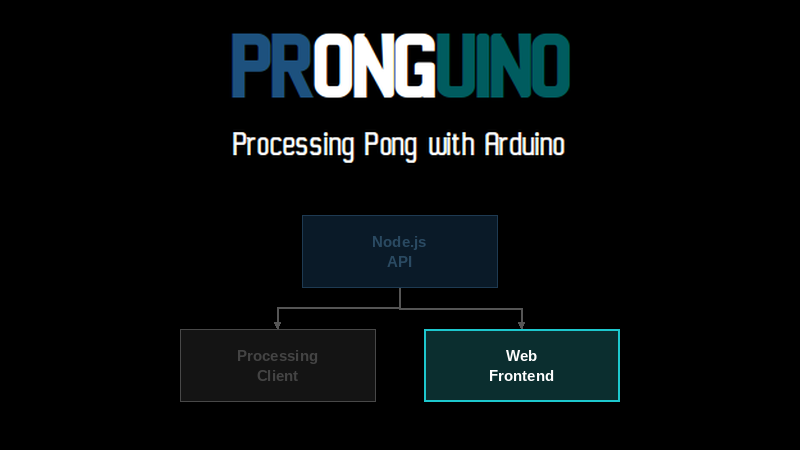
OK, so we have our API ready and Pronguino is connected to it and updating scores. Now let’s create a small responsive website using HTML, CSS, and JavaScript where we can see the live scores updating and view ended game results.
Scope
| Description | |
|---|---|
| Web | A static website using HTML, CSS, and JavaScript to read game data from the API and display live and past game results. |
Learning
| Description | |
|---|---|
| Fetch API | How to make HTTP GET requests in JavaScript using the fetch() function. |
| CORS | Why the browser blocks requests to a different origin and how the API handles it. |
| http-server | How to serve static files locally using the http-server npm package. |
| Web Workers | How to run JavaScript on a background thread to avoid browser tab throttling. |
Getting Started
Installation
We are going to need a server to host our website. As we are running locally and the site is not complicated in its structure, we can use http-server, a simple, fast HTTP server for static files.
If you are going to be developing a few test sites, it may be a good idea to install this package globally — it can then be run from any folder…
> npm install http-server --global
added 1 package, and changed 39 packages in 8s
11 packages are looking for funding
run `npm fund` for details
Code Editor
I am using VS Code again for this part of the project, but you can use your favourite editor.
The Code
The downloaded code will be in the following structure…
www ├── app.js ├── favicon.svg ├── images │ └── logo.png ├── index.html ├── styles.css └── timer-worker.js
HTML
The HTML structure is minimal — the key id attributes (live, results, no-live, no-results) are targets for the JavaScript to locate and update as game data arrives.
<!DOCTYPE html>
<html>

<head>
  <meta name="viewport" content="width=device-width, initial-scale=1.0">
  <link rel="icon" type="image/svg+xml" href="favicon.svg">
  <link rel="stylesheet" type="text/css" href="styles.css">
  <title>Pronguino - Web</title>
</head>

<body>
  <div class="container">

    <div class="logo">
      <img src="images/logo.png">
    </div>

    <div class="states">

      <div class="state">
        <div class="heading">Live</div>
        <div id="live">
          <div id="no-live">No Live Games</div>
          <!-- live games will be appended here -->
        </div>
      </div>

      <div class="state">
        <div class="heading">Results</div>
        <div id="results">
          <div id="no-results">No Results</div>
          <!-- ended/cancelled games will be appended here -->
        </div>
      </div>

    </div>

  </div>

  <script src="app.js"></script>
</body>

</html>
JavaScript
There are a couple of helper functions at the top — formattedDate() formats an ISO date string into a readable short date (1 May 23), and elapsedTime() calculates the time elapsed since a live game started and returns it formatted as 00:00:00.
buildGameDiv() creates and returns a new DOM element for a game. It sets a data-id attribute on each element so the game can be located and updated later without having to rebuild the whole list.
updateGames() receives the latest data, maps it into a simple array of game objects, then selectively adds, updates, or removes game elements in the live and results sections. Updating elements in place rather than clearing and recreating the entire list on every tick avoids any flickering in the display.
At the bottom, a Web Worker is created from timer-worker.js. The API URL is sent to the worker via postMessage(), and an event listener calls updateGames() each time the worker sends back fresh data.
Learn: The MDN Web Docs are a great reference for the Fetch API and general web development.
// Replace with the URL of your API
let apiUrl = 'http://localhost:3000/games';

/**
 * Formats an ISO Date string to default locale in format d MMM YY
 */
function formattedDate(isoDate) {

    return new Date(isoDate).toLocaleDateString(undefined, {
        day: 'numeric',
        month: 'short',
        year: '2-digit'
    });
}

/**
 * Calculate elapsed time from start to now and format to 00:00:00
 */
function elapsedTime(isoStarted) {

    // Get times ...
    const started = new Date(isoStarted).getTime();
    const now = new Date().getTime();

    // Calculate elapsed time in milliseconds ...
    const elapsed = now - started;

    // Calculate time parts ...
    const hours = Math.floor(elapsed / 3600000);
    const minutes = Math.floor((elapsed % 3600000) / 60000);
    const seconds = Math.floor((elapsed % 60000) / 1000);

    // Return formatted ...
    return `${hours.toString().padStart(2, '0')}:${minutes.toString().padStart(2, '0')}:${seconds.toString().padStart(2, '0')}`;
}

/**
 * Build a new game div element for a given game
 */
function buildGameDiv(game) {
    const liveStates = ['Started', 'Paused', 'Serve'];

    const gameDiv = document.createElement('div');
    gameDiv.className = 'game';
    gameDiv.dataset.id = game.id;

    if (liveStates.includes(game.state)) {
        const timeDiv = document.createElement('div');
        timeDiv.className = 'time';
        timeDiv.textContent = elapsedTime(game.started);
        gameDiv.appendChild(timeDiv);
    } else {
        const dateDiv = document.createElement('div');
        dateDiv.className = 'date';
        dateDiv.textContent = formattedDate(game.started);
        gameDiv.appendChild(dateDiv);
    }

    const playersDiv = document.createElement('div');
    playersDiv.className = 'players';
    gameDiv.appendChild(playersDiv);

    const scoresDiv = document.createElement('div');
    scoresDiv.className = 'scores';
    gameDiv.appendChild(scoresDiv);

    game.players.forEach(player => {
        const playerDiv = document.createElement('div');
        playerDiv.className = 'player';
        playerDiv.textContent = player.name;
        playersDiv.appendChild(playerDiv);

        const scoreDiv = document.createElement('div');
        scoreDiv.className = 'score';
        scoreDiv.textContent = player.score;
        scoresDiv.appendChild(scoreDiv);
    });

    return gameDiv;
}

/**
 * Update display with game data
 */
function updateGames(data) {
    const games = Object.values(data).map(game => ({
        id: game.id,
        started: game.started,
        state: game.state,
        players: Object.values(game.players).map(player => ({
            name: player.name,
            score: player.score
        }))
    }));

    const liveDiv = document.getElementById('live');
    const resultsDiv = document.getElementById('results');
    const noLiveDiv = document.getElementById('no-live');
    const noResultsDiv = document.getElementById('no-results');

    const liveGames = games.filter(g => ['Started', 'Paused', 'Serve'].includes(g.state));
    const resultGames = games.filter(g => ['Ended', 'Cancelled'].includes(g.state));

    // Show/hide placeholders
    noLiveDiv.style.display = liveGames.length ? 'none' : '';
    noResultsDiv.style.display = resultGames.length ? 'none' : '';

    // Remove game divs that are no longer present
    const liveIds = new Set(liveGames.map(g => String(g.id)));
    const resultIds = new Set(resultGames.map(g => String(g.id)));
    liveDiv.querySelectorAll('.game[data-id]').forEach(el => {
        if (!liveIds.has(el.dataset.id)) el.remove();
    });
    resultsDiv.querySelectorAll('.game[data-id]').forEach(el => {
        if (!resultIds.has(el.dataset.id)) el.remove();
    });

    // Update or create live game elements
    liveGames.forEach(game => {
        let gameDiv = liveDiv.querySelector(`.game[data-id="${game.id}"]`);
        if (!gameDiv) {
            gameDiv = buildGameDiv(game);
            liveDiv.appendChild(gameDiv);
        }
        // Update elapsed time and scores in place
        gameDiv.querySelector('.time').textContent = elapsedTime(game.started);
        const scoreEls = gameDiv.querySelectorAll('.score');
        game.players.forEach((player, i) => {
            if (scoreEls[i]) scoreEls[i].textContent = player.score;
        });
    });

    // Update or create result game elements
    resultGames.forEach(game => {
        let gameDiv = resultsDiv.querySelector(`.game[data-id="${game.id}"]`);
        if (!gameDiv) {
            gameDiv = buildGameDiv(game);
            resultsDiv.appendChild(gameDiv);
        }
        // Update scores in place (date never changes)
        const scoreEls = gameDiv.querySelectorAll('.score');
        game.players.forEach((player, i) => {
            if (scoreEls[i]) scoreEls[i].textContent = player.score;
        });
    });
}

// Use a Web Worker to fetch data - workers are not throttled when the tab is not in focus
const timerWorker = new Worker('timer-worker.js');

// Send the API URL to the worker so it can start fetching
timerWorker.postMessage(apiUrl);

// Receive game data from the worker and update the display
timerWorker.addEventListener('message', (e) => {
    updateGames(e.data);
});
Web Worker
Browsers throttle setInterval in the main thread when a tab is in the background, which would cause live scores to stop updating the moment you switched to another tab. A Web Worker runs on a separate thread and is not subject to this throttling — setInterval inside the worker fires reliably regardless of whether the tab is focused.
The worker waits to receive the API URL via a message event, then polls the API every second using fetch() and sends the response back to the main thread with postMessage(), where updateGames() takes over and updates the display.
Learn: MDN Web Docs – Web Workers API covers how Web Workers work, what they can and cannot access, and how to communicate between a worker and the main thread.
let apiUrl = null;

self.addEventListener('message', (e) => {
    apiUrl = e.data;
});

setInterval(() => {
    if (!apiUrl) return;
    fetch(apiUrl)
        .then(response => response.json())
        .then(data => postMessage(data))
        .catch(error => console.error(error));
}, 1000);
Styles
The layout uses CSS Flexbox throughout. By default (mobile), the Live and Results panels stack vertically. The @media query at 768px switches them to a horizontal side-by-side layout, and at 1024px the container width is constrained further to keep it readable on wide screens.
body {
    font-family: Arial, Helvetica, sans-serif;
    background-color: #000000;
}

.container {
    display: flex;
    flex-flow: column nowrap;
}

.logo {
    display: flex;
    justify-content: center;
}

.states {
    display: flex;
    flex-flow: column nowrap;
}

.state {
    display: flex;
    flex: 1 0 auto;
    flex-flow: column nowrap;
}

.heading {
    height: 30px;
    display: flex;
    justify-content: center;
    align-items: center;
    font-weight: bold;
    background-color: #1d517e;
    color: #ffffff;
}

#no-live,
#no-results {
    display: flex;
    height: 60px;
    justify-content: center;
    align-items: center;
    font-weight: bold;
    background-color: #b3b3b3;
    color: #1d517e;
    margin: 5px 0 5px 0;
}

.game {
    display: flex;
    flex-flow: row nowrap;
    height: 60px;
    margin: 5px 0 5px 0;
}

.time,
.date {
    display: flex;
    flex: 0 0 120px;
    align-items: center;
    justify-content: center;
    background-color: #ffffff;
    color: #000000;
    margin: 1px;
    font-size: larger;
}

.players {
    display: flex;
    flex: 1 1 auto;
    flex-flow: column nowrap;
}

.player {
    display: flex;
    flex: 1 0 auto;
    align-items: center;
    margin: 1px;
    padding-left: 5px;
    background-color: #ffffff;
    color: #000000;
}

.scores {
    display: flex;
    flex: 0 0 50px;
    flex-flow: column nowrap;
}

.score {
    display: flex;
    flex: 1 0 auto;
    align-items: center;
    justify-content: center;
    margin: 1px;
    background-color: #005c5f;
    color: #ffffff;
}

@media screen and (min-width: 768px) {

    .container {
        align-items: center;
    }

    .states {
        width: 80%;
        flex-flow: row nowrap;
    }

    .state {
        margin: 5px;
    }

}

@media screen and (min-width: 1024px) {

    .states {
        width: 60%;
    }

}
Run
With the API server already running, open a terminal, navigate to the www folder, and start the HTTP server…
www> http-server
Starting up http-server, serving ./
Available on:
http://127.0.0.1:8080
http://192.168.x.x:8080
Hit CTRL-C to stop the server
Open a browser at http://127.0.0.1:8080 and you should see something like the following — the Results panel showing ended games pulled from the API, and the Live panel waiting for a game to start. The layout adapts to the screen size: side by side on wider screens, stacked on mobile…
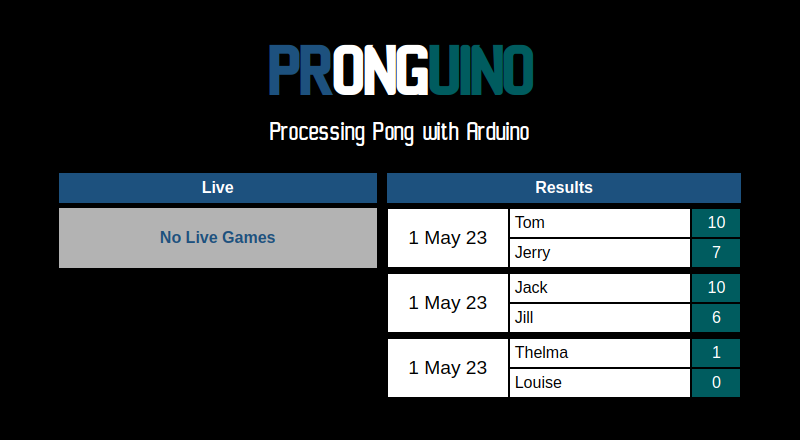
Desktop
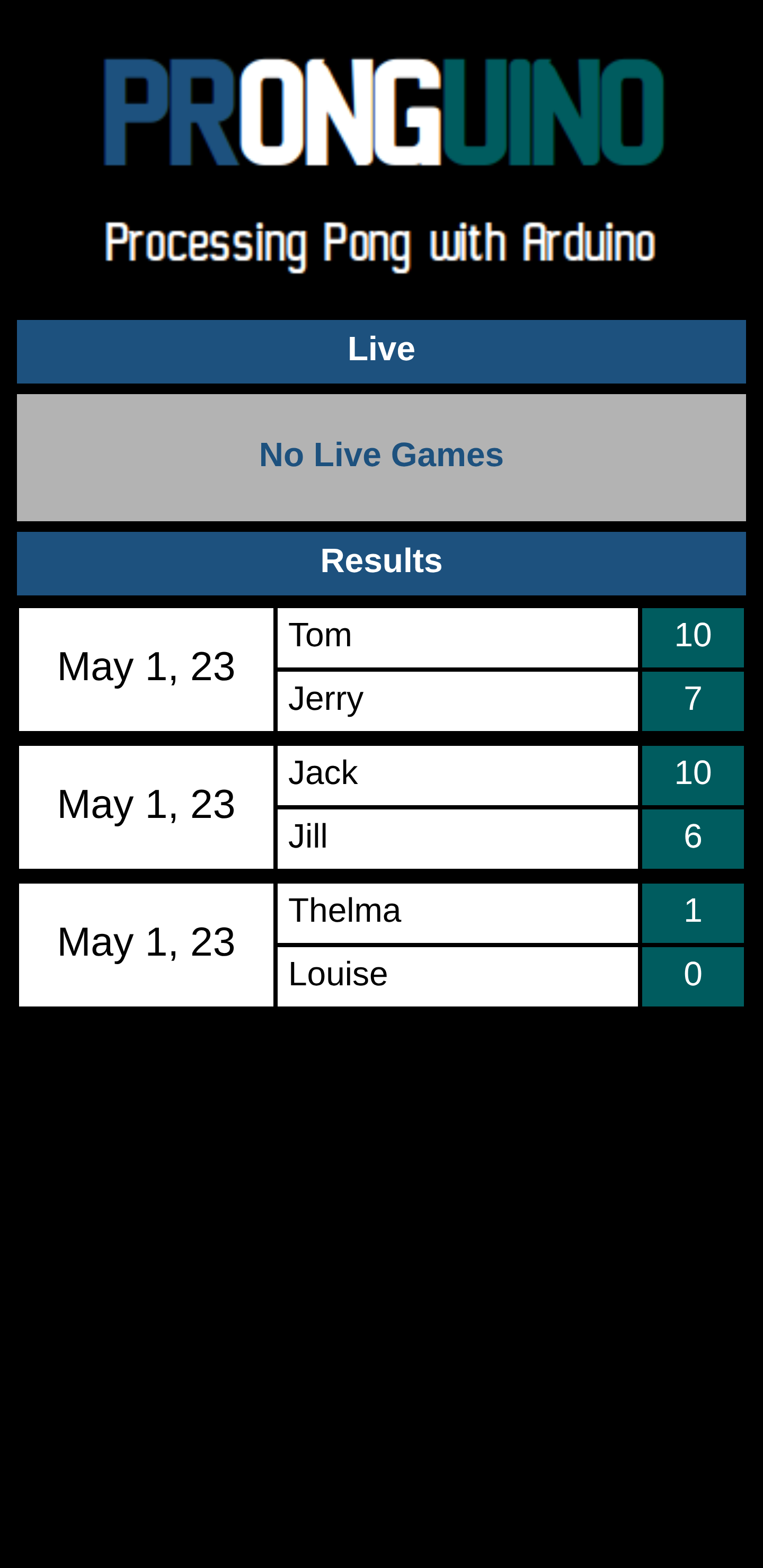
Once you start a game in Pronguino, the Live panel will show the current score updating in real time. When the game ends it will move across to Results.
Challenge: The elapsed time shown for live games counts up every second — can you also highlight the player who is currently winning, or change the score colour when a player reaches a certain threshold?
Note: If you see errors in the browser console about blocked requests, check that the API server is running — CORS and how it is configured in the API is covered in the Pronguino – API post.
Further Reading
- Fetch API (MDN) — complete reference for making HTTP requests from JavaScript using
fetch() - Web Workers API (MDN) — guide to running scripts on a background thread and communicating via
postMessage() - CSS Flexbox (MDN) — introduction to the Flexbox layout model used throughout the website
- CORS (MDN) — detailed explanation of cross-origin resource sharing and how the API’s CORS policy works
- http-server (npm) — documentation for the http-server package used to serve the static website locally
Conclusion
And that wraps up this series. We started with a simple Pong game in Processing, added Arduino controllers, built a local REST API with Node.js and Express, connected it to the game, and finally created a small responsive website to watch the live scores unfold.
There is plenty of room to take this further — hosting the API in the cloud, adding authentication, persisting data in a real database, or building out the frontend with a framework — but hopefully this gives a solid foundation to build from.